Hi,
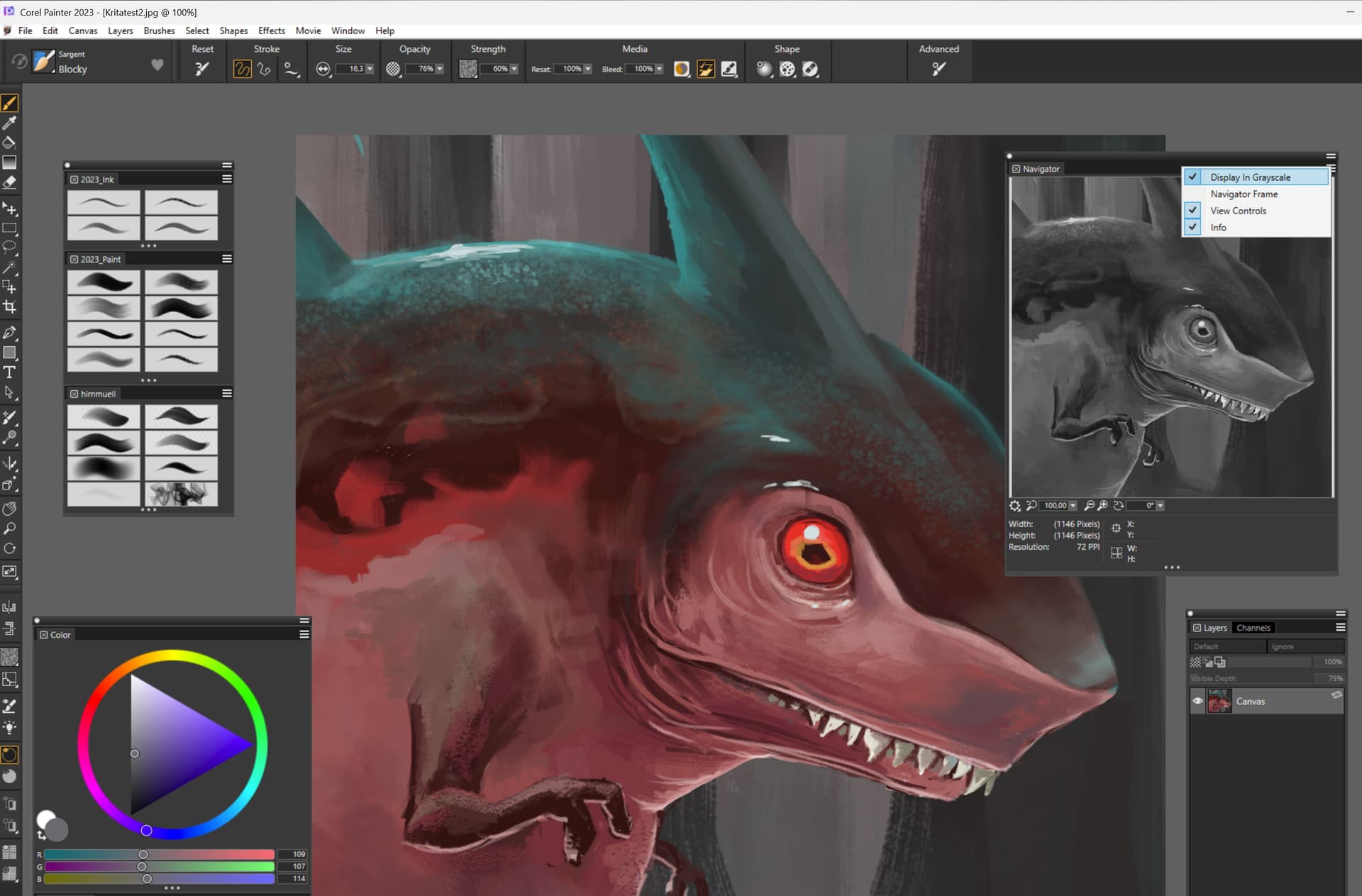
Would it be possible for the ‘overview docker’ to have the option ‘in shades of gray’?
That way we would have a real-time conversion of colorful art. This could be quite useful for viewing the values.
Here is an image. I don’t know if my English is correct
hello, instead of using the overview docker, you can open a ‘new view’ (in window menu) of your image and do whatever you want on it (greyscale, mirror, zoom…)
Thanks! Mco, I believe it is the most used method.
1 - I’m not sure, but I believe that this increases the consumption of RAM and processing?
2 - I am in doubt in some aspects, for example, how did you keep the window in shades of gray?
I did a quick test now, but it didn’t work. I converted the ‘clone’ to shades of gray and also added a filter layer. But the original image has also changed.
I was thinking of something that would not increase the consumption of ram and processing. So I thought that this could be a solution. (But I don’t know anything about programming).
you’re right, i think it may be more ressource consumming. For the second point, i activate/use soft proofing (in greyscale mode) on the second view and it only affect this view, the primary stay normal… (as you can see in the previous screenshot)
Mco, excellent, thanks again!
Yes, I switched to subwindows.
I did the test with sof tproofing.
As soon as I set up, there was a problem. The main image went gray, too. But I kept testing, turning layers on and off, so it looks like it’s working properly again.
I was just thinking about such a feature and came to check for old threads asking the same!
I know “new view” trick exists as well as making a new layer in Color mode and filling with black/white, but it’d be super convenient if Overview had a little checkmark for greyscale, so we could preview values & composition with a single click.
Hi! i’m also in this situation right now haha, did you find if there’s any other method tbat may have been added recently? I’d love to have a mode to see the painting in grayscale while picking up colors… afaik this is only possible in photoshop. It would be such a useful feature but for some reason art software never consider adding it
I know that this is a super old thread, but I did not see anyone propose the most effortless solution: placing a Filter Layer in Desaturate mode on top of your layer stack, and just switching it On/Off to preview results… that’s what I do. Maybe there’s some obvious problem with some workflows that does not affect me.
I’d just like to add that my initial idea was to visualize in real time a grayscale copy of the artwork I’m painting with colors.
There’s another very practical way to do what you’re proposing, @Paint4Thought: Set the ‘soft proofing’ to grayscale and activate it with Control + Y
Thank you all for reviving this thread.
As I mentioned above, the idea was to have a real-time grayscale copy.
So, if there were a grayscale option in the ‘docker overview’, it would be like:
“knocking down two avocados with one stone.” =
A faster method is to use a layer filled with pure white in “Color” blending mode. It uses the HSY’ model so it should be mostly human-eye-consistent, I think it’s even the equivalent of one of the Luminosity BT.something modes (which are best modes to use here).
Set proofing is another good method.
Another good method is to use Krita in subwindows mode and set up soft proofing to greyscale in one view of the same picture. But it’s more of a niche solution, and you’d need the Subwindows plugin from @wojtryb I think for convenient usage of subwindows.
I know the Krita workarounds, but a simple switch to toggle between grayscale and color in the navigator is so much more convenient. I don’t know about resource consumption though.


 =
=