Blockquote Inverse square is complicated since the curve depends on the distance from the light source. The question is how to make it intuitive for artists and how they might use it in tandem with cosine.
I use this used in photography too
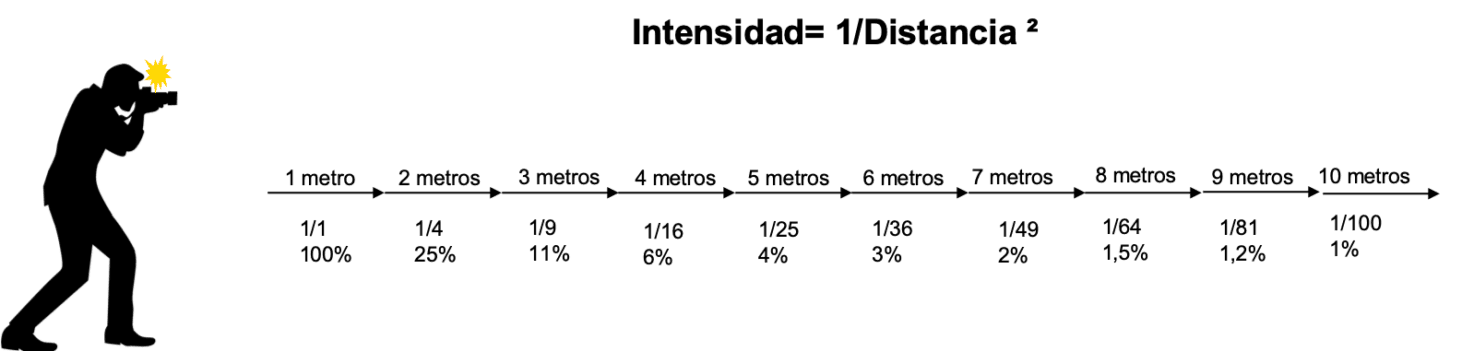
Intensity = 1/Distance^2
My way of applying this is by reducing the opacity according to the percentages of the distance
And I don’t get that complicated and what I do is after one meter take into account the opacity, nothing more.
Blockquote One example is lighting a plane from a point source. Y-axis is lightness relative to the brightest point of the plane. X-axis is the distance on the plane from the brightest point. Inverse square is more influential than cosine in this case. The falloff is quick and is even more extreme the closer the light source.
That’s because the cosine law applies to Lambertian surfaces (ideal surfaces that are only affected by the angle of incidence of light) and does not take into account either the intensity of the light or its distance.
The truth is that I don’t know what you wanted to see with the graphs you made because I can’t tell you which curve is the closest to reality.
To implement this, what I had thought (and it is what I do manually) is to reduce the opacity according to the distance in meters, and unless you are in a dark room you will not see the light itself from the source but only the object that receives it, which is what matters, and it is what the plugin was already doing but with only the distance of one meter.
In summary, add a parameter called “light distance in meters” and by default it is set to one meter with the law of cosines, and when it is further away like 2 or 3 meters etc., change the amount of mixing (which would be the equivalent of lowering the opacity) according to the inverse square law and maintaining the cosine law in the same way.
So that’s it, tell me what do you think c: