Preamble:
So I’m not a C++ whizz or anything but im testing the waters right now to see if I’m capable of developing a feature that I’ve only found evidence of a single other person asking for via reddit 3 years ago: the ability to easily paint 360 panoramas (spherical panoramas/equirectangular environment textures). I’m in need of this feature myself right now (saving 3d blockouts to cubemaps, doing paintovers and converting back to equirectangular images and cleaning up seams just wont do it for me), I’ve heard photoshop can do it but as a linux user I’d rather see the feature implemented in my preferred painting application (krita).
Context:
I haven’t posted this in a proper feature request channel yet because, as mentioned before, I thought I would try taking this into my own hands given that its not a very commonly requested feature and I know no one is likely working on it. Anyhow at this point I’ve got a very cursory understanding of how images are drawn to the canvas. I was kind of hoping to find that the canvas shader rendered the entire canvas as a single quad and I could get from cartesian coordinates to spherical rather easily with a minor adjustment in the fragment shader. I see, however, that the canvas is rendered in tiles, I assume this is a necessary optimization. I’m not really skilled enough to easily navigate around this, or predict which course of action would inflict the least amount of pain, as I currently don’t know everything I would need to do to efficiently remap the inputs (brush strokes, selection etc) to map to spherical coordinates as well or if there’s a way to do this where everything just works as is, though right now I’m only really concerned with how to get the canvas to render in spherical coords.
Approach:
At this point I’m almost convinced I’d have an easier time creating a new drawSphericalImage method that bypasses the tiles, if that’s possible, I assume theres a full canvas buffer somewhere, and I don’t know what kind of inefficiency that will introduce but I assume that whatever benefit tiling adds to 2d canvas rendering wont apply to spherical canvas rendering(I could be wrong).
Question(s):
Am I wrong with my approach or my assumptions? Can anyone think of a sane way of modifying the existing functionality or am I on the right track? And If I am on the right track I also presume I should start worrying about how I’m going to get the tool inputs to map to spherical coordinates as well which I don’t know where to start for that yet.
Or maybe someone more competent is secretly working on this and I should leave it to them, in any case I’m happy to start the conversation.
I was just seeking this feature today and found your post. If you are still on it, I will be glad to help to develop such plugin ( I have done in the past some equirectangular projections in openGL but I haven’t looked at all how we can integrate similar thing in Krita )…
Though I’m not developing this as a plugin (if there’s a way in the api to modify core canvas functionality of krita I have not found it). Rather I’m trying to make a direct modification to krita.
So far I’ve successfully:
added a menu item to the gui to turn on and off the new view mode
basically just coppied the wrap mode code where ever it shows up and renamed it spherical view mode
I ended up trying to copy the function that draws the checker shader, lock it to the viewport rect, and tried to find a way to access the full image buffer and bind it to a texture, but my lack of experience with C++ and the open gl api has been slowing me down.
I think though that the image buffer is stored in a private property named m_bufferStorage in the KisOpenGLImageTextures Class (absolutely not sure about it, or at least I know image data is stored there I just haven’t figured out how its structured yet).
However I’m still questioning my approach, the more I think about it, the more I feel like I could just modify the function in the KisOpenGLCanvasRenderer class that draws the image tiles and have every tile render on the entire viewport rect and then feed the shader an extra uniform value every time a tile is drawn to set the offset of the particular tile so I can position it correctly in spherical coordinates, also there will have to be a uniform for the “camera rotation” and zoom. I just get the vibe that, while that approach might actually be easier and would mean having to create less extra methods, it’s probably not going to be more performant than just drawing the entire image in one go in this particular instance (again, its just vibes until I actually accomplish what I’m going for or someone explains to me how all this code works and why no one has created this feature yet.)
Anyways, I’d love to share my modifications, I just spent the latter half of my day trying to rebase my changes over the latest commit and wasn’t able to get it to build (seems like it might have been an issue that may have been resolved a few hours ago).
I figure tho I could share a patch with my latest changes while I figure out how to maintain a forked repo to develop the feature in (let me know if the patch is of interest and I’ll upload it). Also I did see just now that the github readme mentioned the IRC room where the actual devs hang out, I might bring some of my more in depth questions there.
I guess the Krita repo is known to you, but if you want to talk to the devs you can find them on IRC channel #krita at libera.chat, where you can ask questions to the developers.
But please note that they currently are very, very busy, because of the upcoming launch of Krita 5.2 and the needed work behind it to complete the task. For me, it feels that this step is as big as the step from 4 to 5.
Just found out about this plugin, its not directly related to what I’m trying to do, but it makes me think there might be a way to construct a spherical projection of an image as a layer through the python api and have brush strokes projected back onto the original image. Much like this plugin it would be kind of slow, but I haven’t made much progress in my mod yet and I still don’t feel very close to having a working solution.
Also I have yet to talk directly to the devs on their IRC channel
I can’t really help you with implementing this properly in c++ (And I also don’t think doing this as a plugin would help, the api is fairly limited and python is incredibly slow if you aren’t careful).
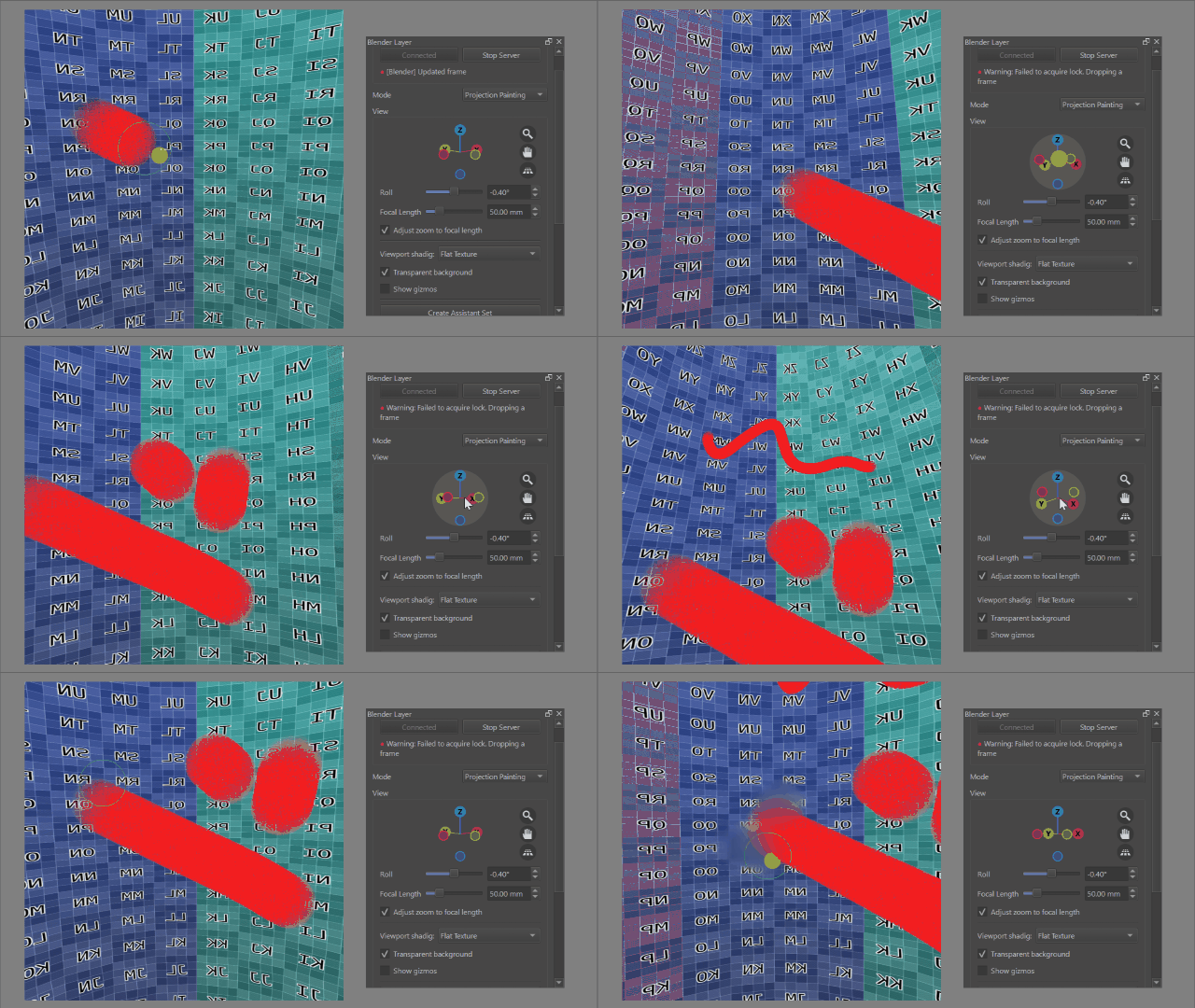
However, I think if I understand correctly what you are trying to achieve, my Blender Layer plugin should be able achieve something to that effect, more specifically using the projection painting feature which I had been working on but isn’t released yet.
You would have to setup some geometry and texture mapping inside of Blender and then use the plugin to project brush strokes from Krita onto it.
This is fairly hacky and therefore has some caveats:
As brush strokes are projected after they are drawn on kritas canvas, the final quality depends both on the canvas size in krita and the texture size in blender
Anything more fancy than a simple brush (e.g… smudging) is a bit difficult, you can get it to work to a certain degree if a) lighting is disabled, so colors appear in krita as they are on the texture and b) you enable overlay mode on your brushes, however quality will degrade quickly as this reprojects all pixels in that area
No blending modes (as this goes through blender, requires either some modifications to blender or could be done through overlay mode)
Setup is a bit awkward, i.e. for a spherical you have to make sure the camera stays in the center of the sphere or everything will be skewed
My implementation is only a proof of concept so far and it’s not particularly user-friendly as is (for example you might get weird artificacts if the blender texture uses a different format than krita…)
I’m also a bit busy with other stuff at the moment so it could take quite a while before I get to release a proper version of this
Its time that I make it clear that I gave up and I’m instead trying to get used to using blender’s internal painting tools to achieve what I need. I never did contact the dev irc channel, luckly I only sunk a week or two poking around at the code.