Help needed creating line breaks in brush strokes

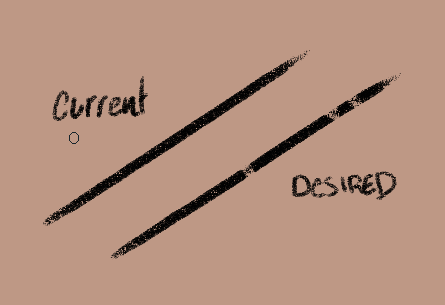
Hey. Can someone explain how i could alter the Pencil brushes to have a randomised break in the line?

Is there a certain graph shape or setting in the brush editor that i can use to achieve this effect?

I would like to give the pencil a small gap now and again to add to it’s sketchiness.

Thanks in advance.

You could do that by using an animated brush tip (a .gih file) that had the same (or very similar) images for most of the set but had a couple of ‘faded/sparse’ images in the set.
Then use Random selection when Exporting the .gih brushtip file.
However, you would probably need a large set of images to get the effect you’ve shown in the image in your post.

Another way would be to use large Distance variation of Opacity with a few ‘drop downs’ in the curve and use Repeat mode. That would not be random though and the ‘pattern’ might be obvious.

2 Likes

Multiple options come to my mind. Like controlling opacity or flow by “Fuzzy dab” or by “Distance” on repeat. It kinda depends on how much control you want over the gaps.

2 Likes

You know, i never even knew about animated brush tips.

I’ll have to look around for some example videos.

I’ll also give the opacity dips a try.

Thanks.

1 Like

I will give this a try.

I guess i just want some variation to make the linework more interesting in a sketch form.

Thanks for your help.

In some cases, like this one, there are multiple ways to do something with different advantages. Sometimes you have to play around and see what works for you.

Another thing that just came to my mind is adjusting the pressure curve for opacity to fall off pretty steep at some point that even when you lose pressure only slightly the brush barely paints, like when you draw with an old dry ballpoint pen which is about to die.
1 Like

I tried the falloff on the curve and it works.

Thanks.

I may need to look into animated brush tips if i want some further variance.

The best way to learn how to make them is to try to make them. It’s not difficult but it can be tedious:
How can I make a brush similar to the Stamp Heart?

Random Brushes, how do they work?

Other topics are available if you so a forum Search for “.gih”.

It would be quicker and easier to try the ‘Opacity dips’ technique with Fuzzy Dab or Distance with Repeat.

Using a masked brush and changing the spacing and size is another way to create breaks in the brush stroke

A masked brush? That’s new to me.

I’ll have to look into it.

1 Like