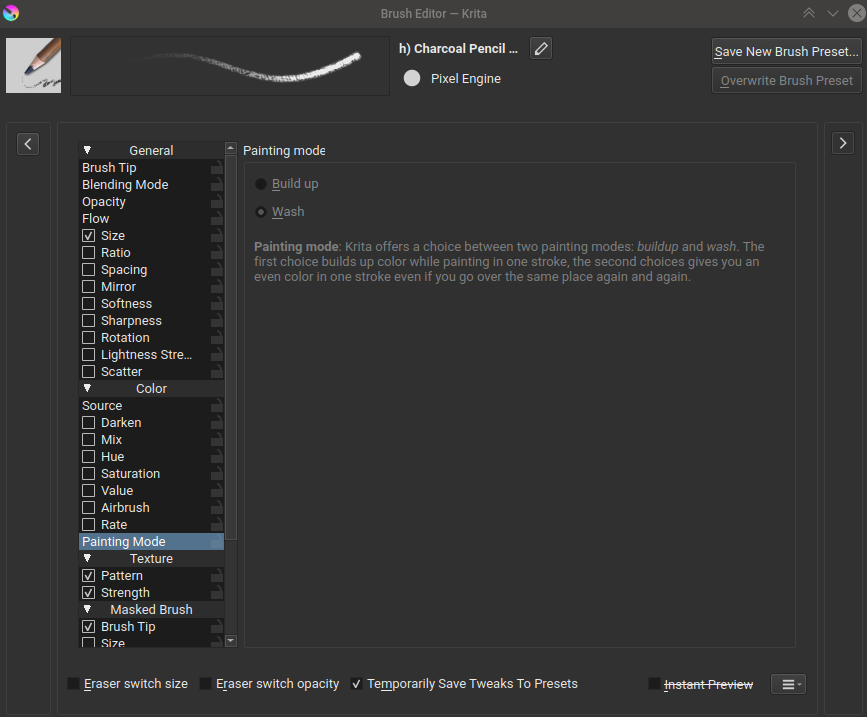
I want to use a brush with a low opacity, so that when I hold the same pressure and go over the same area it will ‘build up’ over itself and get darker each time. How can I do this in Krita?
I saw this Understanding wash-build-up-flow-opacity brush settings
But have no idea where the painting mode tab is they mentioned
tom
April 21, 2022, 3:51am
2
Press F5 to open the brush editor and it should be the bottom item of the Color category on the list of brush options.
This assumes your brush is using a brush engine that supports this option, such as the most common Pixel Engine.
2 Likes
seguso
April 21, 2022, 10:11am
3
Also, the color smudge engine does that automatically. (For the pixel engine, as stated, you need to enable “build up”)
I think lowering the “Flow” parameter without changing other setting can also do the trick.
Or assign key to darkening color incrementally and press it as you draw
system
April 24, 2022, 1:00pm
6
This topic was automatically closed 3 days after the last reply. New replies are no longer allowed.