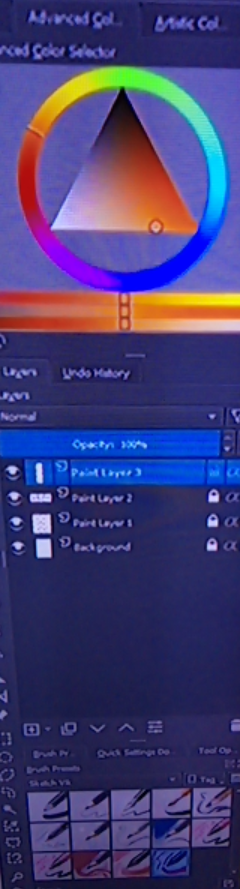
I think that the interface of the android version of Krita is only designed to be used on tablets. If you’re interested in other android art programs that works well with phones, you should try IbisPaint or Medibang which are both free
thank you for your attention. I have tested it. But it does not compare to the kitra. The quality of the paintings are fake in these apps! However the kitra has superior quality! Maybe somebody could show me the way, to modify the desktop with windows that fits on a cell phone screen(responsive)? I am not a programmer but I would like to try.
This topic may be of interest and use to you.
Please read it very carefully before trying the sugestions for altering the system settings using the ‘developer mode’: Dialogs hard to use on tablet
thanks! really helped, the problem in my case was not DPI. It was in the FONTS with high size. Now I need to find out how to hide the windows (layers, color picker, history,But make it visible when I select a layer for example (like the function of sidebars that are hidden at the edges of the smartphone screen)
What you call the ‘windows’ are the ‘dockers’. You probably mean the ‘Advanced Colour Selector’ (the ‘colour picker’ or Colour Selector Tool is a specific tool, not a docker).
You can remove all the dockers and bring them back again with the Tab key which acts as a toggle on/off for Canvasa Only Mode. I don’t know how easy it would be to generate a Tab keypress in your case.
That use of the Tab key is specified in the Keyboard shortcuts and can be changed to a different keypress if that would be useful in any way.
I want to leave it hidden, on the side and when I touch the side, it becomes visible (I’m on the smartphone it’s difficult to use the keyboard.) . These bars take up a lot of space on the screen … Thanks for your attention and patience with me.
Yes, those are dockers. I see eight of them there.
You can create a workspace that doesn’t have any dockers.
You can create a workspace that has as many dockers as you like and select between different workspaces for display.
This creation and selection of workspaces can be controlled from the main menu using Window → Workspace.
find out that i can use plugin. From quick shortcuts on the screen instead of the keyboard, or Mini windows plugin … But I’m confused as to how I install …
You need to give more information about what this plugin is called and where you found it.
Then someone who knows about this may be able to advise you.
Generally, you can import/install a plugin with Tools → Scripts → Import Python Plugin.
Then you have to go to Settings → Configure Krita → Python Plugin Manager to enable it and then restart krita.
I don’t think it is possible to work with a plugin, I didn’t find the plugin manager. Do I have to configure kitra to be able to install the plugin?Kitra by default already comes with plugin support?
It’s starting to look like Android doesn’t have plugins.
Have you tried using workspaces to control the presence/absence of dockers? Did I mention that before?
Currently, there is no way to install plugins on Android, I’m afraid. Python does support Android, it is just something that nobody has tried to get working for Krita, yet.
Do you happen to use the Nightly build of Krita? This four-finger tap gesture is only present in it. You can enter and exit canvas-only mode with it. Mobile experience is pretty bad presently. There are some things which were implemented recently for ChromeOS like moving/resizing dialogs, mmaaaaybe that could help a bit.