Hello, I have been using Clip Studio as my art program since manga Studio days.
recently, with Windows forced update I got ‘fed up’ with all the constant updates and have been migrating to linux. While I have everything else working clip studio uses a windows authentication, and that makes the program unusable.
This brings me to my current problem.
To keep a consistency on some of my art projects, I have certain brushes I use, I would love to port them to Krita, however I cannot. I have extensively tried to recreate them in Krita and the ones I have made just do not ‘feel the same’.
I am really not used to making my own brushes, but I am learning and I do like how they are designed. I feel there is something missing, or needed as a fix.
All my krita brushes I make, seem to not get a level of sharpness I need and at the same time, a watercolour bleed.
I am not sure what to do to accomplish what I need to recreate the brushes myself, I have spent hours on this alone.
If this type of brush import will not be possible, perhaps someone could direct me to some custom brushes, or a good tutorial for making brushes myself.
While I currently have created some brushes, none feel right.
Welcome to the community 
It might be that there are some special features in CSP that are not translatable in Krita. But it would be great if you can add a screenshot of the original CSP brush and the version that you created to give us more details.
Thank you 
I made a video in Krita, ( sorry or my stuttering ) Here is the Krita example:

here, is the Clip Studio example:
I also have examples of rotation features I’d like to see in Krita also ( fully understanding this might be a programming nightmare and not happen ) hehe

Hello and welcome to the forum,
Lets start with the easy ones.
The transform box
Just use the tool Transform a layer or a selection, by default the shortcut is CTRL+T
It will give the ‘box’ to transform your duplicate layer. (Icon highlighted in the image bellow)
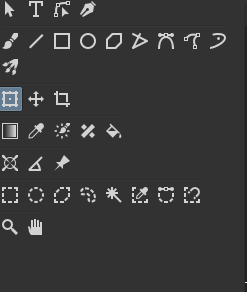
After clicking on the layer with the transform tool selected, you can Right click with the mouse button. It will give some options, including flip horizontally. Additionally you can go to the Tools Options docker to access those.
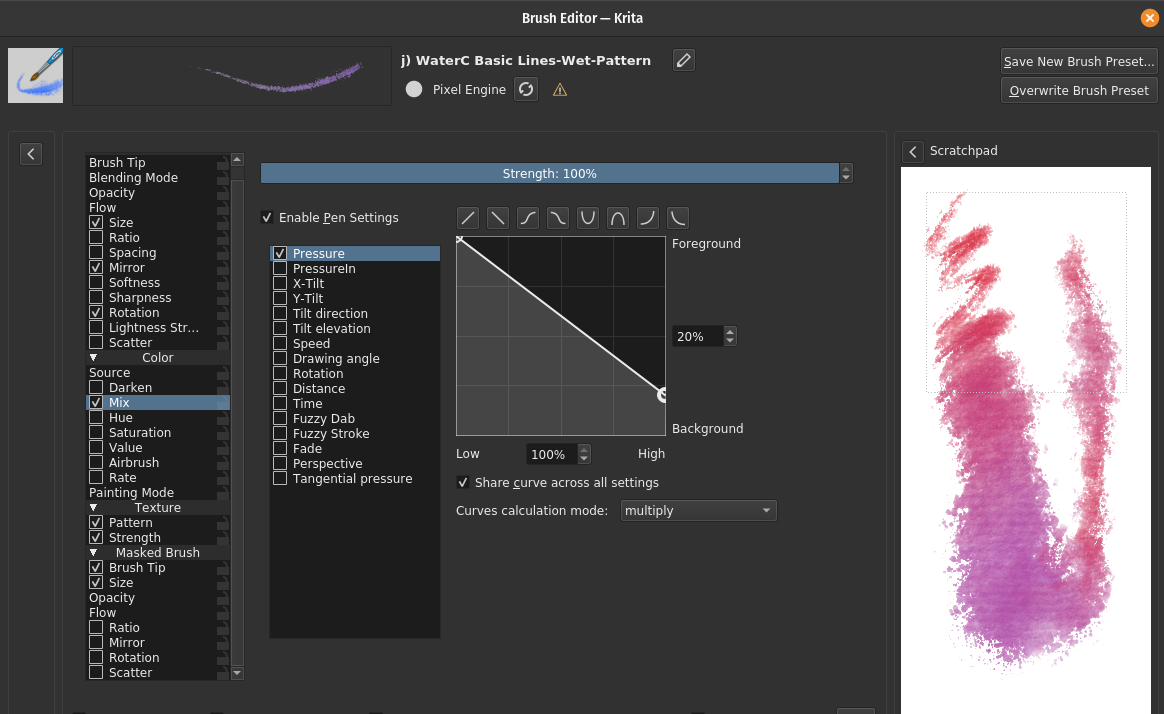
Mix Colors on one stroke
By looking at your second video at 10:30, you can achieve this effect on krita fairly easy. On the brush editor what you want is on the Color section under Mix, check the box and set what parameters you want (pressure / time / random).
Now the hard ones.
The brush
I’m not really well versed in making custom brushes, especially for other people. Mainly because I find hard to grasp exactly what others need. Maybe the best advise I can give you is to look at the settings of the default brushes: j) WaterC Basic Round-Fringe 02 and j) WaterC Basic Lines-Wet-Pattern.
They can give you some insights of how Krita works internally to achieve Watercolor-like brushes, with defined and crispy edges.
For the tapper start and end without the brush getting ‘fatter’, maybe trying playing with the Ratio setting? It is a way to restrict the height of the Brushtip, while keeping it with the original width. A advise for this setting is some brush tip have to be rotated 90 degree in the editor (or imported as a 90° version).
Lastly, it may be good for you to be wary that CSP has a “post-process” to the stroke that Krita has no analogous option. So some brushes from CSP cannot be 100% reproduce even if you try the hardest. Maybe this dark edge from your CSP brush uses it.
You can read about this in more detail in this topic.
Hope this can help.
Cheers.
Hi @Hoppa_Joel - Welcome to Krita! I find it’s way easier to edit existing brushes than to start from scratch. One of my favourite brushpacks is Muses by Ramon. The watercolour brushes in this pack are beautiful. I wonder if they would be a good place to start on your custom brushes… You can get the Muses pack on this page:
Thank you for the help! I will see if I can adjust my brushes.
ahh, with the post processing thing not available, that makes sense. That is probably my missing ‘feel’ to that brush.
I will work on these brushes I have, and hope for the best. It is possible my Lil Pup art projects will need to remain on Windows/Clip Studio for the time being then. ( A shame, because Windows has made streaming my art on twitch, rough and laggy, where as on linux, I have a very nice smooth stream these days )
the colour mixing did help considerably, but it still isn’t there yet.
I looked at the topic, and yes that seems to be what my brush is missing, that darker edge.
I’ll do some editing and see if I can’t get some nicer options, looking into the resource manual now, thank you!
Also check the water colour brushes. I think they use masked brush or dual brush technique. You have two brushes overlay on top of each other the outer brush tip is slightly bigger than the inner brush. This gives it darker edges.
Check out the masked brush feature. I’ll study the video and add more suggestions.
the dark edge is from csp’s watercolor edge option and krita doesn’t have it : (
There may be some way to mimic that, may be someone else can suggest ideas.
I am watching the video, and fro mirroring things I would suggest you use the mirror view tool. Click on mirrored triangle icon on the top toolbar.

You can adjust the center line and draw it will draw on the opposite side automatically.