Hello and welcome to the forum,
Lets start with the easy ones.
The transform box
Just use the tool Transform a layer or a selection, by default the shortcut is CTRL+T
It will give the ‘box’ to transform your duplicate layer. (Icon highlighted in the image bellow)
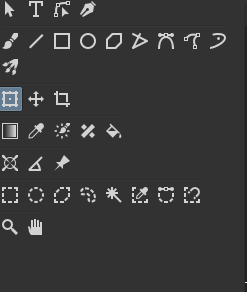
After clicking on the layer with the transform tool selected, you can Right click with the mouse button. It will give some options, including flip horizontally. Additionally you can go to the Tools Options docker to access those.
Mix Colors on one stroke
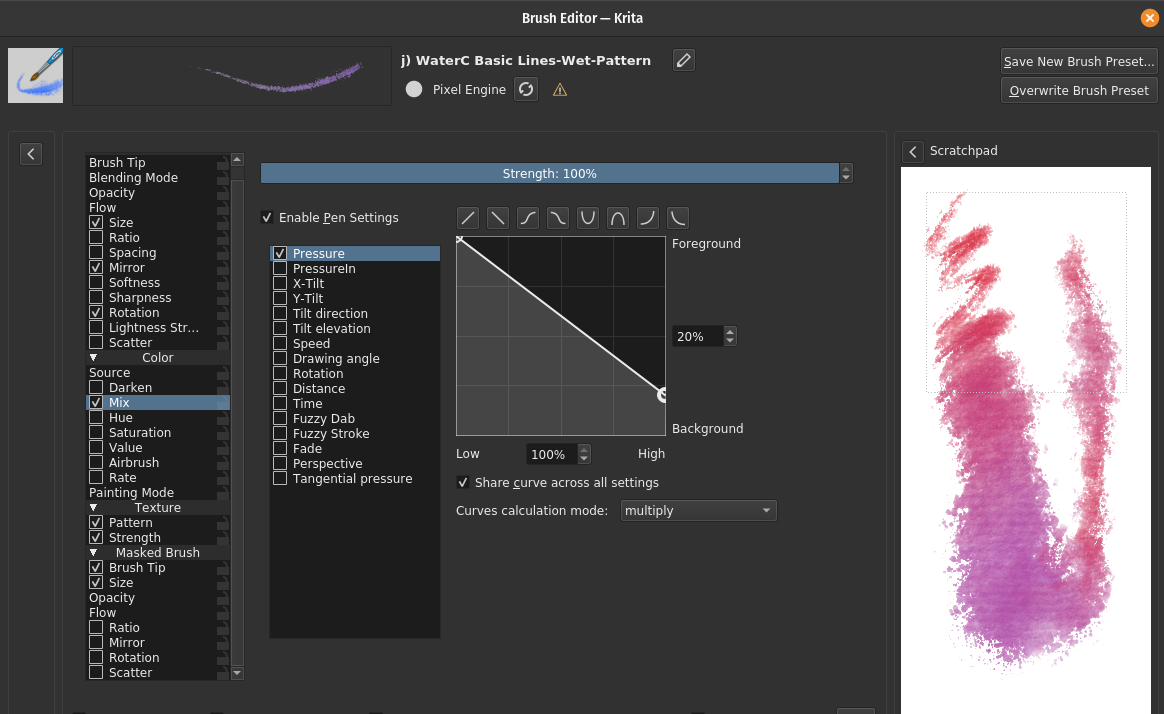
By looking at your second video at 10:30, you can achieve this effect on krita fairly easy. On the brush editor what you want is on the Color section under Mix, check the box and set what parameters you want (pressure / time / random).
Now the hard ones.
The brush
I’m not really well versed in making custom brushes, especially for other people. Mainly because I find hard to grasp exactly what others need. Maybe the best advise I can give you is to look at the settings of the default brushes: j) WaterC Basic Round-Fringe 02 and j) WaterC Basic Lines-Wet-Pattern.
They can give you some insights of how Krita works internally to achieve Watercolor-like brushes, with defined and crispy edges.
For the tapper start and end without the brush getting ‘fatter’, maybe trying playing with the Ratio setting? It is a way to restrict the height of the Brushtip, while keeping it with the original width. A advise for this setting is some brush tip have to be rotated 90 degree in the editor (or imported as a 90° version).
Lastly, it may be good for you to be wary that CSP has a “post-process” to the stroke that Krita has no analogous option. So some brushes from CSP cannot be 100% reproduce even if you try the hardest. Maybe this dark edge from your CSP brush uses it.
You can read about this in more detail in this topic.
Hope this can help.
Cheers.