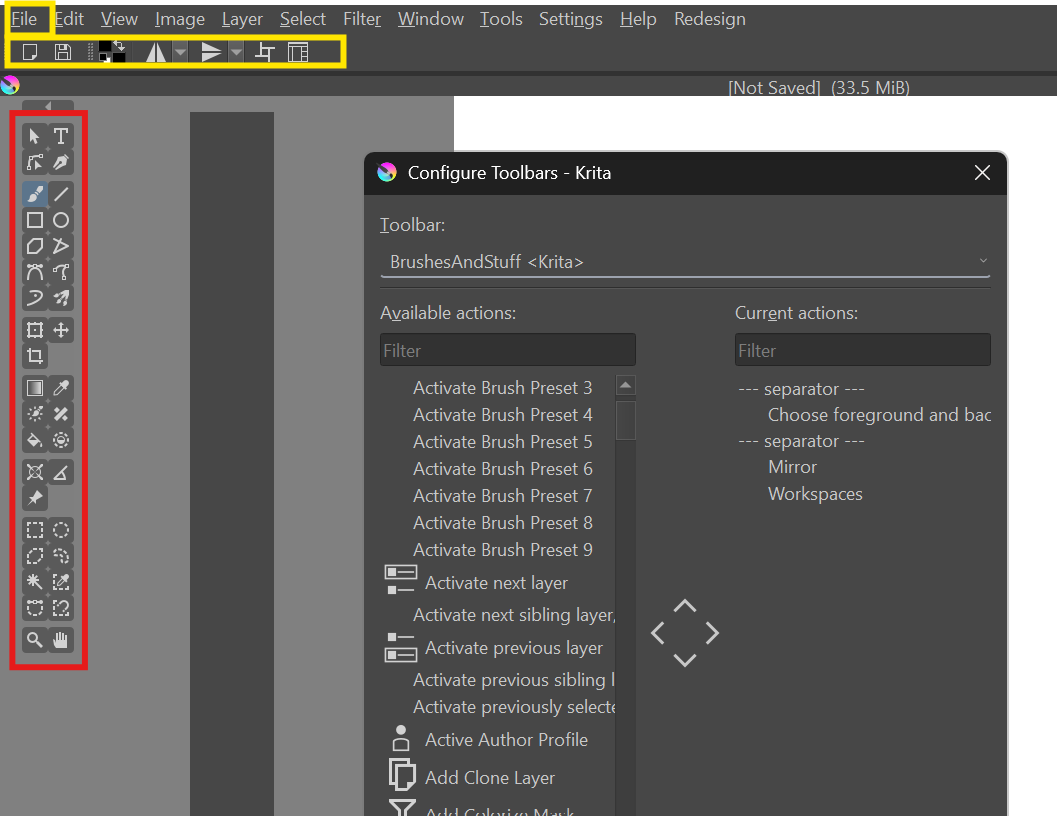
The Menu, edit and brushes under Configure Tools doesn’t only seems to effect the yellow area. How do i edit the red area?
I’d like to remove some of the tools and only leave leave useful ones. Is there also a way to make the red part UI larger? If there are no options can it be done in Scripts?
You can make the icons of the toolbox larger (right click the toolbox and choose a size) but you can’t edit what tools it shows, at least not with vanilla Krita.
Nearly everything in Krita’s UI can be influenced and adapted to your own needs using scripts, if you know how. The Python Plugin Developer Tools will be a huge help to discover the needed “handles”. But don’t ask me how, I’m no coder.