I cant get rid of rulers, perspective tools etc after usinge them. I tried clicking on several other tools but nothing happens.
Hello @Marion666, long time no see, welcome back to the forum!
Try Krita’s “View”-Menu, there you can toggle the visibility of many things in Krita.
Michelist
To delete any painting assistants that you’ve placed in an image, select the Assistant Tool in the Toolbox and you will be shown their control handles and ‘widgets’.
Click on the delete icon of each assistant widget to remove each assistant as needed.
Or, to remove them all, there is the ‘delete all’ icon in the Tool Options docker.
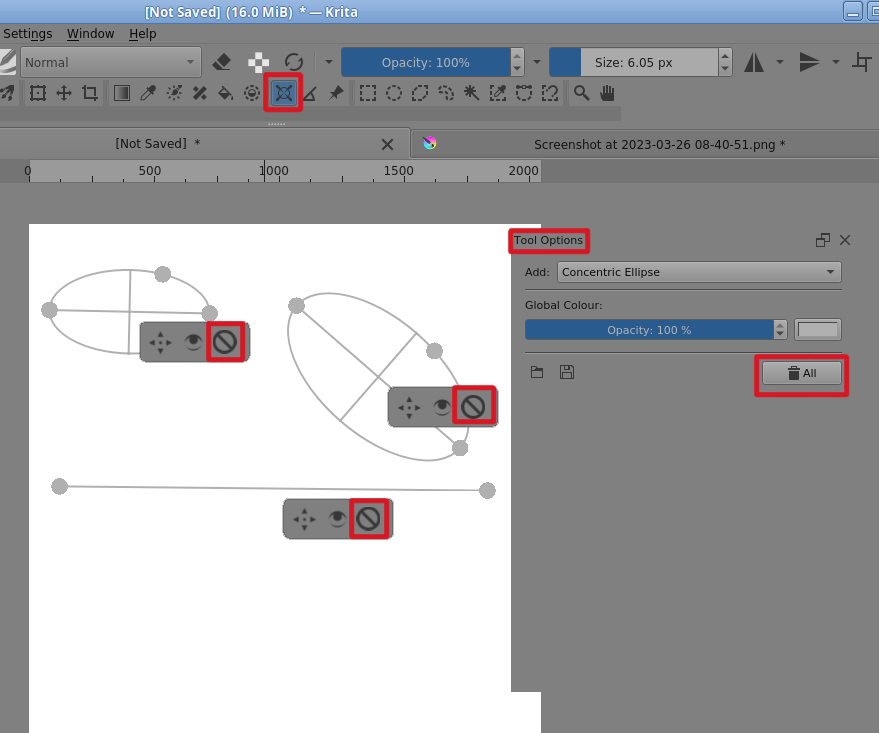
 Hello @AhabGreybeard, that came just to my mind, as I took the screenshot to add this to my posting, I got the message you’d posted. It is a good feeling to have such a perfect “Watchman”! The “Eye in the Sky”? LOL
Michelist
Hello @Michelist, I’m not following you, it’s just a total coincidence that I post at the same time as you every day 
I’m fully aware of that, it is just fun and a pleasure “to play with this”. I’m still a big playful kid. 
Michelist
Add/Edit: A kid of 6’ 7’’ or ~2 m. ROFL
Thank you both, that was the only thing i did not try…