Win10, Krita 5.2.3.
If the right word is internal these icons can be set to actions, such as smoothing-weighted in the krita.action file at Krita (x64)\share\krita\actions\krita.action
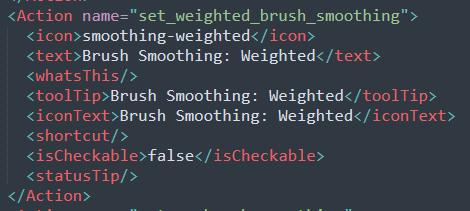
This specific icon can be retrieved with Krita.instance().icon("smoothing-weighted") and applied to a button.
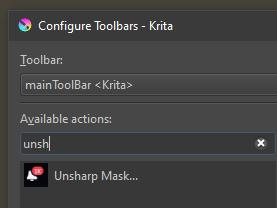
I know there are ways of loading an image as an icon in scripts or plugins with QIcon(path) but it’s not really the same same thing, it doesn’t persist and to replace one icon here we needed to get the icontext (Unsharp Mask) not the name of the action.
This script sets an icon.
from krita import *
from PyQt5.QtGui import QIcon
from PyQt5.QtCore import QSize

inst = Krita.instance()
qwin = inst.activeWindow().qwindow()
toolbar = qwin.findChild(QToolBar, 'BrushesAndStuff')
button = next((w for w in toolbar.findChildren(QToolButton) if w.text() == 'Unsharp Mask'), None)
action = button.defaultAction()
path = "path/to/image.png"
myicon = QIcon(path)
action.setIcon(myicon)
The new icon also shows up when you search for actions in Configure Toolbars.
I’ve searched and read a bunch of topics and there doesn’t seem to be a clear answer, here are some of the most relevant with unclear answers.
nothing relevant here
(2021) didnt work?
(2021) use emojis (clever)
(2021) solution seems to relate to brush icons…?
(2022) developers did add more icons but then gave up?
(2023) despite being marked as solved it seems to only use existing icons
edit 2025-04-18
Doing some more digging, in the api Krita.instance().icon references kis_icon_utils.h, and looking in kis_icon_utils.cpp on line 42 we find this in the loadIcon function
    // Dark and light, no size specified
    const QStringList names = { ":/pics/" + realName + ".png",
                                ":/pics/" + realName + ".svg",
                                ":/pics/" + realName + ".svgz",
                                ":/pics/" + name + ".png",
                                ":/pics/" + name + ".svg",
                                ":/pics/" + name + ".svgz",
                                ":/" + realName + ".png",
                                ":/" + realName + ".svg",
                                ":/" + realName + ".svgz",
                                ":/" + name,
                                ":/" + name + ".png",
                                ":/" + name + ".svg",
                                ":/" + name + ".svgz"};
Perhaps the pics folder is in reference to Krita (x64)\share\krita, where there is a pics folder that contains icons. I tried svg and png icons in the krita folder, pics, and a folder inside pics, but no luck. I also tried putting a pics folder in the appdata resource folder.
One of the lines later references different sizes, these seem to be found in the Krita (x64)\share\icons folder inside hicolor.
    // Now check for icons with sizes
    QStringList sizes = QStringList() << "16_" << "22_" << "32_" << "48_" << "64_" << "128_" << "256_" << "512_" << "1024_";
There is a Krita icon inside each folder. No other icons though, so where are they hiding? I tried putting a svg inside the scalable folder, nothing happened when I did Krita.instance().icon('intersect-selection-icon').
edit 2025-04-19
I didn’t find out how to add internal ones, but this script will open icons from a folder and set them, assuming its named the same as an action.
#----------- scripter_add_icons_from_resource_folder_icons.py -----------
from PyQt5.QtGui import QIcon
from pathlib import Path

inst = Krita.instance()
icon_folder = Path(R"C:\Users\work\AppData\Roaming\krita\icons")

def add_icon(entry):
    fn = entry.stem
    ext = entry.suffix
    if ext not in ['.svg','.png']: return
    icon_fp = str(entry.resolve())
    try:
        relative_path = entry.relative_to(icon_folder.parent)
        print(f"Adding icon for '{fn}' from '{relative_path}'")
        action = inst.action(fn)
        icon = QIcon(str(icon_fp))
        action.setIcon(icon)
    except Exception as e:
        print(e)

def _traverse(folder):
    for entry in folder.iterdir():
        if entry.is_dir():
            _traverse(entry)
            continue
        #
        add_icon(entry)

_traverse(icon_folder)
I also added it to a plugin in setup() and connected the function to a signal when a document is opened.
Here is another script that will give a readout of if an action has an icon, its objname and icontext (more descriptive). Could be handy as the plugin Plugin Developer Tools doesn’t seem show icons in the actions tab.
✔️ wrap_around_v_axis......................... Wrap Around Vertically
❌ level_of_detail_mode....................... Instant Preview Mode
❌ softProof.................................. Turns on Soft Proofing
from pathlib import Path

inst = Krita.instance()
output_file = R"C:\Users\work\AppData\Roaming\krita\icons\action_icons_readout.txt"

# Get all actions and collect their data
actions_data = []
for action in inst.actions():
    has_icon = not action.icon().isNull()
    icon_status = "✔️" if has_icon else "❌"
    actions_data.append({
        'icon_status': icon_status,
        'objname': action.objectName(),
        'icontext': action.iconText()
    })

# Find the maximum length for each column for proper padding
max_objname = max(len(str(item['objname'])) for item in actions_data)

# Prepare the output content
output_lines = []
for item in actions_data:
    # Format: [icon] objname.....icontext
    line = f"{item['icon_status']} {item['objname'].ljust(max_objname, '.')} {item['icontext']}"
    output_lines.append(line)

# Write to file
with open(output_file, 'w', encoding='utf-8') as f:
    f.write("\n".join(output_lines))

print(f"Action icons report saved to: {output_file}")