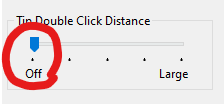
You could try to set the Tip Double Click Distance to “off” in the Wacom Tablet Properties, that worked for me on one of my laptops
Ooo, if you think you know, maybe you can share what you think in case someone gets the same problem in the future? 
You could try to set the Tip Double Click Distance to “off” in the Wacom Tablet Properties, that worked for me on one of my laptops
Ooo, if you think you know, maybe you can share what you think in case someone gets the same problem in the future?