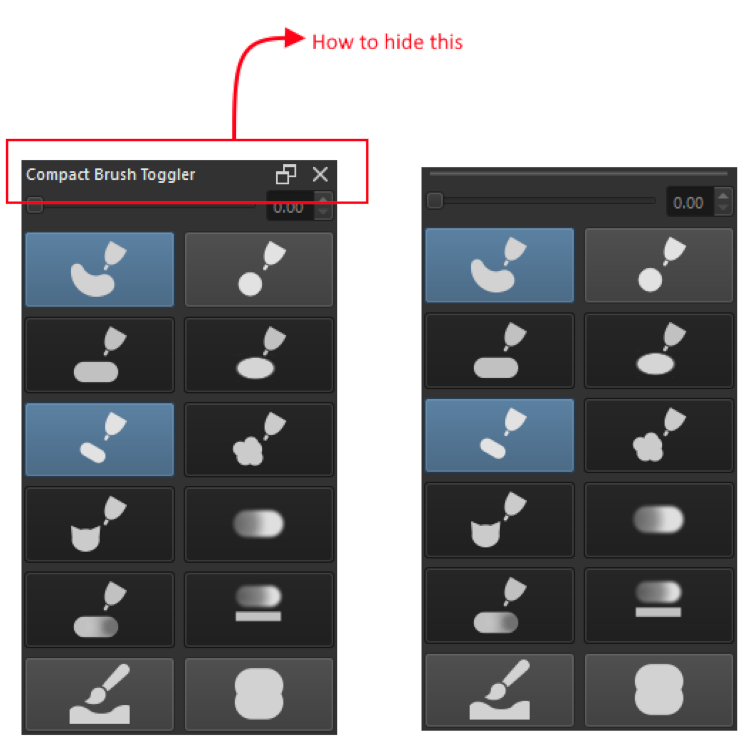
I was planning on a layout where the above bar will be hidden / have option to be hidden when the docker is undock in floating state.
is there a way to do this?
I have tried BypassWindowManagerHint, CustomizeWindowHint and FramelessWindowHint.
They havent work.
Thank you.
There is a shortcut key called “Show Docker Titles” that you can use. This will toggle show/hide the text and buttons on the title bar but it won’t remove the space the title bar occupies.
There is another plugin that has this feature that you might want to try:
[before and after]
[before and after]
This plugin is a fork of @general-avalanche-43 ’s Lock Docker Resize plugin.
Super Docker Lock combines the separate locking and visibility toggles into one button. Also this plugin is friendly to floating dockers as they will not be re-docked when …
(edit: just realized you are making something yourself, look at the other plugin’s source to see how it was accomplished)
EyeOdin
February 25, 2026, 8:25am
3
If you dont give the widget a name it wont show anything.
A Docker Name or Set Title?
AkiR
February 25, 2026, 8:39am
5
Tiny example, hope it helps. (tested on Kubuntu Krita 5.2.11)
from krita import (
        Krita,
        DockWidget,
        DockWidgetFactory,
        DockWidgetFactoryBase)


try:
    from PyQt6.QtCore import Qt, pyqtSignal
    from PyQt6.QtGui import QPixmap
    from PyQt6.QtWidgets import QWidget, QLabel
except ImportError:
    from PyQt5.QtCore import Qt, pyqtSignal
    from PyQt5.QtGui import QPixmap
    from PyQt5.QtWidgets import QWidget, QLabel


class ContentLabel(QLabel):
    clicked = pyqtSignal()

    def __init__(self, **kwargs):
        super().__init__(**kwargs)
        pixmap = QPixmap()
        pixmap.loadFromData(
                b'<svg xmlns="http://www.w3.org/2000/svg" width="256px" height="256px" viewBox="0 -960 960 960" fill="#33FF33">'
                b'    <path d="M585.42-316.19q48.2-31.58 72.43-83.81h-355.7q24.23 52.23 72.43 83.81 48.19 31.57 105.42 31.57 57.23 0 105.42-31.57ZM312-536.92l44-43.54 43.54 43.54L424.62-562 356-631.08 286.92-562 312-536.92Zm248.46 0L604-580.46l44 43.54L673.08-562 604-631.08 535.38-562l25.08 25.08ZM339.72-148.34q-65.73-28.34-114.36-76.92-48.63-48.58-76.99-114.26Q120-405.19 120-479.87q0-74.67 28.34-140.41 28.34-65.73 76.92-114.36 48.58-48.63 114.26-76.99Q405.19-840 479.87-840q74.67 0 140.41 28.34 65.73 28.34 114.36 76.92 48.63 48.58 76.99 114.26Q840-554.81 840-480.13q0 74.67-28.34 140.41-28.34 65.73-76.92 114.36-48.58 48.63-114.26 76.99Q554.81-120 480.13-120q-74.67 0-140.41-28.34ZM480-480Zm227 227q93-93 93-227t-93-227q-93-93-227-93t-227 93q-93 93-93 227t93 227q93 93 227 93t227-93Z"/>'
                b'</svg>',
                format='svg')
        self.setPixmap(pixmap)
        self.setFrameShape(QLabel.Shape.Box)
        self.setAlignment(Qt.AlignmentFlag.AlignCenter)

    def mousePressEvent(self, event):
        self.clicked.emit()


class MyTitleDocker(DockWidget):
    def __init__(self):
        super().__init__()
        self.setWindowTitle('My Title Docker')
        self._dummy_title_bar = QWidget()
        self._original_title_bar = self.titleBarWidget()
        content = ContentLabel()
        self.setWidget(content)
        content.clicked.connect(self._on_content_clicked)
        self.topLevelChanged.connect(self._on_top_level_changed)

    def _on_top_level_changed(self, is_floating):
        if is_floating:
            self.setTitleBarWidget(self._dummy_title_bar)
        else:
            self.setTitleBarWidget(self._original_title_bar)

    def _on_content_clicked(self):
        self.setFloating(not self.isFloating())

    def canvasChanged(self, canvas):
        pass


def register():
    app = Krita.instance()
    docker_factory = DockWidgetFactory(
            f'{__name__}:{MyTitleDocker.__qualname__}',
            DockWidgetFactoryBase.DockRight,
            MyTitleDocker)
    app.addDockWidgetFactory(docker_factory)


register()

# notes:
#     Testing in Krita's Scripter requires a new main window to be created after script is executed,
#     docker will appear in available dockers list at new windows
#     As there is no title bar in floating state, you can press the content to toggle floating state.
/AkiR
Thank you for this. This is a great help.