Hi to all. I often work in different programs and therefore want to set them up roughly the same. Tell me how to change actions like photoshop. For example, I want to activate the color picker using options, not commands. Instead, the command should activate the move tool. Also, I want to quickly duplicate the selected area using options + move. How do I do this safely Thanks
Apart from the fact that you, like so many others, have made the conceptual mistake of assuming that everyone knows how Photoshop works and what works there and how, I am not absolutely sure that this is what you mean. So I’m afraid the actions you want from Photoshop don’t exist in Krita. But I would imagine that you would get much closer to your goal with @yetanotherpainter’s paid plugin, “Actuator”, than with the Krita and graphics tablet options I describe below.
Krita is customizable in large parts, you can load a Photoshop adapted scheme for the keyboard shortcut keys, for example, but it can’t be 100 percent Photoshop compatible, because some keys can’t be remapped without causing major programming difficulties, due to the fact that Krita comes from the Linux world AND has to work not only under Windows and macOS.
Another possibility to create a similar operating concept for all programs can be achieved in the driver of your graphics tablet, if it offers the possibility to assign profiles to programs, as almost all current graphics tablets do.
In the combination of adapting the respective software and driver profiles, it is almost always possible to produce an extremely similar operating concept across all programs, but not always a 100% identical one. And not every software offers every operating concept other software has.
Michelist
2 Likes
Fine. Thank you, I understand you.
1 Like
Hello @Yaroslav_Kutrovskyi
The Actuator is definitely able to do everything that is possible via python. One of the fanciest cases was a request from one of the users: New View on Second Screen : Script for Actuator - Augmented Brush
The user need to create new view, send it to another display and then send a keyboard stroke to the OS to activate external tool.
Regarding your needs, could you elaborate a bit more?
What do you mean by “options, not commands”?
This one is not clear for me as well. Do you want activate Move Tool by pressing P instead of T?
A gif animation of this case would definitely help.
2 Likes
Thank you for your interest in this question) I meant the “option” and “command” keys on the Macbook keyboard) on Windows, these are the “alt” and “ctrl” keys. In photoshop it works as follows: when I have a brush selected as a tool, I can press the “ctrl” key and this activates the move tool. If you hold down “ctrl” and press “alt” and move the object at the same time, it will create a copy of the object. YouTube is full of video lessons for beginners where this is demonstrated.
Also, in Photoshop, when the brush is activated, if you press alt, the color picker is activated (in the Krita, this is implemented on the ctrl key and I would like to change it if possible)
1 Like
You can change them all to anything you like:
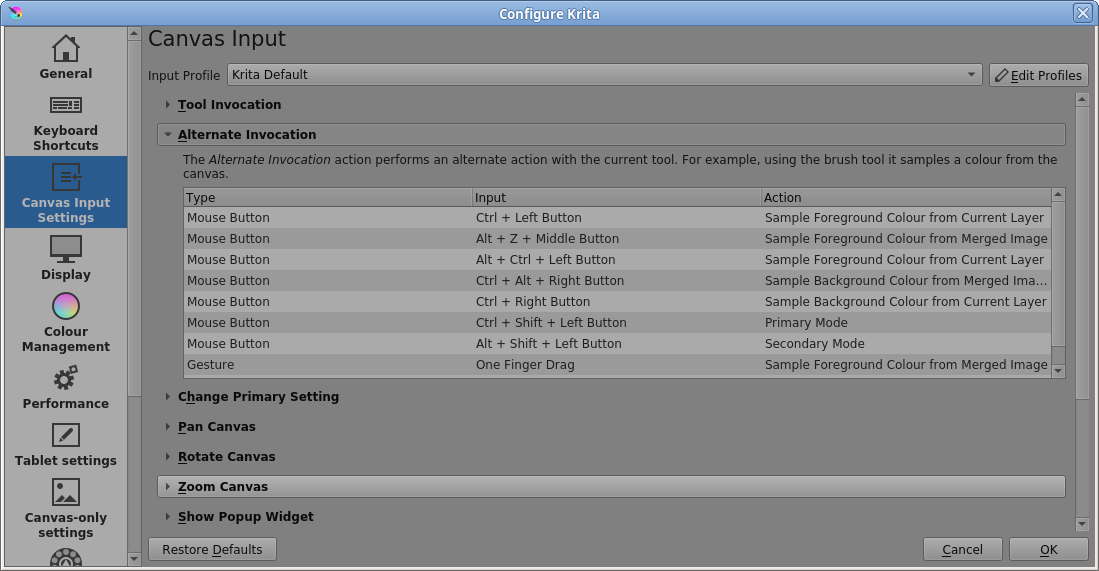
Double click on the Input field to open it for editing, for every action.
Be careful to make sure that you don’t have any clashes before you press OK and start using them.
3 Likes
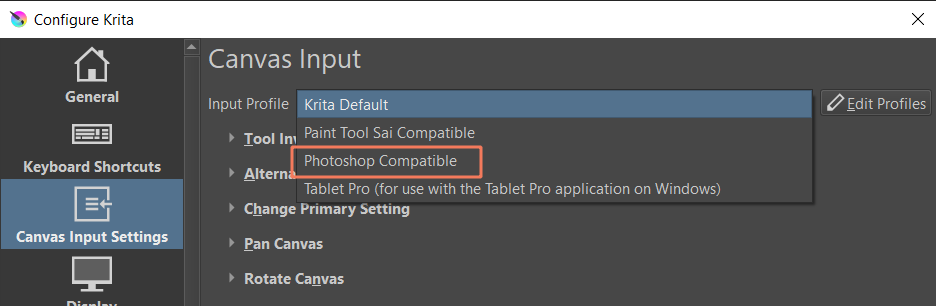
If you are coming from Photoshop world, you may just try to switch Canvas into Photoshop comaptible;
2 Likes
Thank you. Yes, I looked at this area of the settings, but I don’t understand exactly how to set the action I want. I’m afraid to experiment here, because it seems to me that Krita is too sensitive to this. One careless movement and you can break something)
1 Like
You can restore the default settings by clicking the Restore Defaults button if you make a mistake.
Also, using Edit Profiles, you can create a new named profile, which will be stored in the input sub-folder of the resources folder. You can select that to edit it and make changes and resave it etc. then go back to the standard profile at any time.
Here, I’ve changed the usual Ctrl+Left button Action, for picking the foreground colour from the current layer, to be Alt+Left button.
Double click on the Input itself and the small editor window lets you change it,
Double-click on the Action to see what actions are available.
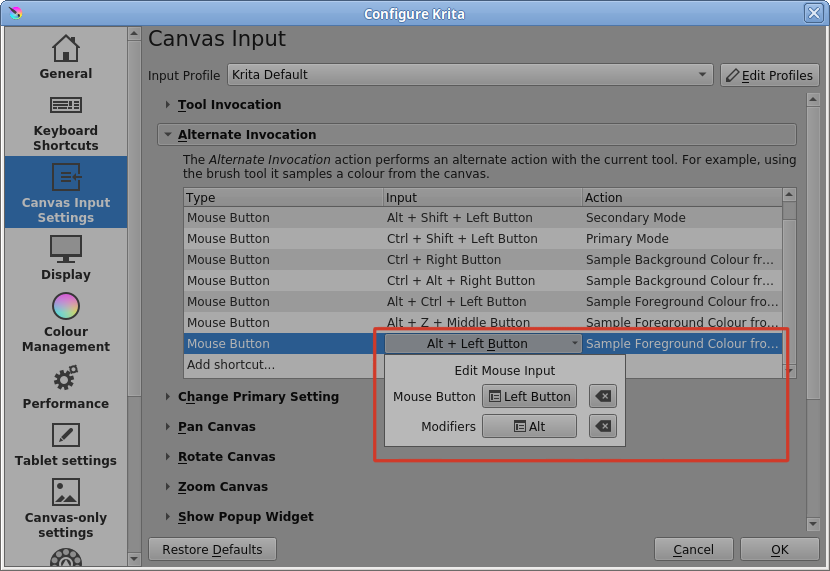
Press Cancel if you get too confused or Restore Defaults if things go wrong 
2 Likes
You almost can’t destroy Krita because, as in the topic where you wanted to reinstall Krita, there is usually a way to reset Krita.
And here I must confess to having forgotten something else, and that is that after you have set up Krita to your liking, you should make a backup copy of the “kritarc” file, so that you can quickly return to a defined working state by simply copying this file back, overwriting the broken “kritarc”.
Michelist
3 Likes
Also backup the entire resources folder because some settings are stored in there, such as canvas input profiles and workspaces.
2 Likes
Thank you all. In principle, almost everything worked, except for dynamic copying, but I think it is also possible, I’m just not looking there. Basically I need to create a copy of the layer when the brush is activated with a keyboard shortcut. I think I will find a solution after some time)
1 Like
By the way, here’s a good example of what I call “breaking Krita”: after all my manipulations, everything works, but if I want to hide the selection and press the combination of ctrl + H, Krita just completely collapses, and I don’t understand why this happened and where can it be fixed because I didn’t touch it at all
1 Like
This might be a bug. Since this shouldn’t happen. If you can give us the steps to reproduce we can then report it.
1 Like
What i need to do?
1 Like
Okey, i did it) This bug occurs when the window of the mole is not expanded to its full width, then for some reason keyboard shortcuts for the Finder work and collapse all windows.
1 Like
What is the ‘mole’?
What is the ‘Finder’?
1 Like
Here the Actuator might come in handy.
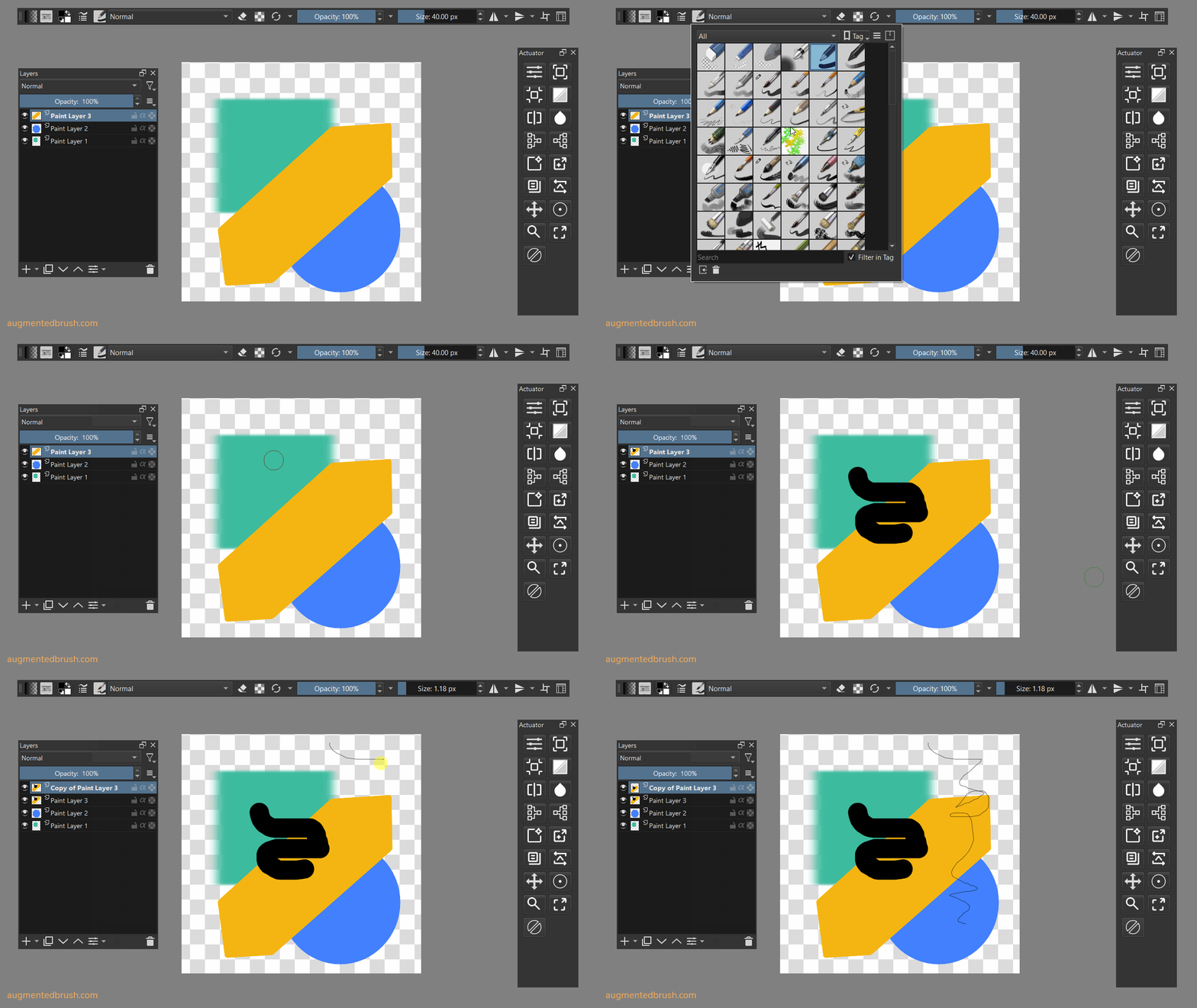
Reacting on the even of activating the brush might be a bit tricky. However, it is possible to activate the particular brush and duplicate layer at the same time.
Here the example:
Suppose you want to activate brush “b) Basic-5 Size” and make a duplicate layer. Then you will have a sequence like this.
- Custom Script Step
- Duplicate Layer
The script itself is simple:
from krita import Krita

all_presets = Krita.instance().resources('preset')

BRUSH_NAME = 'b) Basic-5 Size'
selected_preset = all_presets[BRUSH_NAME]

currentView = Krita.instance().activeWindow().activeView()
currentView.setCurrentBrushPreset(selected_preset)
And the result will look like this:
1 Like
‘Finder’ is macOS’s file explorer. Cmd+H is the global macOS shortcut to hide an application. Apparently this shortcut overrides any attempt to set Cmd+H as a shortcut in Krita unless Krita is fullscreen.
4 Likes
That’s right, thanks for answering for me, I was absent for a while)
1 Like