In the config window I set the canvas shortcut successfully
, and when I press (hold) alt and click-drag the left mouse button
, the temporary line tool is activated, but it draws nothing.
Is it a BUG?
I must release the alt key to draw the line, why?
It sounds like a bug, yes.
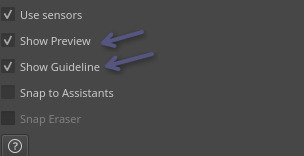
Unless you have in the “Tool Options” docker after selecting the line tool (in tollbar) these two checkboxes unselected. Then no preview, and no guidelines, even while using the shortcut in Freehand tool.
I turned off both options, but it still can’t draw.
When I use Alt + Mouse Drag to activate the Line Tool, it shows X/Y coordinates at the top-left corner of the canvas , why is that?

When the Line Tool is activated correctly, it should display the line length instead.
This might be a bug-like feature of the Line Tool.
The Alt key is reserved for previewing the start point position, which interferes with and blocks the custom shortcut.
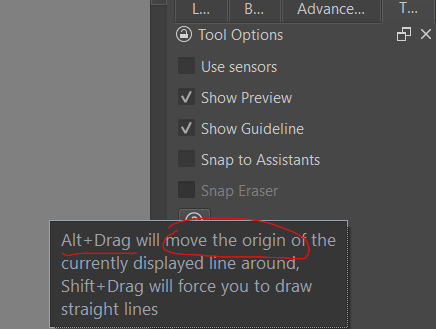
I got it, it’s a bug in this feature :
alt+drag will move the origin
This feature blocks my custom shortcut.
The Ctrl, Shift and Alt keys are often used as ‘modifier’ keys that affect/modify the operation of a tool when it’s being used.
So, the Alt+left-click canvas input setting does activate the Line tool but is then interpreted as a modifier key.
As far as I know, the ‘modifier’ behaviour is baked-in to the code and has no options to change it.
It looks like you need to use a different key.
It’s basically a bug, and it can be fixed —— the alt+drag is used to offset the already drawn line, but since there’s no line been drawn yet, it should just draw a line normally.
OK I changed to win+left click, it’s crazy, I have to use AHK to suppress the windows start menu.
As I understand it, the line is not already drawn when you press-hold Alt and then do left-click-Drag.
It’s just started and so the continued holding of Alt with left-click-Drag causes the origin of a not yet drawn line to be moved because Alt is often a tool modifier key.
You may want to make a new topic in Develop: Artists Feedback and Testing to discuss this in detail, or wait for further feedback and comment in this topic.
Yes, binding anything to single Ctrl, Alt or Shift is often a big issue, as these are modifiers and not just simple keys: many tools have alternate behavior with these modifiers.
That’s why the default for the Line Tool keyboard shortcut was set to “V”, and also because it was mnemonic: the V symbol looks like an icon with two lines.
I made a short video in 4min about this feature, btw:
I agree that this is basically a bug. It’s pretty useless to move the origin of a zero-length line around, you could just move your cursor without clicking and holding Alt.
There’s a fix pending here: https://invent.kde.org/graphics/krita/-/merge_requests/2784
Yeah, I’ve switched to another key now.
But there’s likely a more serious issue with the Line Tool: the temporary Line Tool feels a bit laggy compared to using it directly, no matter which key I bind it to.
Also, why can’t I access your link? It shows a 403 error.
I think 403 errors are usually due to abuse prevention, the rules had to be tightened a lot because AI scrapers kept taking down the developer infrastructure. Try a different browser and turn off any VPN services you may be using. If that doesn’t work, you’re probably out of luck.
Spoofing the user-agent to Linux with whatever browser usually helps.
Michelist
Using Alt + left-click to activate the Rectangle Tool or the Ellipse Tool does not cause the origin of the drawn shape to move while Alt is kept pressed. If Alt is released while drawing and then pressed, the origin is moved, as expected.
There is also ‘strange’ behaviour of the brush outline cursor position if Alt + left-click is used again some time after that: The cursor snaps to the end position of the last drawn line or the last drawn shape.
I haven’t tried this with the many other drawing tools that can be activated by the Canvas Input Settings in this way.
I have tried it with the Move Tool and the results and the behaviour is ‘strange’: Keeping the Alt key pressed gives reduced movement rate of the painted area compared to the cursor movement and moved are then ‘snaps’ to the cursor when the Alt key is released.
That’s a behaviour of the Move tool anyway though so it’s a separate thing.
It also happens in the 5.4.0-prealpha.