I really liked the simple interface and the ease of the program itself. The color mixing and brushes are just amazing. But this thing prevents me from fully immersing myself in the work.
Understandable. It took me an annoying week or so to learn the different things, when I switched away from Photoshop.
There is KisConfig entry called zoomHorizontal=bool, but looks like it’s ignored in actual zooming code.
Any way here is plugin that overrides zooming action. Sadly it will not center zoom to cursors initial position.
Just copy & paste code text to correct file paths, and enable plugin from Kritas settings + restart Krita. There should be new menu entry Tools → Show Cursor Zoomer Settings, that allows to change zoomer settings.
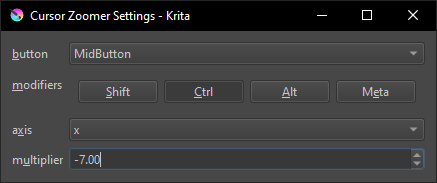
file tree structure
pykrita/
    cursor_zoomer_plugin/
        __init__.py
        cursor_zoomer_extension.py
    cursor_zoomer_plugin.desktop
cursor_zoomer_plugin/__init__.py
from krita import Krita


PLUGIN_NAME = __name__


def register():
    from .cursor_zoomer_extension import (
            CursorZoomerExtension,)

    app = Krita.instance()
    extension = CursorZoomerExtension(app)
    extension.setObjectName(f'{PLUGIN_NAME}:cursor_zoomer_extension')
    app.addExtension(extension)


register()
cursor_zoomer_plugin/cursor_zoomer_extension.py
from krita import (
        Krita,
        Extension)

from PyQt5.QtCore import (
        Qt,
        pyqtSlot as QSlot,
        pyqtSignal as QSignal,
        pyqtProperty as QProperty,
        QSize,
        QEvent)

from PyQt5.QtGui import (
        QKeySequence,)

from PyQt5.QtWidgets import (
        QWidget,
        QComboBox,
        QPushButton,
        QDoubleSpinBox,
        QFormLayout,
        QHBoxLayout,
        QApplication,
        QMessageBox)

from cursor_zoomer_plugin import (
        PLUGIN_NAME,)


class CursorZoomerExtension(Extension):
    def setup(self):
        self._button = Qt.MiddleButton
        self._modifiers = Qt.KeyboardModifiers(Qt.ControlModifier)
        self._axis = 'x'
        self._multiplier = 1.0
        self._editor = None
        self._zoomies_start_pos = None
        self._zoomies_start_level = None

    def createActions(self, window):
        show_editor_action = window.createAction(
                f'{PLUGIN_NAME}:show_editor_action',
                'Show Cursor Zoomer Settings',
                'tools')
        show_editor_action.triggered.connect(self._on_show_editor_triggered)
        self.read_settings()

    def _on_show_editor_triggered(self, checked=None):
        if self._editor is None:
            self._editor = CursorZoomerSettingsEditor()
        self._editor.show()
        self._editor.raise_()

    def read_settings(self):
        self._button, self._modifiers, self._axis, self._multiplier = read_settings()
        QApplication.instance().installEventFilter(self)

    def eventFilter(self, obj, event):
        e_type = event.type()

        if e_type in {QEvent.MouseButtonPress, QEvent.TabletPress, QEvent.MouseButtonRelease, QEvent.TabletRelease}:
            if ((event.buttons() == self._button) and (event.modifiers() == self._modifiers)):
                self._zoomies_start(event.globalPos())  # .globalPosition() in Qt6
                return True  # eat the event!
            else:
                # buttons is not ONLY self.button, disable zoomies
                self._zoomies_end()
                # don't eat the event
        elif (e_type in {QEvent.MouseMove, QEvent.TabletMove}
                    and (event.buttons() == self._button)
                    and (event.modifiers() == self._modifiers)):
            self._zoomies(event.globalPos())  # .globalPosition() in Qt6
            return True  # eat the event!

        return super().eventFilter(obj, event)

    def _zoomies_start(self, pos):
        app = Krita.instance()
        window = app.activeWindow()
        view = window.activeView()
        canvas = view.canvas()
        self._zoomies_start_pos = pos
        self._zoomies_start_level = canvas.zoomLevel()

    def _zoomies_end(self):
        self._zoomies_start_pos = None
        self._zoomies_start_level = None

    def _zoomies(self, pos):
        if (self._zoomies_start_pos is None) or (self._zoomies_start_level is None):
            return  # something strange.

        level_offset = 0.0
        if self._axis == 'x':
            level_offset = 0.001 * self._multiplier * (self._zoomies_start_pos.x() - pos.x())
        elif self._axis == 'y':
            level_offset = 0.001 * self._multiplier * (self._zoomies_start_pos.y() - pos.y())

        app = Krita.instance()
        window = app.activeWindow()
        view = window.activeView()
        canvas = view.canvas()
        canvas.setZoomLevel(self._zoomies_start_level + level_offset)


class ModifiersEdit(QWidget):
    modifiers_changed = QSignal(Qt.KeyboardModifiers)

    def __init__(self, **kwargs):
        super().__init__(**kwargs)
        layout = QHBoxLayout()
        self.setLayout(layout)
        self._shift_button = QPushButton(text='Shift', checkable=True)
        layout.addWidget(self._shift_button)
        self._ctrl_button = QPushButton(text='Ctrl', checkable=True)
        layout.addWidget(self._ctrl_button)
        self._alt_button = QPushButton(text='Alt', checkable=True)
        layout.addWidget(self._alt_button)
        self._meta_button = QPushButton(text='Meta', checkable=True)
        layout.addWidget(self._meta_button)

    def get_modifiers(self):
        modifiers = Qt.KeyboardModifiers(
                self._shift_button.isChecked() * Qt.ShiftModifier
                | self._ctrl_button.isChecked() * Qt.ControlModifier
                | self._alt_button.isChecked() * Qt.AltModifier
                | self._meta_button.isChecked() * Qt.MetaModifier)
        return modifiers

    @QSlot(Qt.KeyboardModifiers)
    def set_modifiers(self, new_modifiers):
        new_modifiers = Qt.KeyboardModifiers(new_modifiers)
        old_modifiers = self.get_modifiers()
        if new_modifiers == old_modifiers:
            return  # nothing to do
        if new_modifiers & Qt.ShiftModifier:
            self._shift_button.setChecked(True)
        if new_modifiers & Qt.ControlModifier:
            self._ctrl_button.setChecked(True)
        if new_modifiers & Qt.AltModifier:
            self._alt_button.setChecked(True)
        if new_modifiers & Qt.MetaModifier:
            self._meta_button.setChecked(True)
        self.modifiers_changed.emit(new_modifiers)

    modifiers = QProperty(
            Qt.KeyboardModifiers,
            fget=get_modifiers,
            fset=set_modifiers,
            notify=modifiers_changed,
            user=True)


class CursorZoomerSettingsEditor(QWidget):
    def __init__(self, **kwargs):
        super().__init__(**kwargs)
        self.setWindowTitle('Cursor Zoomer Settings')

        layout = QFormLayout()
        self.setLayout(layout)
        self._button_selector = QComboBox(editable=False)
        for name, button_enum in mouse_buttons().items():
            self._button_selector.addItem(name, button_enum)
        layout.addRow('button', self._button_selector)
        self._modifiers_edit = ModifiersEdit()
        layout.addRow('modifiers', self._modifiers_edit)
        self._axis_selector = QComboBox()
        self._axis_selector.addItem('x', 'x')
        self._axis_selector.addItem('y', 'y')
        layout.addRow('axis', self._axis_selector)
        self._multiplier_spin = QDoubleSpinBox(minimum=-10000.0, maximum=10000.0, value=1.0)
        layout.addRow('multiplier', self._multiplier_spin)

        self._button_selector.currentIndexChanged[int].connect(lambda _: self.write_settings())
        self._modifiers_edit.modifiers_changed.connect(lambda _: self.write_settings())
        self._axis_selector.currentIndexChanged[int].connect(lambda _: self.write_settings())
        self._multiplier_spin.valueChanged.connect(lambda _: self.write_settings())

    def write_settings(self):
        write_settings(
                self._button_selector.currentData(),
                self._modifiers_edit.modifiers,
                self._axis_selector.currentData(),
                self._multiplier_spin.value())
        self.refresh_extension()

    def refresh_extension(self):
        app = Krita.instance()
        extension = next((e for e in app.extensions() if isinstance(e, CursorZoomerExtension)), None)
        extension.read_settings()

    def read_settings(self):
        button, modifiers, axis, multiplier = read_settings()
        button_index = self._button_selector.findData(button)
        self._button_selector.setCurrentIndex(button_index)
        self._modifiers_edit.modifiers = modifiers
        axis_index = self._axis_selector.findData(axis)
        self._axis_selector.setCurrentIndex(axis_index)
        self._multiplier_spin.setValue(multiplier)

    def showEvent(self, event):
        super().showEvent(event)
        self.read_settings()


def write_settings(button, modifiers, axis, multiplier):
    app = Krita.instance()
    app.writeSetting(PLUGIN_NAME, 'button', get_mouse_button_name(button))
    app.writeSetting(PLUGIN_NAME, 'modifiers', modifiers_to_string(modifiers))
    app.writeSetting(PLUGIN_NAME, 'axis', str(axis))
    app.writeSetting(PLUGIN_NAME, 'multiplier', str(multiplier))


def read_settings():
    app = Krita.instance()
    button = get_mouse_button_enum(app.readSetting(PLUGIN_NAME, 'button', 'MiddleButton'))
    modifiers = string_to_modifiers(app.readSetting(PLUGIN_NAME, 'modifiers', 'Ctrl'))
    axis = app.readSetting(PLUGIN_NAME, 'axis', 'x').strip().lower()
    multiplier = float(app.readSetting(PLUGIN_NAME, 'multiplier', '1.0'))
    return button, modifiers, axis, multiplier


def mouse_buttons():
    mouse_buttons = dict()
    for name in dir(Qt):
        value = getattr(Qt, name)
        if isinstance(value, Qt.MouseButton):
            mouse_buttons[name] = value
    return mouse_buttons


def get_mouse_button_name(button_enum):
    for name in dir(Qt):
        value = getattr(Qt, name)
        if isinstance(value, Qt.MouseButton) and (value == button_enum):
            return name


def get_mouse_button_enum(button_name):
    for name in dir(Qt):
        value = getattr(Qt, name)
        if isinstance(value, Qt.MouseButton) and (name == button_name):
            return value


def modifiers_to_string(modifiers):
    modifiers_string = '+'.join(token for token, a_modifier in (
                ('Ctrl', Qt.ControlModifier),
                ('Alt', Qt.AltModifier),
                ('Shift', Qt.ShiftModifier),
                ('Meta', Qt.MetaModifier))
            if a_modifier & modifiers)
    return modifiers_string


def string_to_modifiers(modifiers_string):
    modifiers = Qt.KeyboardModifiers()
    tokens = {token.strip().casefold() for token in modifiers_string.split('+')}
    for a_modifier, token in (
            (Qt.ControlModifier, 'Ctrl'.casefold()),
            (Qt.AltModifier, 'Alt'.casefold()),
            (Qt.ShiftModifier, 'Shift'.casefold()),
            (Qt.MetaModifier, 'Meta'.casefold())):
        if token in tokens:
            modifiers |= a_modifier
    return modifiers
cursor_zoomer_plugin.desktop
[Desktop Entry]
Type=Service
ServiceTypes=Krita/PythonPlugin
X-KDE-Library=cursor_zoomer_plugin
X-Python-2-Compatible=false
X-Krita-Manual=readme.md
Name=Cursor Zoomer Plugin
Comment=Adds Cursor Zoomer to Krita (settings for zooming to documents using mouse axis with button + modifiers
Ps: settings will allow you to brick your Krita (buttons = All buttons, modifiers = None) so be gentle! (if you brick your Krita, open kritarc in text editor and edit / remove [cursor_zoomer_plugin] section)
/AkiR
@AkiR: Since you offered your work openly, I was so cheeky to put your parts together, so the less computer-savvy can download your plugin as an already installable package that can be imported via Krita’s standard plugin import function.
It can be downloaded via this link:
cursor_zoomer_plugin.zip ¹
You install plugins in Krita by clicking on “Tools” >> “Scripts” >> “Import Plugin from File” and in the dialog that opens, select the file you just downloaded, confirm the selection (click on the OK-Button), then confirm Krita’s activation request and the message that the plugin is installed, and restart Krita.
If you missed letting Krita activate the plugin during the steps above:
Then you have to search in Krita under ‘‘Settings’’ >> ‘‘Configure Krita’’ >> ‘‘Python Plugin Manager’’ for the plugin you just installed and activate it by checking the box in front of it. Then confirm with OK and restart Krita a second time to be able to use the plugin.
Michelist
¹ The report from VirusTotal for the plugin is found via this link.
@Michelist: good work, I’m bit conflicted should I put scripts to some repository, as scripts are small and quickly written. And repository upkeep is not as fun as writing code as challenge puzzles.
/AkiR
EDIT: @Michelist , @AkiR , sorry for the false alarm, after some tests the “View print size” stretched problem is due to a new display which I think is passing wrong dimensions, is there a way to manually give the right dimensions somehow to Krita? I fear not, anyway in the meantime I’m going to use the old display.
Re-ADDED INFO:
Win 11 - Krita 5.2.9 Portable
@Skess01: To exclude the plugin as the cause, you can delete it from your pykrita folder in Krita’s resource folder. You open Krita’s resource folder via ‘‘Settings’’ >> ‘‘Manage Resources…’’ >> ‘‘Open Resource Folder’’ and change to the subfolder pykrita, there you delete the folder cursor_zoomer_plugin and the file cursor_zoomer_plugin.desktop and check the kritarc again to remove the already known remnants that are created by restarting Krita with the plugin in the pykrita folder, then restart Krita and the plugin is completely deleted.
In addition, I do not have the problems you described and was totally puzzled by your report.
Michelist
Add/Edit: Oh, you edited your post while I was writing.
With your new display, I’ll get back to you in a few hours, I’m just in the usual “break” around this time of my sleep and have to take medicine before I’ll sleep further.
I looked through all of my Krita’s settings and also searched through the kritarc, but I couldn’t find something that can assign, or pass over, the settings to your display.
Of course, I may have overlooked something, since I’m no developer and do not know about all (hidden) settings or switches Krita may have under the hood - like the, under Linux Command Line hiddenly documented, --nosplash switch. “Hiddenly”, because you can use that switch for all versions of Krita, where you can start up Krita with additionally variables, at least Linux, macOS and Windows offer this ability.
I don’t know if @freyalupen, @Lynx3d, @YRH, @KnowZero or other users with coding and Krita knowledge can help you further, but I’m at my wits end here.
Michelist
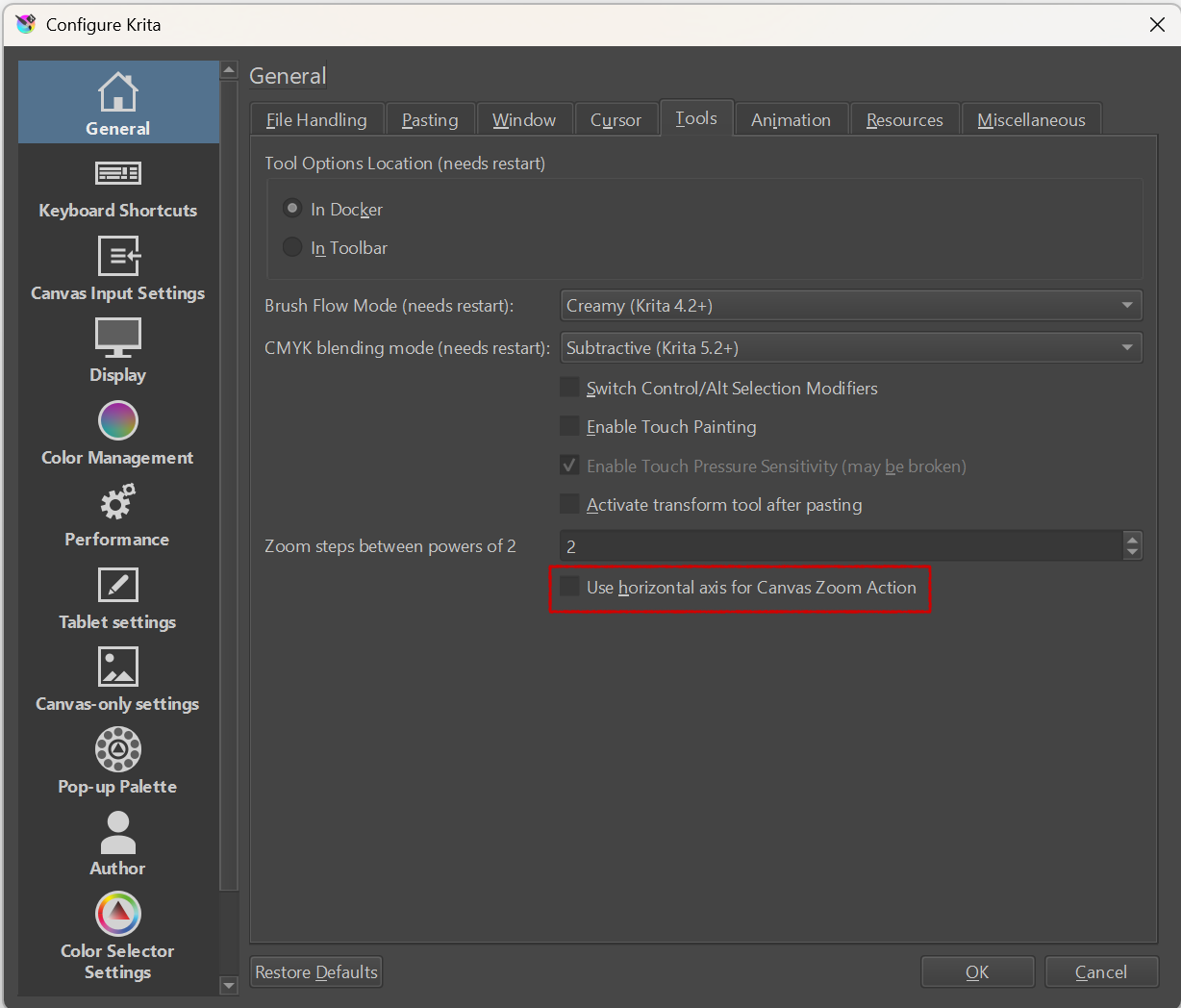
@Skess01 and I misused this topic for this issue with a new display not correctly handling “View print size”:
And since it is beyond my knowledge, I pinged you and the others, hoping you may be able to help here.
Michelist