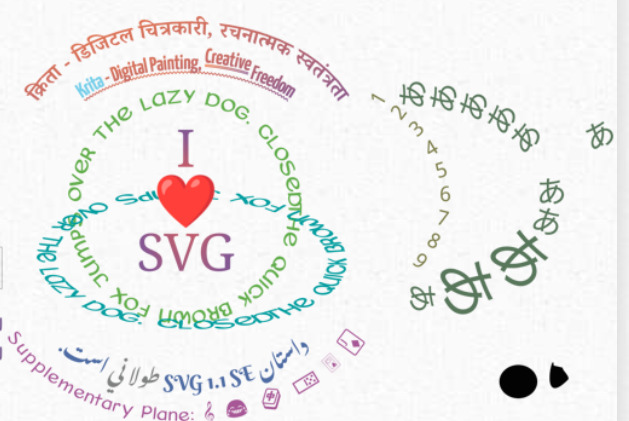
This is an image from Krita’s official blog post :
How could I wrap text around like this?
Hi
You can’t
This is currently a work on progress on text edition ability that has been presented for example
That part is done! It will be merged right after the Krita 5.1 release, because it needs new dependencies,
@wolthera might be able to give an estimation for which Krita version it will be available (5.2 I Guess)
Grum999
GIMP can do text along a path, for which you have to first create a path.
1 Like
You can also do it in Inkscape , if you prefer:
1 Like
There are definitely ways to write in circles with Krita, even if it is a bit “hackish”.this old topic again, especially the following posts are interesting, but actually it was fun to read through the whole topic again:
Was curious to see if it was possible even if committing several war crimes in the process and YUP! Admittedly it consumes quite a bit of processing power to do it and it’s not perfect (although it could be made better with patience), but here it is
It’s using a transformation mask with mesh transform to bend everything into a circle
[2021-07-25-081535_1813x1431_scrot]
Here with a UV Map test texture thingie to show the effect (texture by ByValle under CC ShareAlike 4.0)
[2021-07-25-082103…
This is Google Translate.
Enable Pipe mode.
Adjust the spacing to see the text clearly.
[1_2]
ELLipse Tool Options
Fill: Not Filled&OutLine: Brush
[3]
Click the left mouse button on the canvas.
I’m adding onto @Eranthis_stellata 's technique. Here is one (slightly flawed) way to create arcane circles.
[image]
make a circle assistant.
[image]
add inner circle.
[image]
add arcane runes with a text brush.
[image]
add outer circle.
For the brush:
download runic fonts (here are some Runic Fonts | FontSpace )
take a basic-2 opacity brush
remove all brush properties
enable Rotation → drawing angle
[image]
change brush tip to text, you can adjust the size and spacing to your prefer…
Michelist
1 Like
system
August 30, 2022, 3:45pm
6
This topic was automatically closed 15 days after the last reply. New replies are no longer allowed.