Hello, are you like me - you fill up on interesting brushes and then feel overwhelmed about which one to use? Besides the tags and package names, do you organize them in some way? Is there a plugin for that? Should I suggest it to the developers  ? Maybe delete some brushes
I use tags, mainly. Also, the plugin Shortcut Composer lets you create 3 radial brush menus – plus you can save the brushes used right inside each document.
2 Likes
Thanks, I’ll try that
I know it’s not what you’re after, but I do simply tag them. I’ve always preferred to find a few brushes I get along with and then use them to a point of familiarity. Being able to sit down and know exactly what to expect from the tool takes one less concern off the plate when focusing on the creation process itself. For that reason, I take the few brushes I find myself using the most and put them into focused tag collections (like “Sketching”, “Inking”, “Painting”, “Speed Lines”, etc). That’s not to say I don’t explore new presets, but I tend to do that as a separate exercise. So, when I’m sitting down to draw with an intended goal, I stick to what I know. When I want to mess around, I explore new presets (or make my own). That then leads to new presets getting added to my focused collections. So, should any of the collections get too large, I just have a look through them and drop anything that hasn’t been used in the past month or so (just from the collection; not from Krita, entirely).
5 Likes
Sure, that helps too, thanks 
I generally test the new bundles (or re-test old ones), find the more interesting brushes for me, save them as new brushes (so I’ll be able to modify them according to my needs but keeping the originals) and then put them in my tags.
I don’t know if you have seen the “Brush Tag Selector Docker”, I find it simple, very convenient and lovable (I think it deserves a topic all its own - maybe do you think the same @general-avalanche-43 / @marui_mg  ?)
?)
Practically you:
- put your favorites brush tags in a txt file (tags.txt)
- then in Krita with a click you select the desired tag
(Krita has to be restarted every time you change the list of favorite tags in tags.txt)
here how it looks (with default tags):
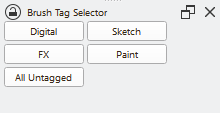
here the plugin:
and here my message explaining a little modification if you change quite often Krita color themes:
2 Likes
And what’s the difference between this and regular tags? How do I modify the categories once I’ve installed the plugin from the compressed folder, inserting it as a Python plugin from a file?
To select a tag from the default dropdown, you have all the tags from all the bundles installed, you have to scroll up and down when you have a lot of them, so you have to:
- click to open the dropdown
- maybe scroll
- then click to select the desired tag
With this docker you put in “tags.txt” only your favorite tags, a little part, so you can:
- select the desired tag with only one click
To find the tags file “tags.txt”:
From Krita menu (at the top) > Settings > Manage Resources
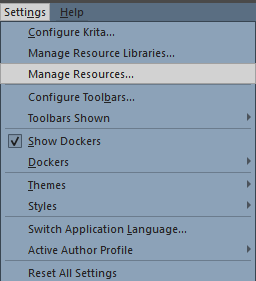
And at the bottom of the Manage Resources window > Open Resource Folder
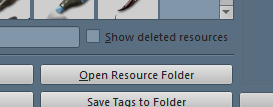
It will open the Krita resource folder in your system and you’ll have to open from there the pykrita folder and then brush_tag_selector_docker folder.
Here you find “tags.txt”, you have to edit it and put there the exact names of your favorite tags.
Then restart Krita (enable this docker and place it wherever you like, if you haven’t done this before).
1 Like
The way over the menu, you gave, is identical on all OSes. (Okay, macOS has “Configure Krita” hidden in the usual Apple-Style settings menu.)
Michelist
2 Likes
Thank you, edited for posterity 
1 Like
This topic was automatically closed 4 days after the last reply. New replies are no longer allowed.