I create a new blending mode to mock [light on albedo]/[HDR paiting],is anyone interested?

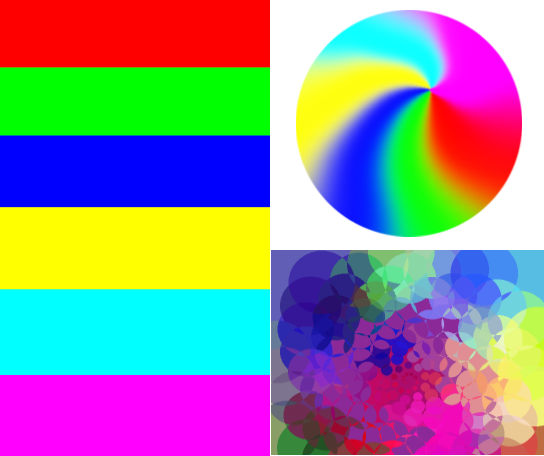
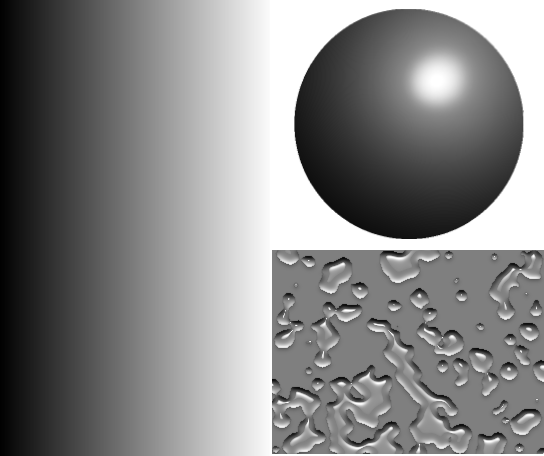
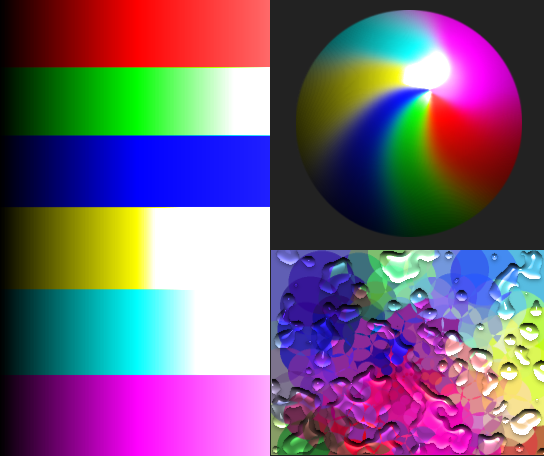
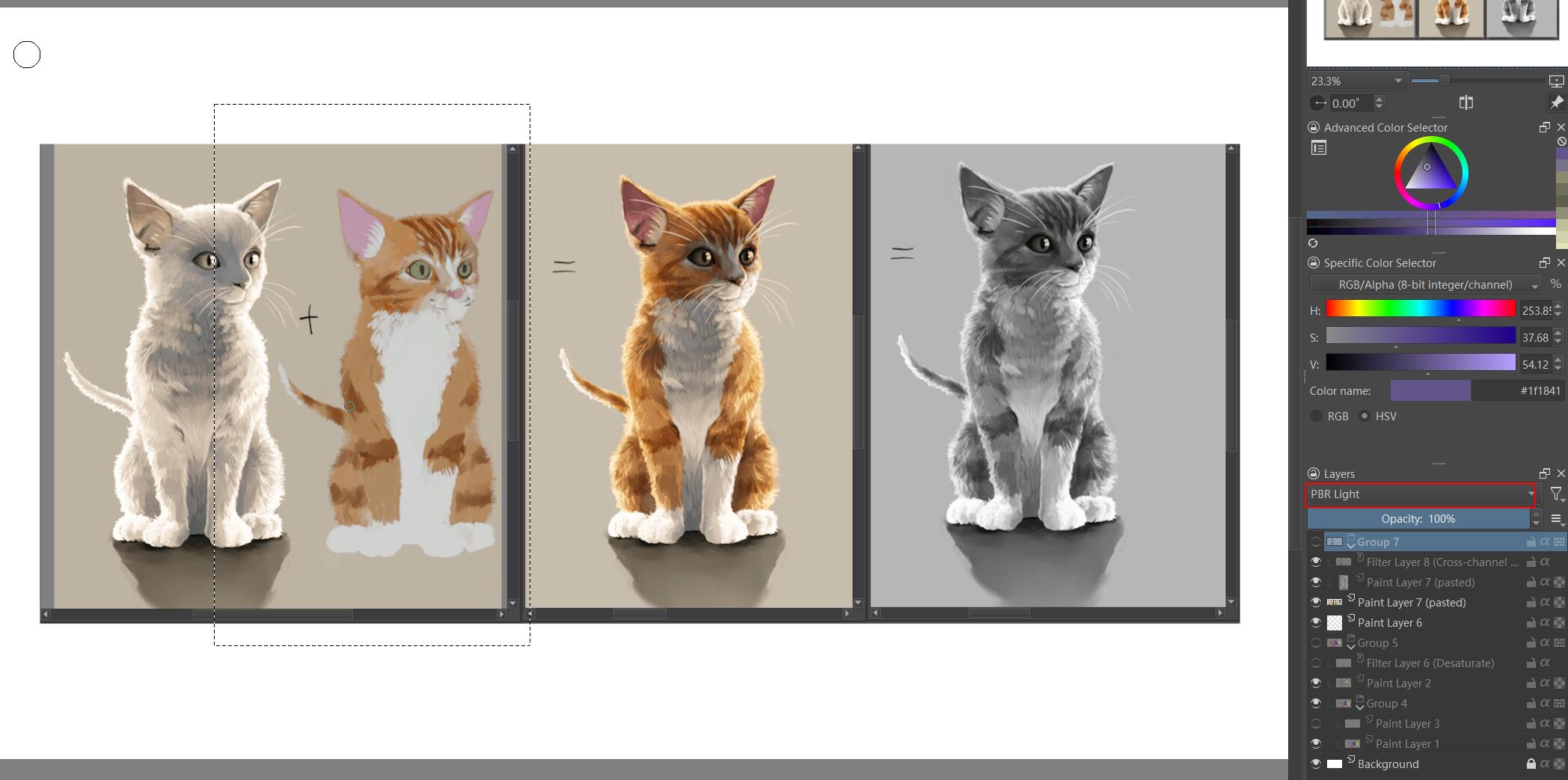
this is the example on Scene Linear Painting doc, left 2 right–> light – base color – result – luminosity

left 2nd is blending mode pbr light result, use left 1st with luminosity adjust as layer content.

Principle very simple, do multiply with a coefficient which equal to 1.0f/ (50% grayscale<gamma2.2==0.5 | linear == 0.215686 >) and do hsy addlightness(0)

If anyone interested this, I can try to commit it to github. I’m not using it
often, I’m afraid of doing some wrong.

8 Likes

I find it useful, and I think it’s a helpful tool in some situations.
So I would release it, but it’s your tool and your decision.

Michelist

Github is just a copy of Krita official repository, which resides on invent.kde.org . You’ll need a KDE Identity account for creating a Merge Request.

The blending mode looks nice. Which bit depth and color profile it is, 8bit sRGB? Have you checked if it works just as nice in 32bit and linear color space (‘g10’)?

I actually would consider using this given your example shows interesting use case.

8bit sRGB-g10, I create it for faster linear painting, keep most composite mode and filter enable.
I’ve tested, it works on 32-bit-float.

2 Likes

But g10 works bad in 8 bits. Are you sure?
However, it all looks very interesting.

Might be some problem, I haven’t painted yet. I just think a pbr base painting without linear space will be a little wrong.

Appimage to test it: krita-5.2.0-prealpha-6d27e40e87c-x86_64.appimage — Яндекс.Диск made by dmitryK

Test info: The mode is named Lambert and can be found in the HSY category in two variation, 2.2 and Linear.

I copy paste here the IRC discussion and test we had with @raghukamath today:

[10:34] <deevad> Ok, tested. A bit of a deception, I was probably too teased by this new mode.
[10:35] <deevad> The shading part (in gamme 2.2) is equal to Hard Light, to the pixel
[10:35] <deevad> while the lighting part is more over exposed
[10:36] <deevad> comparation: (the bright highlight is lambert)

[10:36] <deevad> Hard Light can do this over exposed light by the way
[10:37] <deevad> It simply mean Lambert burn the color to white more quickly, and so allows a less subtle shading work
[10:37] <deevad> Maybe the (Linear) version brings something new
[10:37] <deevad> but I don’t work in Linear color space
[10:37] <raghukamath> deevad: very quick to test thanks.
[10:38] <deevad> I can’t tell
[10:38] <raghukamath> I think the subtle difference from hard light can be handled with opacity, color tone in hard light?
[10:39] <deevad> raghukamath: sure, you can always use grayer colors to get less out-of-the-top bright highlight burst, but on a 0 to 255 scale, that just reduce your options
[10:39] <dmitryK|quack> deevad: the idea is that for gamma2.2, the neutral color if 0.5, and for linear neutral color is 0.215
[10:41] <deevad> dmitryK|quack: Maybe this new mode is more adressed to 3D artist who wants to do compositing in Krita, PBR style?
[10:42] <deevad> and output from Blender their local color, and shading pass?
[10:42] <dmitryK|quack> we need to ask _despair for that I’m afraid
[10:42] <deevad> ok
[10:42] <deevad> I’ll report my notes on K-A and ask at the same time.
[10:43] <raghukamath> the modes are in hsy section right
[10:43] <raghukamath> deevad: can you also share the appimage in your post
[10:45] <deevad> raghukamath: I’ll do, good idea
[10:45] <raghukamath> i see lambert in hsy
[10:45] <raghukamath> there are two right
[10:45] <raghukamath> are there any other extra modes?
[10:45] <deevad> yes , two variation, 2.2 and Linear.
[10:46] <dmitryK|quack> raghukamath, deevad: I’ve checked the maths, yes, when the source color is below 0.5, then maths of Hard Light and “Lambert Lighting Gamma 2.2” is exactly the same. Though when the source is greater than 0.5, the maths is a bit different: Hard Light clips the highlights in a per-channel manner, which can theoretically change the hue of the color, and Lambert does the clipping in HSY color space, which can, in theory avoid hue drifts
[10:46] <dmitryK|quack> can you look closely for the hue drifts when adding very bright highlights?
[10:47] <dmitryK|quack> that should be the main difference
[10:47] <deevad> dmitryK|quack: Ha, thanks for checking that part. Indeed. It can be a huge difference. I’ll test again
[10:47] <dmitryK|quack> (you might also need to test it on an image with vivid colors)
[10:47] <deevad> ok :slight_smile:
[10:51] <raghukamath> yes it seems to preserve hue better than hard light
[10:51] <raghukamath> hard light has preservation of the light and dark and less mid range hues
[10:52] <raghukamath> Imgur: The magic of the Internet here check it

[10:53] <raghukamath> I am lowering the lightness of the base orange hardlight doesn’t vary that much in terms of the white highlight
[10:53] <deevad> Yes, same observation. Too bad Lambert-gamma sort of over expose to white quickly.
[10:54] <raghukamath> is lambert linear for linear colour space
[10:54] <deevad> on a 0 - 255 scale, I easily loose 25% of the brightness subtle work; it’s like being constrained to shade with 0 - ~190
[10:54] <raghukamath> yes
[10:54] <raghukamath> the birghter details are preserved well in hard light
[10:54] <raghukamath> sacrificing the hue mid range though
[10:55] <raghukamath> in this the brighter details are washed out preserving the hue and mid range
[10:55] <deevad> raghukamath: no, I speak about the 2.2. (and yes, Linear is obviously like that, I understand Linear Gamma, good for 16bit workflow I guess)
[10:55] <raghukamath> yes I understood
[10:55] <deevad> :slight_smile:
[10:55] <raghukamath> in the gamma the highlight has too less details
[10:55] <deevad> yes
[10:56] <raghukamath> I think it is somewhat similar to hard light deifference being it preserves mid ranges better than hard light. and it can be useful in some instances
[10:56] <deevad> but that’s probably hard to avoid with how light works. This thing goes additive very quickly. Too quickly
[10:56] <deevad> raghukamath: Yes, same conclusion.
[10:57] <raghukamath> in this you can also see that darker side is almost exactly sam

[10:57] <raghukamath> so it is hardlight with over exposed lighter side giving us more mid range when base layer has darker colour
[10:58] <deevad> Yes
[10:58] <deevad> It makes me wants to go 16bit only to avoid banding issue with using this mid-ranges
[10:59] <deevad> (and 16bit gamma corrected, not even linear xD)
[10:59] <raghukamath> I would probably use it to enhance contrast and a bit of hue in dark artworks which has less highlights but I think those type of artworks are less in my work
[10:59] <deevad> Sure, it sounds like a reliable blending mode for vignette and global highlight/glow
[10:59] <raghukamath> I would need to paint the highlight parts over this
[11:00] <raghukamath> this would kill the details in those areas
[11:00] <deevad> it somehow feels like the Luminosity SAi tool on the light side
[11:01] <deevad> Should we copy/paste the IRC log to DespAir on K-A raghukamath ?
[11:02] <raghukamath> sure
[11:02] <deevad> ok, I’ll do, thanks
3 Likes

So, to summary, it’s an interesting work. Thank you @_DespAir

The blending mode has better ‘natural’ light than Hard Light for shading.

Unfortunately, this light also burn to white too quickly, so the painter has to use greys slightly above 127 (on 0 - 255, 8bit) to build up light. above 200 or 220 , it goes full white.

Not sure if there is possibilities to offer a variation of this blending mode that could compensate that. Let me know if you have an idea @_DespAir , thanks!

Maybe we can inform the people in this post? I think when gamme 2.2 was running, it was probably double multiplication.
Lights and shadows with a single blending mode: Multiply & Double - Develop / Feature Requests - Krita Artists (krita-artists.org)

1 Like

TheTwo : Maybe we can inform the people in this post?

Yes, it sounds like this thread is related to the same goal/quest.

Please test the appimage that @Deevad linked

I see a fake hdr mode this way:

  • the base colors layer has the values on the range [0, 1] (8bits 0-255)
  • the light layer needs to have values greater than 1 to emulate light power greater than 1, but it can’t. So it has to be faked by mapping the [0, 1] range to a larger range, for example [0, 2]. So 0.5 becomes 1, and 1 becomes 2.
  • then we multiply the layers and the result can be a value greater than 1, a pseudo hdr.
  • then we have to deal with those resulting values greater than 1. If we clip then some areas will appear overexposed. So we can use some tone mapping function to map the [0, 2] range back to [0, 1].

I don’t think it requires more than that. The issues are:

  • which range to choose for the pseudo hdr. The blending mode presented here and in the other thread seems to choose [0, 2]. I think it is a good compromise.
  • which tone mapping function to use to remap the values to the [0, 1] range.
3 Likes

do you think the 2nd picture is expected whole white light illuminate effect?

origin:


lighten:

this is a fix resolution , not finally.

I’m dying for find out a “correct” way to do tone map.
I found there is no a common view for each renderer.

2 Likes

A blending mode to more accurately or nicely emulate real shading over an albedo layer would be amazing. But from what I’ve seen here and in past attempts, the math is difficult to get down. Definitely hoping for something to be figured out, though.

There are some variables at play that need to be put as constants in the algorithm. The blending mode only gets as input the src color and the dst color, so:

  • The src (light) image needs to be scaled to have values over 1, a higher range. I think scaling it to the [0, 2] range is a good compromise. So the [0, 0.5] range in the src gets mapped to [0, 1]. This meand that for src values <= 0.5 (or src “hdr” values <= 1) we can just multiply the “hdr” src by the dst (base color) and achieve the traditional multiply, like hardlight does.
  • Then it has to be established what happens when the src > 0.5 (“hdr” src > 1). What you do there it’s never gonna content everybody:
    • what should happen when the dst is dark? should black begin to be lighten the more the"hdr" src approaches 2?
    • what should happen when dst is light? should the resulting values of hdrValue * dst be compressed so that only when dst is 1 then the result is also 1, and other combinations darker? should the resulting values of hdrValue * dst that are above 1 be clipped? for which values of “hdr” src and dst the clipping begins?
    • Ideally there should be a smooth transition between the 2 functions (the one used when “hdr” src <= 0.5 and the one used when “hdr” src > 0.5.
    • it should use the [0.5, 1] range in src in a way that gives a pleasant range of colors at the end while taking into account those dark/light dst areas.
    • I think that having those as parameters would be great but it can not be done for a blending mode. They have to be set as constants.
  • Then there is the whole issue that the 8 bit rgb values are gamma corrected. So we are not working in linear space, that would be the preferred. But I think that we should just seek a good enough, good looking, simple, fake hdr.

By the way. I tried the gamma compression described here as a simple tone mapping and realized that when gamma = 1/2 the result is the same as “geometric mean” blending mode. It gives very washed out colors.

1 Like

Ok, I commit a version fix paint experience, I need your trying, thank you for make it better together.

4 Likes

Hey @_DespAir , thanks for the new commit on your MR ! I’ll test as soon as possible.

I was just doing deeper test and experimentation around the blending modes for shading. I realised that I had no real ‘test plate’ to compare them. So, this is what I did and I’ll share it here (Public Domain/CC-0, mostly generated with GMIC filters). Feel free to use!

Disclaimer

Krita artist index colors for the previews of my research, please click on them to see the real gradients.

Test files

This is the local-color (A) layer, as a PNG on transparency:

This is the shading (B) layer, as a PNG on transparency:

Download Krita source files: 2022-09-09_blending-mode_test-plate_source.zip (478KB)

CC-0/Public Domain


My tests: comparing 5 shading capable blending modes

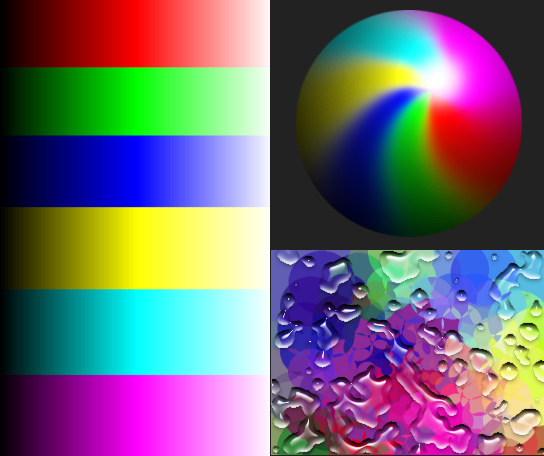
1. Lambert Lighting Gamma 2.2

(Note: appimage 6d27e; before your recent commit)

I like the subtle hue shift on the magenta stripe and red, the light desaturates the local-color while going high level, it has a natural light vibe.

I dislike the sudden white over exposing on yellow and cyan, also, the specular on the sphere is too sharp.

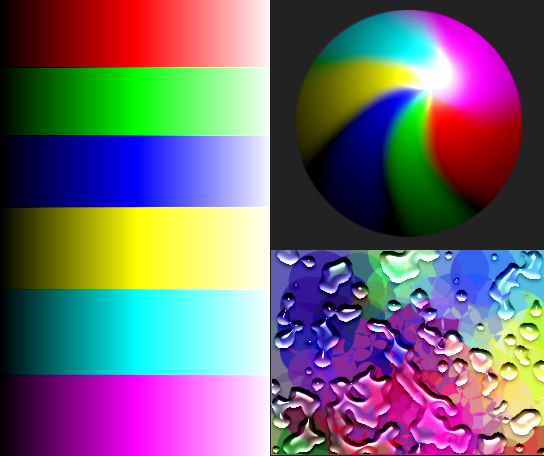
2. Hard Light

I like the consistency for each gradient of shading versus local color, it’s predictable. This is the one I use in production sometime on my comic (eg. on this episode). I experimented and popularized the use of Hard Light for shading in a video tutorial 3 years ago.

I dislike the way hue and saturation is unaffected by the light. It makes the magenta and red part on the sphere looking oversaturated near the specular light. The light feels fake like on the first 3D renderings (eg. it feels of late 90s demo of Phong/Gouraud shading and smoothing methods).

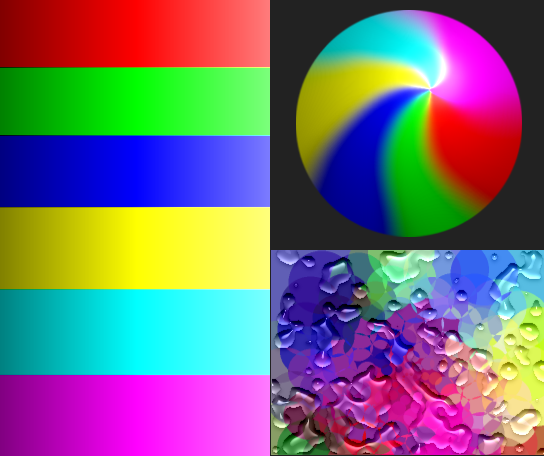
3. Linear Light

A good exemple of a broken blending mode for this task: check the dark pattern on the sphere and the saturation on the green near the specular point of light.

4. Super Light

Another broken one, because bad example informs a lot. White patterns between the color on the sphere, and also a visible subtle dark corona on the cyan part around the specular on the sphere.

blending-mode_test_MEH_Super-Light

5. Grain Merge

Another non-usable one, too fade and weak for really shading, but I put it here because I think it does something right on lighting the deep blue and pure red. The drop of water over the deep blue top-left corner is one of the best rendering over this color this series of example, imo.

7 Likes