Intermittent brush issue where brush stops drawing and a fast pop-up message flashes on screen

When drawing with the ‘pencil (my brush)’ brush I get a fast pop-up message that is too quick to read. At the same time the brush stops working until I lift my pen and start drawing again. It is just random at times with long durations between or repeatedly drawing about 1/4" and it quits working. A couple times I have tried to film my tablet with my phone. The results haven’t shown a clear image of the message. I have slowed down the playback to 1/2 speed with no luck getting a clear image. I am using a laptop running windows 11 that has 8gb ram with an additional 8gb integrated. I am running Krita 5.2.11 Also hooked up to a Ugee UE16 digital tablet.

Is this a known bug or some hardware issue on my end?

Welcome, @Mater_Sandwich

I don’t know if this is the problem, but we can check the driver settings to start.

You will want Windows Ink turned off in the Krita profile inside the Ugee’s interface. Then in Krita, select Wintab (instead of Windows Ink) in Tablet Settings (which is found within Configure Krita).

Another thing in Configure Krita, try turning off on-canvas popus messages (General > Window).

If nothing here helped, let us know and maybe someone else will have other ideas.

1 Like

Thank you sooz for the welcome and the assistance.

My Krita software and Ugee Tablet were already set to those settings. So I tried swapping them to windows Ink. I am still getting the pop up windows as before. I did turn off the on-canvas popup messages but that didn’t stop them.

Another thing; I’ve played around drawing with my mouse and I haven’t had a single popup.

That was smart to try setting both to Windows Ink as a trial. By the way, when you did that, did you restart Krita and restart your device when you made the change? That’s how the change takes effect.

I won’t drag it out and I’ll tell you in a nutshell.

I haven’t drawn on a computer for a long time, and today is the day. I’m drawing a girl, and here’s what happens. Every time I touch the graphics tablet, Krita displays this message:

waiting for image operation to complete.

And this notification pops up every time. It’s annoying. I thought I had an old version, but after installing a new one, the error persisted.

I thought it was due to a lack of RAM. I checked the Task Manager, and everything seemed to be running smoothly.

I searched online to find out what was causing the issue. It seemed like some programs were interfering with it. However, I don’t think that’s the case. I’ve tried reinstalling the program several times, but to no avail.

Could you please tell me what might be causing the error?

1 Like

Hello @hellooo and welcome to the forum :slight_smile:

Your situation is remarkably similar to that in these two recent topics:

Please read those topics to see if any of the advice given has any effect for you.

@sooz, @Takiro, Could these be combined at all?

1 Like

Everytime I try to draw, that message pops up for a split second before going away. It happens on every document, on every layer, with every brush. The first stroke is always fine, then the second one after starts making that pop up constantly

Hi @Mimikyutie

We can’t help you without knowing which operating system you’re on (Android? Windows? etc.) and is your tablet driver up to date?

It would also be good to know which version of Krita you have (Help > About Krita) and where did you get it from?

Oh sorry, Im on windows and yes my tablet drivers are up to date. Im on the latest version of Krita from the official website, but Ive also tried multiple other ones including the current pre alpha and none if it has worked.
These were my logs if they help at all
Add node KisPaintLayer(0x23a31caa230, name = “Paint Layer 7”) to QObject(0x0)

aliases (“/styles/”) “C:/Program Files/Krita (x64)/bin/../”

findResource: type “markers” filename “markers.svg” resource “C:/Program Files/Krita (x64)/bin/..//share/krita//styles//markers.svg”

Color definitions found during svg11parsing (“#000000”)

Color definitions found during svg11parsing (“#000000”)

Color definitions found during svg11parsing (“#000000”)

Color definitions found during svg11parsing (“#000000”)

Color definitions found during svg11parsing (“#000000”)

Color definitions found during svg11parsing (“#000000”)

Color definitions found during svg11parsing (“#000000”)

Color definitions found during svg11parsing (“#000000”)

Color definitions found during svg11parsing (“#000000”)

Color definitions found during svg11parsing (“#000000”)

Color definitions found during svg11parsing (“#000000”)

Color definitions found during svg11parsing (“#000000”)

Color definitions found during svg11parsing (“#000000”)

Color definitions found during svg11parsing (“#000000”)

Color definitions found during svg11parsing (“#000000”)

Color definitions found during svg11parsing (“#000000”)

Color definitions found during svg11parsing (“#000000”)

Color definitions found during svg11parsing (“#000000”)

Add node KisPaintLayer(0x23a1b422410, name = “Paint Layer 7”) to QObject(0x0)

DEBUG: releasing of the pooled memory has been cancelled: there are still 1455 tiles in memory

DEBUG: releasing of the pooled memory has been cancelled: there are still 1455 tiles in memory

Can you open your tablet interface and make sure Windows Ink is off and then look in Krita’s tablet settings to ensure Windows Ink is off? (Configure Krita > Tablet Settings > Input API should be WinTab)

My windows ink was on, however I turned it off and the problem remains. I also have the same problem using a mouse. Is there anything else I can provide thatd help?

If you turned Windows Ink off in Krita, you have to restart Krita for the change to take effect. If you turned it off in the tablet interface, you have to restart your device for the change to take effect.

I’m not positive that this will be a solution for you, I suggest it because many new users don’t know the tablet and Krita have to match when it comes to the Windows Ink/not Windows Ink decision.

I restarted everything just to make sure. I now know that the problem only occurs when my tablet is on. When its off and I use my mouse, I dont get the problem at all. Well it doenst stop when I turn it off, it just begins when I turn my tablet on and then doesnt stop unless i reset my pc. What do I do to stop that

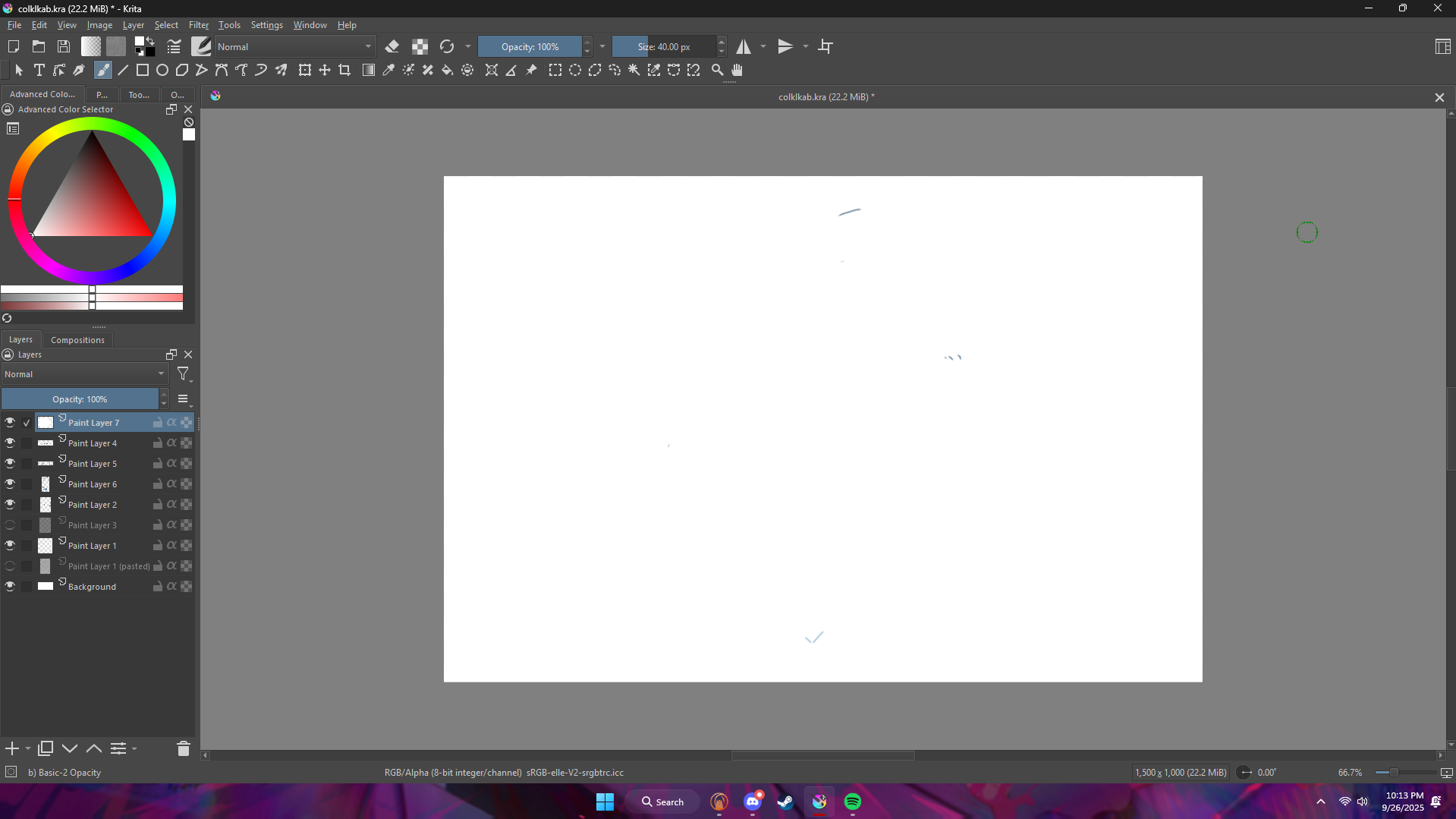
Can we see a screenshot of the entire workspace including the top and bottom status bars and the layers docker open?


Like this?

I can’t see why that document would give you trouble – there’s practically nothing on it.

Are you running any other software at the same time, making your device hang up when you make brush strokes? That would be my last guess – unless your device has too little RAM (like 4 GB?). Don’t know.

I have 16GBs of ram and this still happens even on a brand new small document with nothing else running. I didnt have this problem at all until just recently too

That’s so weird - and frustrating, right?

You said the problem only happens when your tablet is on. Can you uninstall/reinstall the tablet? (If you do this, you 'll need to restart after the uninstall, and also restart after the new installation)

Sometimes Windows updates does odd things to tablet installations.

Ive uninstalled xppentablet, reset my pc, installed the latest driver, reset it again and nothings different. Even went back and did it with revo uninstaller and still the same.

Only thing I could imagine being the cause is a too high sample rate of the tablet. This would explain why it would happen only when it’s connected. Does the problem also happen when you use the mouse while the tablet is connected? (The normal mouse not the one that came with the tablet).