Looking for some troubleshooting help. Using Krita 5.0.6 on a Windows 10 PC. 32GB Ram, Intel 10 core processor, dual head EVGA GeForce GT1030 SC video card, SSD and HDD drives, Huion tablet…
Krita will hang-up or become unresponsive occasionally. Everything just grinds to a standstill. Nothing works. For anywhere from 5 -15 seconds. After that, Krita starts working properly. It happens almost every session. It seems (seems) that it has something to do with layers - or working within the layers window. Quite often I’m moving layers up or down, locking or unlocking layers, picking brush types, nothing terribly sophisticated tech-wise. Something is causing Krita to stop responding. Can happen multiple times within a single session. Not sure how to go about troubleshooting this problem. Could be an auto-save thing? Something stealing cpu cycles on my PC? Some feature not setup properly within Krita? Any ideas?
thx!
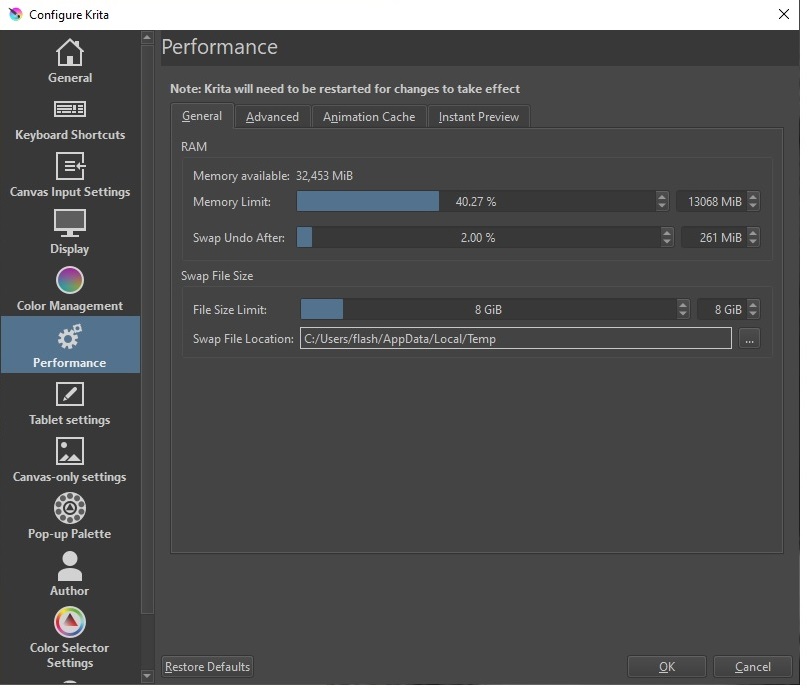
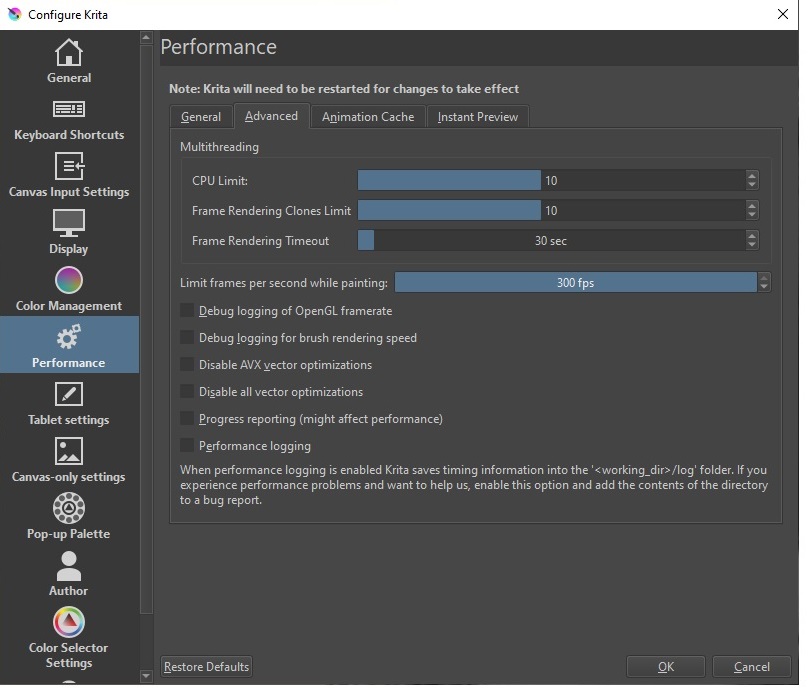
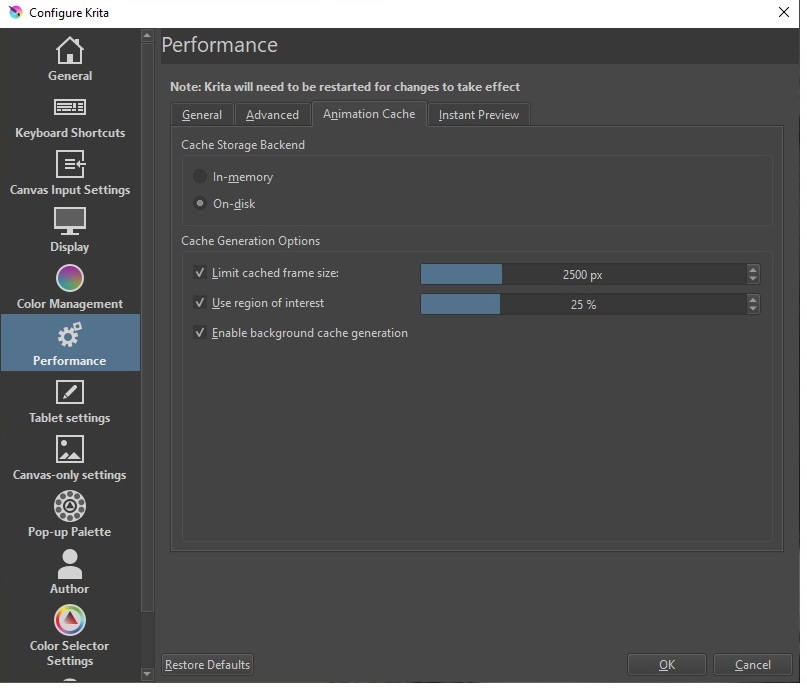
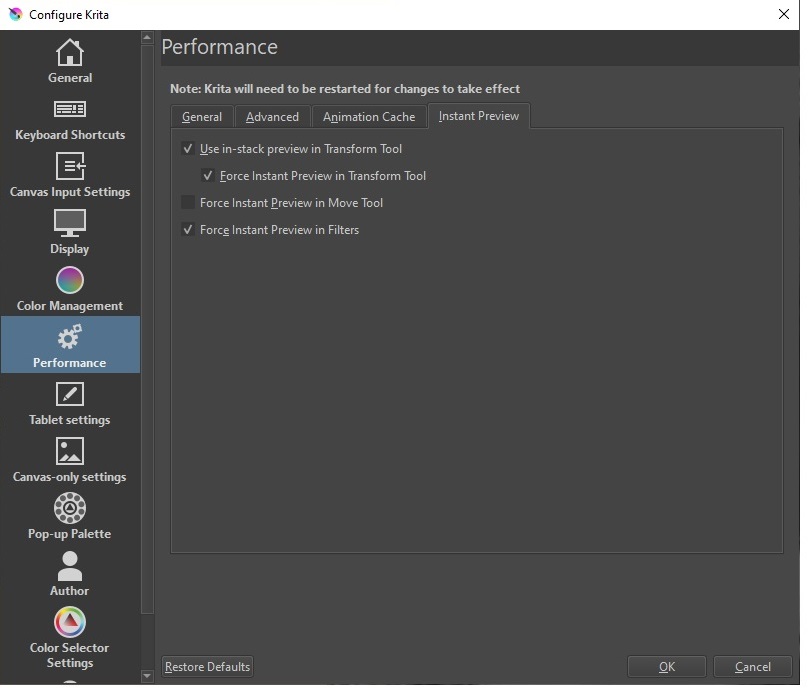
It’s a little early to tell for sure but I’ve already noticed an improvement. I went into the Configuration menu under Performance and started tweaking some of the settings. I made a number of adjustments and the problem seems to have gone away. I’ve been working all morning and so far nothing bad to report. Normally I would have noticed problems almost immediately. It makes sense to start there but I can’t tell you what specifically changed that made the situation better. I will post the current settings and maybe that will be of help to others. I guess though, that your happiness will depend on your system hardware configuration. I know for sure I changed settings with the memory limit and CPU limit.
In the first tab of the performance settings ‘‘General’’, you can normally set the ‘‘Memory Limit’’ to 66% (24 GB) without any problems.
If you have more than 100 GB free space on drive C:, you can increase the ‘‘File Size Limit’’ at ‘‘Swap File Size’’ to 64 GB, at 90 GB free to 54 GB, at 80 GB to 44 GB…
The rest of the settings seem reasonable to me. If you have a second SSD in your PC, and plenty of free space on it, then it would make sense to move Krita’s swap file there, ideally it would be at least 64GB free there, so you could allow Krita to use a maximum size swap file if needed, but anything over 30 GB is good (64 GB is the largest value that can be set). In my experience, however, Krita rarely requires the swap file on my system, but when it is needed, chunking is better than spilling. You could say: ‘‘A lot helps a lot when it is needed’’.
very cool thanks Michelist for the tips. I’ll play around with the settings. I should add something: after I posted the original responses yesterday, I noticed something else happening. When I would try to erase something on a layer, it would also remove whatever was on the background layer (which was locked). Happened again this morning a few minutes ago when I turned on the 'puter and fired up Krita. I had never seen that problem before so I’m thinking there is some additional tweaking needed. I’ll fiddle with the settings as you suggested and see if a miracle happens lol
Oh well - afraid the changes actually made things worse. Krita is now just crashing completely. No warning, just poof gone. I’ll keep at it but I was actually better off with the original settings. At least it didn’t die completely.
I’ve tweaked things a bit more and so far so good but I’ll need a few more days of stress testing to make sure. If I can’t get this resolved I’ll create a bug file and send it to the mothership. I’ve seen a few other bugs as well though I see there’s a new update pending
Might sound a bit dumb, but is it possible you have autosave turned on and it’s making your system hang whenever it fires?
Might have some info, but when you open %LOCALAPPDATA%/kritacrash.log, scroll all the way to the bottom and then scroll up until you see something similar to
-------------------
Error occurred on Tuesday, July 19, 2022 at 22:53:00.
krita.exe caused an Access Violation at location 00007FFAD958505C in module libkritalibpaintop.dll Reading from location 0000000000000000.
AddrPC           Params
00007FFAD958505C 0000000000000000 0000000000000000 000001B53EA76FF0  libkritalibpaintop.dll!KisBrushBasedPaintOpSettings::paintOpSize+0x1c
Where the date and time is the last time Krita crashed. What does the first line say under 'AddrPC Params'?
Thanks for the tip Ralek. I thought about that and had turned on error reporting option but at the moment, Krita seems to be behaving. I made a few more performance tweaks and it seems ok now. But I’ll wait a few days and run some more projects with it before passing judgment. I’ll upload the latest settings if everything passes muster. I realize there are infinite variations of hardware and software drivers and things. This PC was my studio recording workstation. It was built for multi-track recording. I could record and mix up to a hundred tracks of 24 bit audio. You’d think Krita would be a no-brainer on something like this but I guess digital art can tax a system every bit as much as audio.
I ended up resetting Krita to factory defaults. It was the only way to get it to function properly (which means I’m back to the momentary hang-ups, but at least it’s not crashing or doing other worse things). I also tried installing the latest Beta release in hopes maybe something related to this got corrected code-wise. Nope still the same problem for me.
Back again with another update. A couple days ago I stumbled on something that seems to have made a positive impact on my problem. Sadly, I can’t remember how or why or where I found this “tip” but it seems to have made a big difference. I have not seen my original problem since doing this.
In Windows 10 there is an option to enable Hardware-accelerated GPU scheduling. It can be found by right-clicking on the desktop and selecting Display Settings. In the Display window, scroll down and select Graphics settings. In the Graphics settings window, check to see if Hardware-accelerated GPU scheduling is enabled. In my case it was disabled. Enabling it seems to have cured my problem although I’m not exactly sure how or why. I waited a few days before responding here because I wanted to make sure the problem didn’t magically return. So far Krita is working as expected. If you’re seeing anything remotely similar to my original problem, give this a try. If hardware acceleration is already enabled then your solution might lie elsewhere.
btw: settings in Krita performance are as follows: available memory 32gb memory limit set to 50%, swap after undo is 2%, swap file is 4gb, CPU limit is set to 20 (I have a 10 core CPU), frame rendering clones limit 10, frame rendering timeout 30 sec
My last response here. Yeah Krita is working perfectly for me now. Enabling Hardware-accelerated GPU scheduling did the trick. Enough days of work and not a single hiccup. Also installed Windows 11 working fine there too.