Wanted to see if this has been done already.
Krita on android os is great, functional, all there.
On a smaller screen alot of the functions are crowded.
Some functions (user preference) dont need to be on screen all the time.
My idea (if its not been done) do a apple like aproach, press hold-quick taps-hold. To bring up a tre menu, leave the top header (file layer etc).
Quick tap to bring up menu to display layer groups, brushes. Hold to select brushes, filters, etc.
Naturally have an option to use the default mode and to lock certain boxes to canvas.
If you do some searches on this forum you’ll find many tips and work arounds to make the Android workspace friendlier.
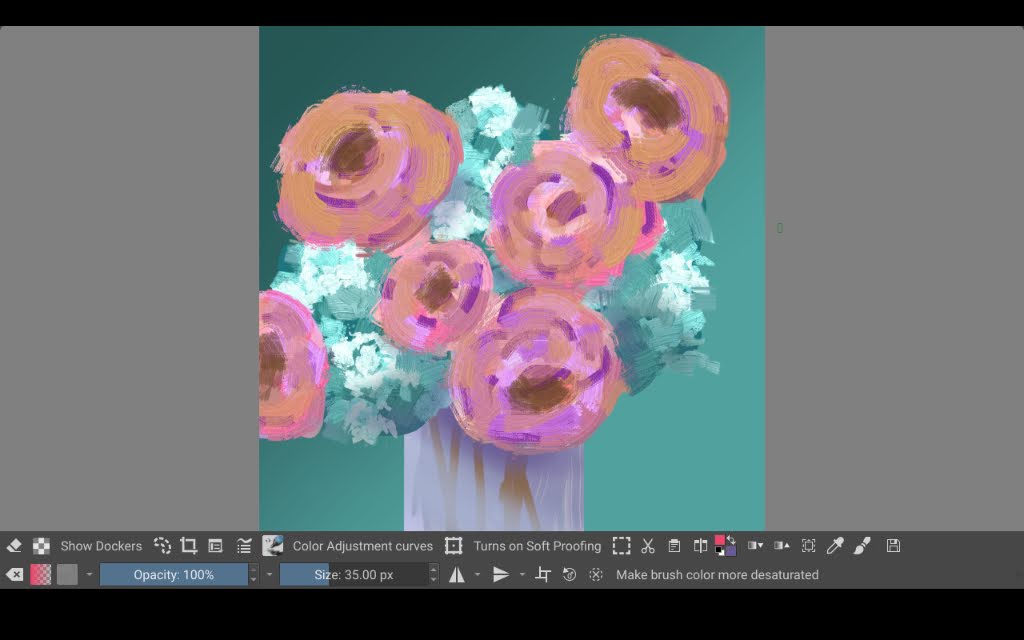
Here’s one I like. I work in canvas-only mode most of the time and have set it so that the toolbars are the only thing that remains on the screen in that mode (I also moved it to the bottom). I edited the toolbar to add “show dockers” (you can see it in my screenshot at the lower left). When I tap show dockers, the dockers and the toolbar appear.
It works better than switching canvas-only mode on and off.
You should join me and @BeARToys . We are thinking of small ways to push some Android/ tablet / no keyboard setup .
like things android will probably not come till QT6. small feature to enhance the experience are I think doable.
I think providing a layouts that are no keyboard/ tablet specific are a good way and maybe adding a couple of docker and actions to facilitate that will help in the meantime.
on the meantime. Docker on Menu, Docker on Palette [ allows for dockers like brush and layer to be hidden but easily accessible ] are coming to 5.3
If you like to test nightly build of krita, there are new features to make things very tablet friendly. of course still not everything is touch ready with workflow is there. You don’t even need to switch to full screen mode for this now.
Here is the link to my two tutorials which cater to tablet interface. Give it a go
android developer for krita moves on to other projects, so there will be extremely slow development in the android development.
The drawing experience of krita for android I have, is still far superior to the other drawing apps I’ve tried so far. I think it is because of the brush-engine and its tilt recognition.
Autodesk sketchbook has a similar drawing experience, but it is too limited in its free version.
Ibis Paint is nice, but the drawing experience I have is bad.
Infinite Painter and medibang troublesome with their ads.
Artflow is a nice app, and its design is top, but I would pair it together with ibis paint.
HiPaint has really nice features, but still has a long way to go.
CSP is not free, and it is not really an alternative, as it was even more crowded when a had the tryout.
So when I summarize my current experience, krita wins in every aspect when it comes to drawing experience, but its UI is lacking as it was not designed for tablets. If I could I would take inspiration from autodesk sketchbook and take its little pen pref-tool, and its drag circle at its bottom for fast access functions. And I would take inspiration from Artflow for its simplified layer management and clean Ui. Oh and krita’s recorder feature sucks on android, that I would take from Ibis Paint or HiPaint.
I concur, for me at least Krita is the best option and I have tried a lot.
Even hipaint which is more or less clone of procreate cant really stand beside krita.
Krita could have been more powerful with python and ffmpeg support, but that will now take much time.
However the recent work on 5.3 has given me tremendous workflow flexibility. funny thing is I now paint in split mode in my Tab with youtube or other thing running side by side. I haven’t had so much fun to doodle before. Thanks to Freya.
However, I still believe a complete overhaul is needed. Not only krita should be more adaptable but should be more feature rich. more users mean more support I guess. If only they can crack ios too.
Why do I not believe, that apple will be open to krita.
Run a linux vm and let krita run in there. That would be far more faster than waiting for apple support. Or let a remote desktop application run in ios…
I think you’re conflating two different things here. The developer who moved on to other projects is not the same as the Android maintainer, who is merely busy.
But you are right in that, there’s not much Android-specific development being done at the moment.
Procreate was designed for specifically for iPad, while Krita is multiplatform with desktop as its origin/focus, so it’s not too comparable to begin with.
Though if Krita on Android can become stable with mobile-friendly UX to add to its desktop-oriented full-featured-ness, it may be able to come closer to being a “standard recommendation” for an Android drawing app in a similar way.
The way I see it, there are a few different angles for Android support and how it could be improved.
The platform-specific things, like lack of Python and FFmpeg, which are more complicated to support on Android than on other OSes.
And the not platform-specific things, which are more common on mobile devices than on desktop, but can still benefit desktop.
UI design and customizability that’s friendly to
– Touch screen (buttons large enough to tap, better gesture support)
– Keyboard-less (alternatives to modifier keys and shortcuts)
– Small screen (dialogs not going offscreen, functional minimal workspaces)
– Screen rotation ? (vertical toolbar widgets)
Though I don’t actually use Krita on Android except for testing, so I may be missing some things.
Oh yeah, sorry those two things got mixed up in my head.
Well, that’s a shame
Is there a blank project where one of the community could pick up, where we could design the interface, and which you could then take per copy and paste to implement into krita?
Krita is just so daunting. You could create so so many bugs just because you don’t know what to do…
I think that a specific workspace for tablets could work, for example having the brush sliders on the side, although at the moment these cannot be in vertical form it would be nice if that were possible.
Also this is already merged, I think we can create a Procreate-inspired workspace, I think it would be quite comfortable for users.
Well i do agree that krita was desktop first app and then ported to other devices, hence the UI shenanigans on touch device, what i meant was that people were looking for a touch device app comparable to procreate on android and if the UI could have been tackled sooner then that could have been possible.
Apart from procreate, there are apps which has multi interface and i think that is the approach krita probably will to take.
Right now krita’s main painting interface can be adjusted enough to work on touch device and imho could also be made default layout for android. However all those settings etc are still not touch ready, for example creating brushes i assume would be a nightmare for touch devices. Thus make a groundup thought process is required.
Yeah this sliderbox on side is soemthing i want to tackle with my slim touch docker proposal. I feel with a few docker we can get something close to work in a keyboardless setup.
Yup, In my mockup I also proposed sliders to get rotated, but it seems much more than trivial, i have tries to add functions which have no icons and the tend to have texts which also don’t rotate. accordingly, it requires some huge hoopla to jump. Guess that makes transition to Qt 6 and thinking of how to tackle this will be more important.
If you have your brushes, I think you would create far less, than when you have not is what I mean. And it was for the problem of having to convert the brush engine for android to make it touch friendly.
I also create brushes, but not on android. I use my desktop for that. If I want them on android, I export them and than import them on android.
That was an idea, to make features, which are not available on android or other platforms available. If krita would provide such a service, which is not required to use the app, I think it would be appropriate to pay for. Krita could also make those server Installation open-source, so that all users could install their own. Just if you want all features, without the need to install all extra plugins and help, you should pay. It would be an additional income-stream, but not necessary.