Had to update the release. Fix an edge case issue, when trying to restore layout and all the files have been moved or deleted on disk. Just patched the current release.
Had to make another bugfix release (v1.0.2) to fix an issue with restore layouts.
As a bonus there is also optimization that makes the splitting feel more snappier.
Download links are on the GitHub README.
You can also follow changes across releases in the changelog.
Unless there are any bug reports, I think this will be the last release for a while.
1 Like
I actually spoke too soon. I implemented a new feature because of something that
was annoying me in my workflow.
You can now lock layouts.
This is helpful when you want to move images around but keep the same layout.
- When layout’s are locked you cannot add or remove split panes.
- You can drag tabs from one split to another.
- Closing tabs does not close the split pane.
- Closing the very last document will take you back to the home screen.
- There is a menu option and a shortcut to toggle locking.
- Some other menu options will become disabled when locked.
This is what it looks like:
v1.0.3 can be download on Github
If there is any issue, let me know.
7 Likes
The lock option is really great, especially for my study sessions, very convenient Thanks again for your contribution !
1 Like
Patched v1.0.3 with minor fix for a small performance issue I introduced. Re-download if you want.
edit: and patched again now 2 hours later for separate bug, again related to clicking “Save Layout” and one of the open documents is not associated with a file on disk.
It’s shocking to me that this is a plugin and not a native feature yet!
Definitely and must have! Thank you so much for taking your time to make this!!
One a different note - if you take suggestions, could there be an option to alter the color-scheme of the UI? I use a custom theme and the darker border looks a bit jarring :c
Hi,
Thanks for feedback.
Please share a screenshot which ‘border’ you are talking about so I don’t skip it. I can add more config options to override colors of each item if it helps.
e.g (tab bar, tab, tab selected, tab active, split handle, drop zone indicate, etc).
Right now I just take some base theme colors and nudge them darker or lighter.
Of course! I also been using Touchify with it, and it seems that those two might conflict a bit, doesn’t seem too severe.
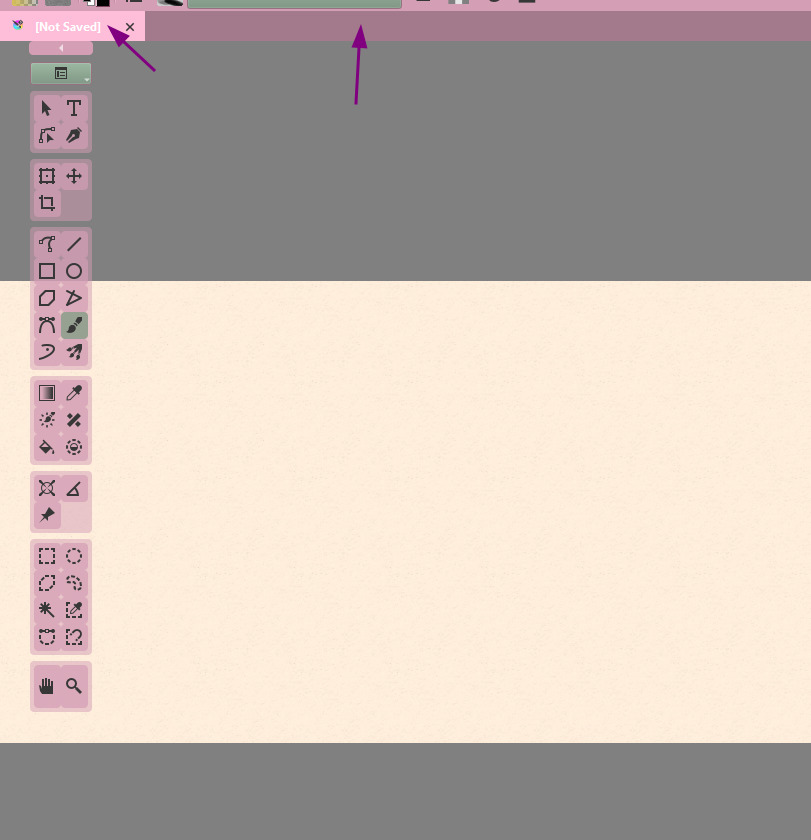
@greenajd I pushed changes to the development version.
If you look on the Github README there is also a download link provided for the development (main.zip).
I added a “Colors” section in the options, you can change the backgrounds of a few things. Let me know if this covers your use case.
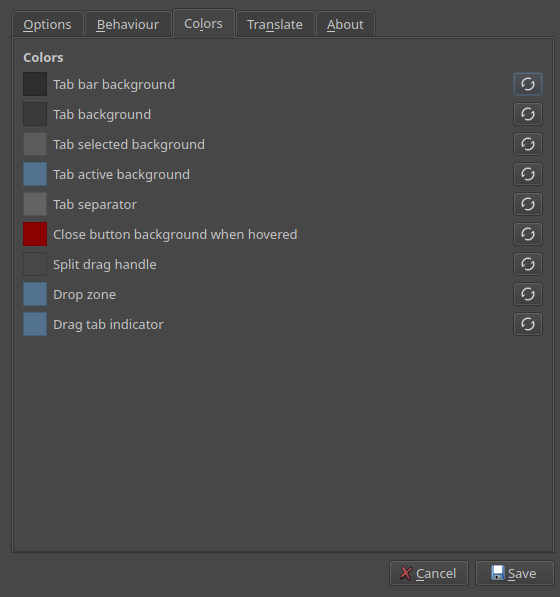
If this works, I will make a new release.
1 Like
Just tested it on 5.3.0 pre-alpha, Windows
Works great, thank you so much!
1 Like
Added v1.0.4 with those new updates.
1 Like
Might be a silly question, but is there a way to “activate” the plugin? I have it installed, I have Split Panes enabled, I have restarted Krita and my PC. Is there an additional setting I need to enable to show the tabs and panes?
(Krita version 5.2.3, Windows 10)
Thanks!
Just make sure that you’re using Tabs instead of subwindows in your settings
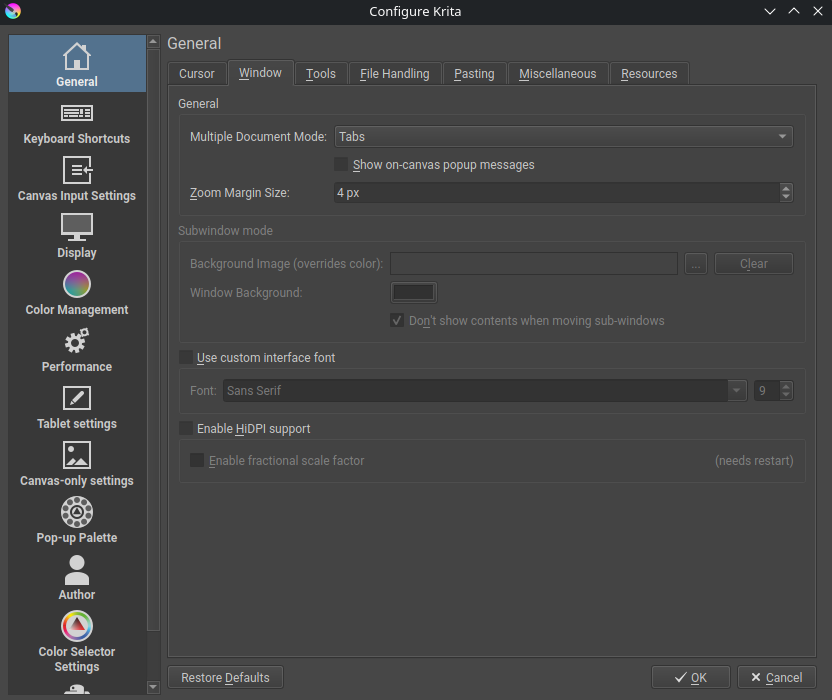
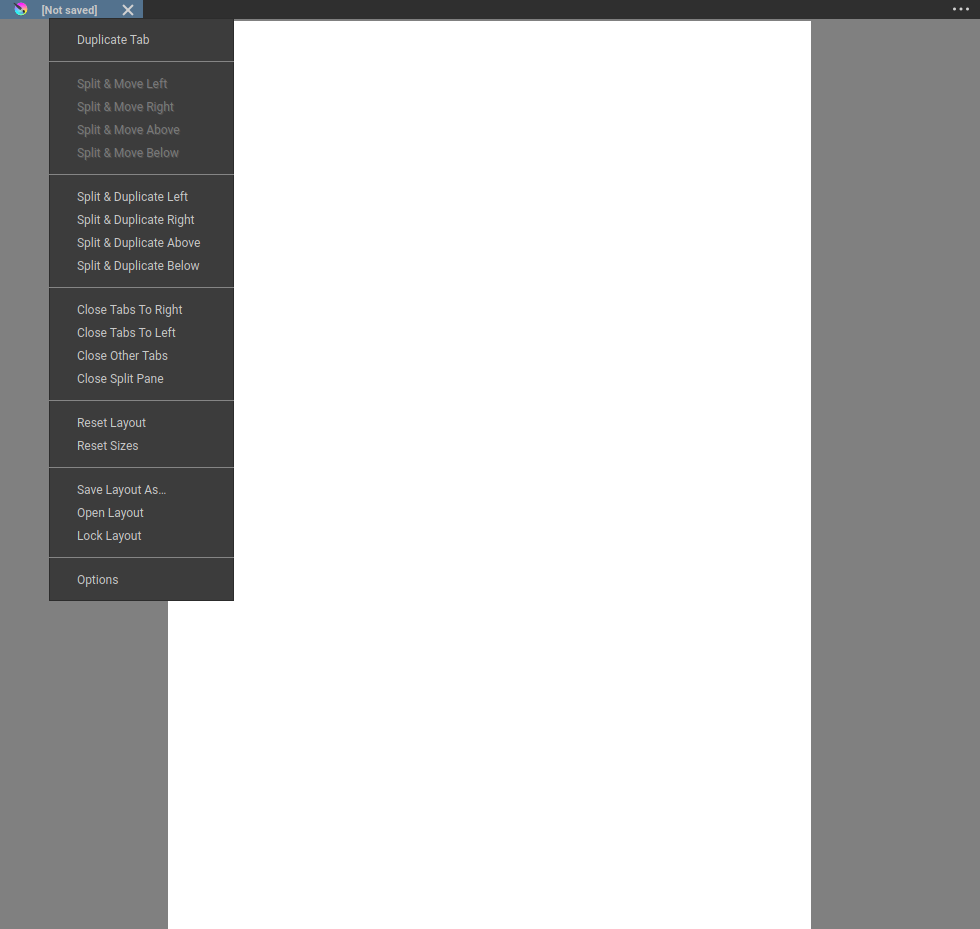
once it’s done, you can restart krita and it should work. Open several documents and test it either by right clicking on the tab bar and seeing a context menu, or clicking on the 3 dots at the right end of the tab bar, as such
I just have a small request. I just noticed that dragging the panes will resize images as long as they are in “fit view” mode. Once I zoom in or zoom out, it stops resizing the image and will crop it instead ( I mean a part of the image will disappear behind the other pane ). Once I set back the image to fit view, it resizes again, I think the “logical” behavior would be to keep resizing at fit view or zoomed out pictures( smaller than fit view) , and crop the picture if zoomed in ( bigger than fit view ) . I hope this can be easily fixed, or maybe this is intended behavior, and you can ignore this message ! Thanks !
I will add something next week sometime. I have more or less figured out how to do this now but will take a bit of refactoring on some parts. I think implementing it also fixes a few other issues (ie some hacks) and will give a performance boost so definitely worthwhile.
This will be another config option, maybe a few different set of options because some folks might prefer it another way.
Can you try the development branch, download the “main.zip” link from the Github readme.
I probably need to go over it all again tomorrow, but it seems to be working ok now.
There is an option added to turn this on in the first tab:
“Options” > “Resize hint: scale images to viewport”
You will notice a massive performance improvement as well.
I will wait for your feedback then decide when to make a new release.
Fully working as expected, without any lag when dragging tabs, great update !
One last tiny thing is that when dragging panes, the change in size of images will sometimes be slightly jerky, not fully smooth, but it seems like it depends more on the aspect ratio of the image, for portrait, it works smoothly, but for square images or landscape format, it happens to be a bit jerky, but it’s more of a QoL rather than a real issue, i can’t thank you enough for this plugin and don’t want to appear ungrateful ans asking too much ! 
Thanks for feedback. I think there are still a few issues I need to address. I was spending some time testing now and I found a few bugs. I will try get it stable then ask you for some more feedback.
@w4ldurr please download the development version (main.zip) again and re-test. This should be working better.
@w4ldurr actually wait. I created a small bug, need to fix something quick.