Mirror Tool seems to be working incorrectly on a pixel level. I need to place individual pixels in specific spots but the mirrored pixel is very often placed incorrectly. I’ve recorded a video about this issue. LINK. I’ve tried resizing the brush to subpixel values, I have snapping to the grid turned on, none of that works. I’ve noticed it reacts to very subtle motions of my mouse, so for example, even if the cursor remains in the same spot on the canvas, Krita registers the mouse motion anyway and it places two pixels on the edge of the grid. It’s really, really difficult to describe because you’d have to experience what I mean. That’s why sometimes the mirroring works, and sometimes it doesn’t. Even if the cursor is in the same spot. You can see it on the video. I have absolutely no idea how I’m supposed to fix this. And I need the mirroring tool to be pixel PERFECT because I’m working on a giant pixelart piece and doing it without the mirroring tool is literally impossible. Any ideas?
Hello @AbaddonDrums and welcome to the forum 
This problem has been noted before and is also mentioned in this topic:
The vertical / horizontal mirroring tool in krita is not accurate.
There was a formal bug report: 427831 – Mirroring tool allows for subpixel placement without supporting it which is marked as Resolved: Fixed.
From what you say, it may not be fully fixed in some situations.
The problem you have may be caused by sub-pixel placement of the mirror line or by the characteristics of the brush preset that you use, or a combination of both.
Also see this topic:
Issues with multibrush in vertical mirror mode
Can you study the topics and the bug report to see if you can get any more information from them about this?
So you’re using a ‘pixelart’ brush that has no ‘leakage’ outside of any pixel?
Project pages plugin has mirror fix button that might be of assistance. I never tested the pixel accuracy before but it works with byte data so it should be the most exact possible. The only thing is that it needs a mirror axis at the center of the document. Beyond that it should fix you that.
P.S.
nah it is pixel exact I don’t even know why I even doubted myself.
I’m using the default 1px brush provided by Krita. I specifically disabled pretty much all of the settings to leave it as bare bones as possible, I just checked it once again to make sure. The only thing I need to have is the snapping to grid. It really is just a single pixel brush, unless I’m not understanding something about how the brushes work, which might be possible because I’m struggling to understand some of the info in the posts you linked. English is not my native language. 
I installed this plugin and it does mirror things correctly which helps a little, but it won’t work for this specific artwork I’m making because:
1: I need to see the changes I’m making in real time.
2: The fix in the plugin doesn’t mirror things diagonally.
I’m using multibrush and the mirroring is set to the snowflake setting so every time I place a pixel somewhere, additional 7 pixels are placed in their respective spots. I’m probably really bad at explaining it so it’ll be easier to just show it. Here are the links to the screenshots:
I’ve noticed three tool “helper lines” are slightly off center though, but I’m not sure if it has any significance. The most bizarre thing is that I’ve worked on this drawing without any issues for months (as you can see on the screenshot, I’ve made a lot of progress already). But now suddenly something changed and the pixels started “bleeding out” to neighboring spots like in my attached video in my first post and I don’t recall changing the brush settings. It’s quite baffling. Unless I’m a donkey and I’ve changed some settings on accident. Idk. 
Edit: THIS is what happens if I try to continue with my artwork while this issue persists. It’s infuriating.
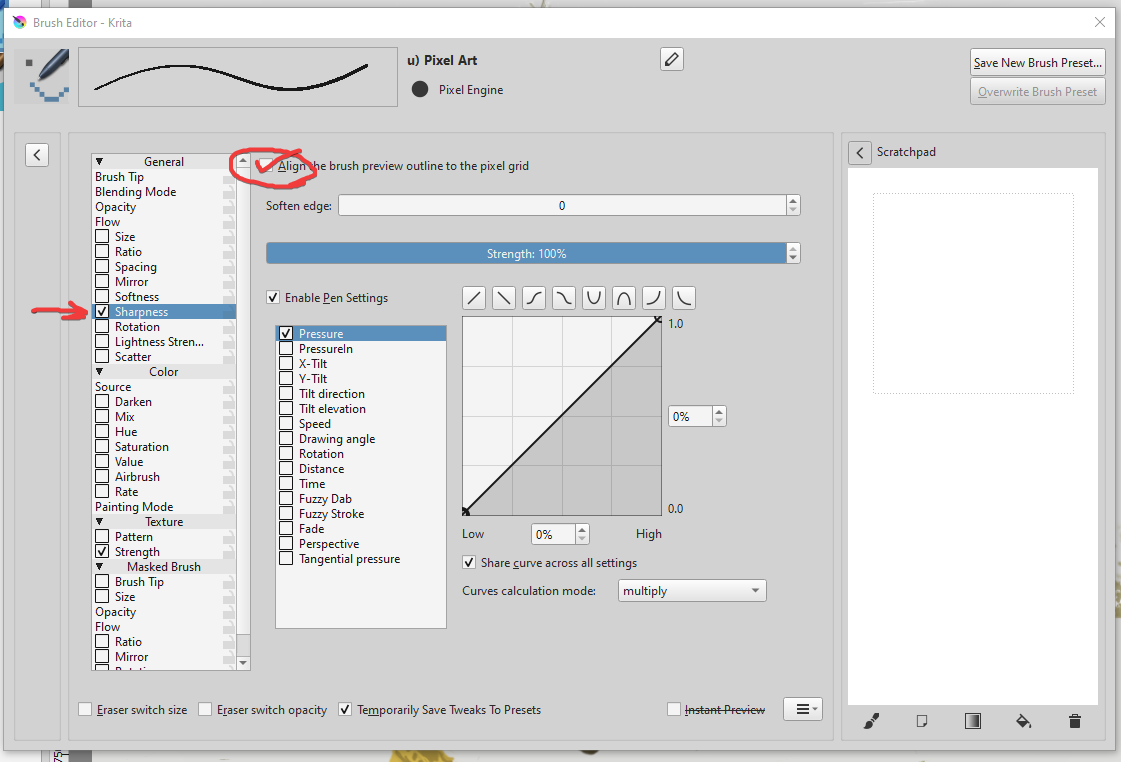


multibrush? damn that takes courage to do that. I would just mirror it properly at the end.
I already have this option enabled, like I mentioned in the previous post.
I’ll be repeating myself but… if I could mirror this particular drawing at the end, I would. That mirror fix in the plugin you’ve linked is good. But again, it won’t work for this particular drawing I’m working on because I’m mirroring it with multibrush on more than two axes.
The biggest question is why this issue appeared out of nowhere. I did not have any problems using 1px multibrush up to a certain point. So it’s like… something happened during the process of making the drawing. This issue appeared suddenly. It wasn’t there from the beginning, it showed up later.