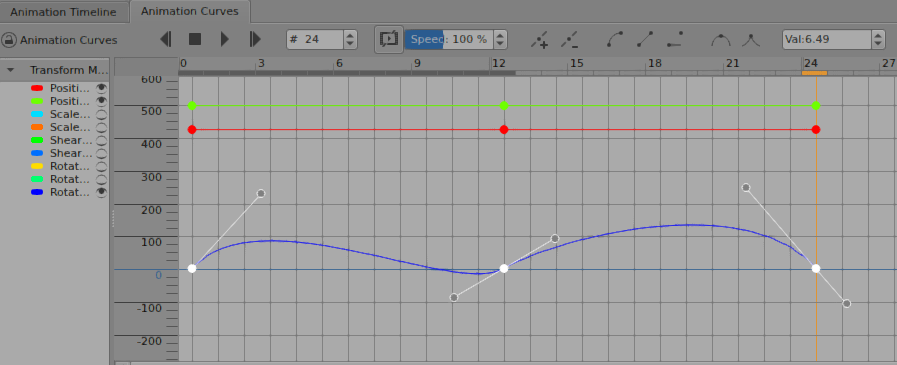
I’ve added the android and how-to-use tags to your topic title.
Note: I don’t use krita on android so there may be some aspects of it that I don’t know about.
Looking at your video recording raises some questions and some points, as follows:
Which version of krita are you using?
I ask about the version number because you have a drop-down selector for the interpolation curve shape but I have separate buttons.
That may be an android thing, I don’t know.
Which theme and which style are you using?
(The theme and style are selected in Settings -> Themes and in Settings -> Styles.)
I ask because the theme/style can affect the presented colour of a UI element and some themes/style make it difficult to see some colour changes that happen.
e.g. It looks like your control points turn black when selected but I’m used to them turning white.
Some immediate advice I can give you is that if two control parameters have the same value, i.e. their control handles are on top of each other then it’s difficult or impossible to select a control point.
This happens with Scale-X/Y, Shear-X/Y and Rotation-X/Y/Z because they start off at the same values, i.e. 1.0, 0.0 and 0.0.
The way to deal with that is to turn off the visibility of some of the parameters by using the eye icon on the left. That makes everything a lot easier and more clear.
I usually turn off Shear-X/Y, Scale-X/Y and Rotation-X/Y, unless I’m using them.
Now for the Bezier curve interpolation:
Every time I use Bezier curve interpolation, I have to relearn how to do it because it is quite complicated in terms of all the options there are for selections.
However, it does work for me with krita on linux:
You should be able to have a single control point set to Bezier interpolation but you can also select more than one control point before clicking for Bezier interpolation.
There is another user who recently had these problems on android:
I’ll ping @Drawpile (a developer) to see if he knows anything about this.
In the meantime, please give answers to the question I asked earlier.
I’ve just tried Breeze Dark theme with Fusion style with the Linux appimage. The control point turns white when selected and can be converted to a Bezier interpolated point and it turns black. The black point(s) can then be dragged out to give one or two Bezier control handles to reveal a control point with normal colouring which then turns white when selected again.
We’ll have to wait for more information about this one. Either from a developer or from someone else who’s tried animation curves on Android.
As far as I can tell, the behavior is identical on desktop and Android. Clicking and holding the curve button summons a context menu where you can pick bezier and that makes a handle show up that’s right on top of the point. Dragging it around curves the curve.
The interface feels pretty overloaded to me though, so maybe it just needs to be done in the correct order to not end up in the wrong state? Select the point, click and hold the button, select the bezier option, then drag the point.
I’ve just found out that reducing the width of my usual size animation curves docker does ‘compact’ the three curve buttons shown on my screenshot into what seems to be a context menu drop-down button but it doesn’t drop down. It has a tooltip of Bezier curve interpolation and only acts as a bezier interpolation option.
Smooth interpolation tangents and Sharp interpolation tangents buttons are compacted as well but they never did work.
There doees a problem with the Linux appimage as far as those compacted buttons are concerned.
That sounds right.
When a coloured control point is selected, it turns white. When made into a bezier curve point it turns dark then the dark bezier control point can be dragged out (one or two of them) to reveal a white selected control point.
It would be interesting to hear from other Android users about their experiences with trying this.
@lakyyzx Did you try turning off the visibility of other curves so that there was no confusion about which colour curve was being selected?
Thank you for posting a link to that video @M4SK3D.M3T4L
It seems that you have an intermittent inability to drag out a newly created control point or drag around an existing separated control point. But sometimes you can do it.
Are you using some kind of cursor highlighting facility (the translucent grey disc)?
Does it make a difference if you turn it off?
Is it the case that if you can’t drag the control handle then the keyframe dot is always moved?
(That was the situation illustrated by the linked video from @lakyyzx.)
Which version of krita on android are you using and where did you get it from?
That’s something for the developers to think about.
I’m at a loss with this problem and don’t have access to an android tablet to test with
I’m on 5.3.3 from the google play appstore and the translucent grey disc that shows up on my video is just a click highlight feature when screen recording to help show where I was tapping! Doesn’t do anything functionality wise.
My points also offset the same way their video shows, however it doesn’t happen all the time.