nice ! welcom to the wonderful world of krita !
1 Like
Thank you for your kind comment. For now and the next years I will still be working with Photoshop for most of my profesional workflow. But in spare time, and in some cases, i can use Krita. I will need to learn a lot about the layer system. I was looking for some non destructive ways for color. I like to use color fils in Photoshop with a mask. By double clicking the color fill, i simply change the color. The clipping system works also very different.  Lot to learn!
Yes clipping system was bizzare to me at first, but now when I have to work in photoshop I’m frustrated that photoshop doesn’t behave like Krita.
As for photoshop itself, yeah I use it when doing color corrections. Sadly the current state of color correction in Krita is nice, but suuuuper slow. Even if you mask the filter layer.
1 Like
I do like. It’s charming
1 Like
It may not be exact carbon copy but you can already do this with the fill layer. The fill layer has option for solid color fill.
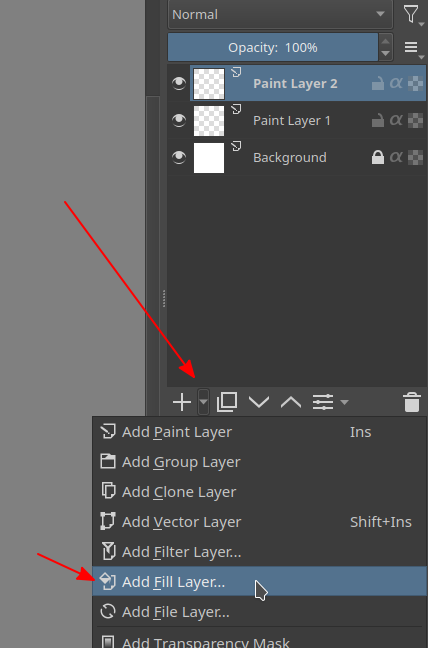
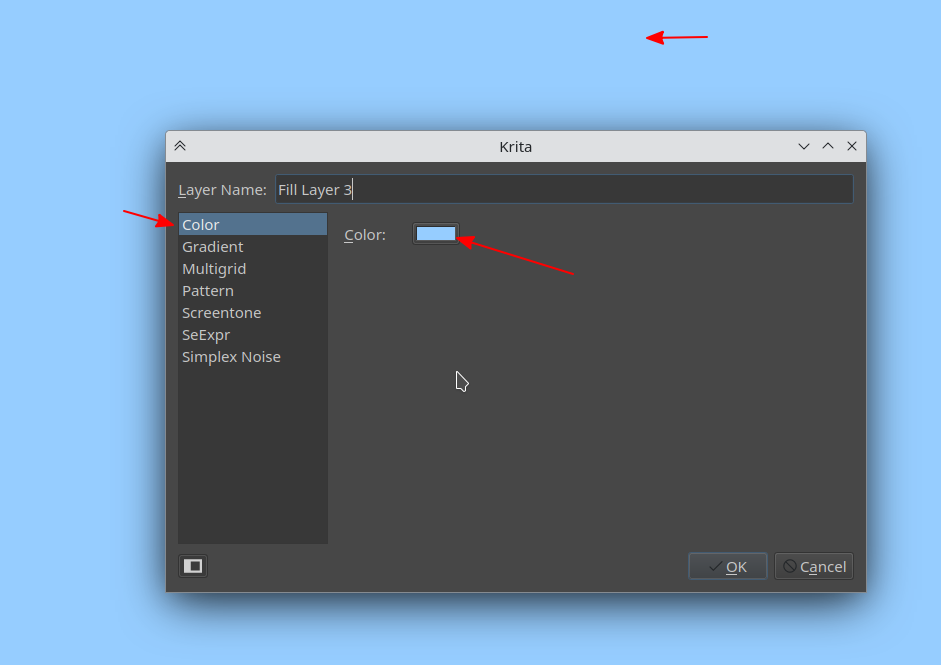
1 Like
I wish I could draw as good, this is so colourful and beautiful!
1 Like
Welcome! Great artwork.
If you take the time to customise Krita to your liking, you’ll find you won’t really miss much from Photoshop (especially not the subscription price!).
1 Like
I like Krita, but Krita is off course no match with Photoshop in a professional way. What I like about Krita is the focus on illustration. That is where this program wins my love. Working with clients, wich many of them are in the Adobe loop, Photoshop is a no brainer. Together with tons of A.I. stuff happening on the baackground, i can work a lot faster these days. I want to try to work with Krita when i know upfront that i can do what ever I like. For now, that is personal work.
I customized Krita shortcuts to get it closer to Photoshop. I disliked the mussle memory fails haha… that all is gone now!
Yes, i have played with this setup. And it is getting me half where i want to be. I always try, to get things non-destructive as possible. How great would it be if i can double click this fill layer, and change the color with a slider. I use this in Photoshop for the bigger base / shapes so i can adjust it later on with minor tweaks and keep control. Any idea to get to this in a Krita way?
Welcome here 
1 Like
Well Deserved. Congrats
1 Like
I agree. Right now double click changes name, but it can definitely be improved to have double click or tap functionality to open properties or relevant dialog boxes like say editing layer styles too. As a workaround for right clicking and going to properties there is a F3 key
2 Likes
Yes, you can remap the shortcut to activate the properties. I thought I made a feature request on this, but apparently I only posted this in the help section: Double click on layer filter mask to edit settings?.
There is a feature request open on the subject, you should cast your vote on the topic below (vote button is on the top left):
That’s the best way to let developers know there is interest in such a feature. It does not guarantee that it’ll be implemented, it’s just for discussing ideas and gauging popularity.
3 Likes
Thankyou for the tips!
That is awesome, i will leave my feedback there!
I like you piece very much, if I can say, it reminds me some sort of eastern-european style that I adore very much, specifically the child 
Might I ask what are your inspirations?
1 Like
Thank you for the kind words. Inspiration is all around me. I like to do these hikes too. And i see myself wondering and dreaming looking around. 2 years ago, i was at 05:30 walking in the forest, first sunshines on the horizon… and deers in the mist. Magical!
1 Like
This is too nice …Welcome to the best digital drawing app
2 Likes
What a great result, for a first drawing in Krita! Keep on going on.
2 Likes
Krita was a big switch for me too, but I’m glad I went through with it!
2 Likes