whenever i try to launch Krita it shows up in the task manager as “Krita digital painting application“ but it isn’t in the task bar and there is no window for it. I’ve been looking around here for people with a similar issue, but for them it seems that it magically got fixed before anyone could figure out the actual issue, i have not had such luck. does anyone have any idea on how i could fix this without losing the animations and drawings I’ve made? ive tried:
restarting my pc
downloading the portable version, extracting the files, and opening the “krita.exe“ file from the bin folder
uninstalling and reinstalling.
any ideas?
edit:
I’ve now tried moving the files from the local and roaming app data files. it took a bit longer to install but I’m still having the exact same issue.
i also tried buying it on steam and running that version, but that didn’t work either (not surprised tbh)
i should’ve added this in the first place but shortly after the issue began i followed this tutorial in an attempt to reset krita.
Hello! I’ve had similar issues at times but it’s always been linked to my tablet. Do you have a screen tablet hooked up to you computer? I found that sometimes unplugging it will make it show up on a different monitor, then I can scooch it back. If it’s not that, then sadly I’m not so sure.
Try booting with an empty resource folder. If that does not work its probably something other than krita. That sounds like when i messup my plugins and krita does not boot and is stuck on the windows manager.
Simply do Settings > Manage Resources... > Open Resource Folder, to enter Krita’s resource folder in Explorer, then close Krita completely. Now leave the resource folder and rename it from krita to krita old for instance and then start Krita again.
It will rebuild an installation-fresh resource folder and then should open Krita.
Michelist
Add/Edit: Another way to reach your resource folder is to enter %APPDATA%\krita\ into the address bar of Explorer and hit Enter will bring you there too, directly.
since i cant open krita at all i cant use the in app settings.
i moved the local and roaming files from app data and put them in new folders following this tutorial
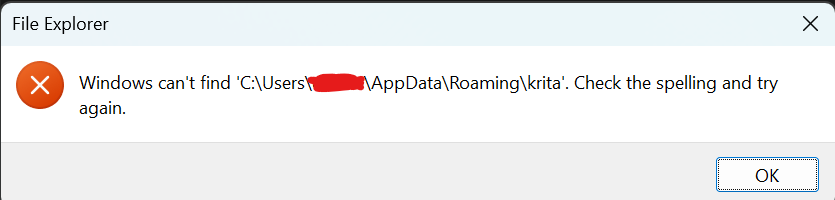
whenever i try to search for %APPDATA%\krita\ it says that windows cant locate it. and I’m pretty sure this is why. but for some reason when I launch Krita, no new files are created in app data.
i honestly feel like I might’ve made the issue worse by trying to reset it.
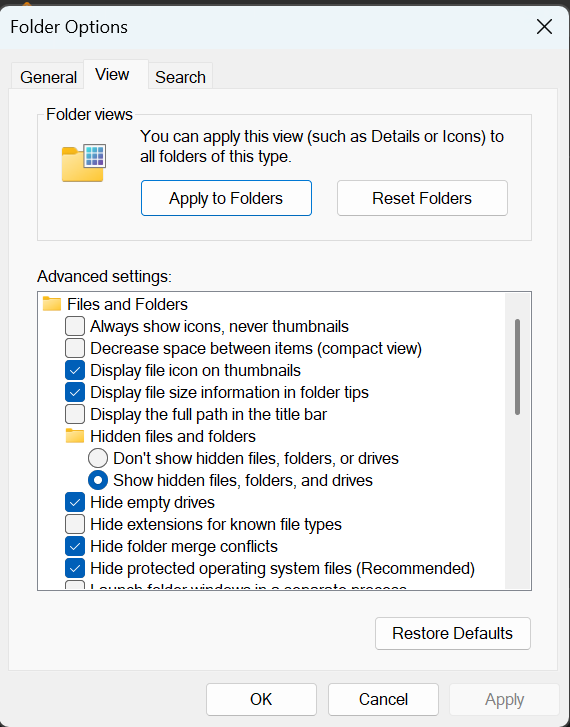
the App Data folder you need to access is a invisible folder you need to make the explorer show you hidden files and folders. then you can access it at:
i think the reason windows cant find the files is because i moved them out of app data when i followed the tutorial on how to reset krita. they are in these 2 folders on my desktop.
i thought that doing this would cause krita to create NEW files in app data but its not doing anything different.
I’ve thought about just deleting the files in there since id only be losing key binds and external brushes but I’m not completely sure that it would fix anything, and i don’t wanna dig the hole deeper.
Oh gosh I really dont think you should do that - moving system folders around that is. The tutorial said to create new folders, not move them, then move the specific krita files out and relaunch it.
But I can see how that’s confusing since they’re named the same… I would put them back then try it again?
Also I’ve never heard of someone making %appdata% visible… You just need to directly type that into the windows search and it will come up. You dont type it in the file path. I guess its not that big of a deal, but figured to share.
Oh i should’ve specified. the folders named “roaming “ and “local“ on my desktop are NEW folders. I moved the files out of the original folders into the new ones like the tutorial said. I’ve put everything back where it belongs now. but the issue still hasn’t gone away. I’m not surprised since the issue started before i did any of this to try and fix it.
no no no, i didn’t move the system folder itself, I moved the files out of the folders into NEW ones with the same name that i made on my desktop. again, i thought that when i did this, Krita would make new files in the original folder and be reset to its original state. but I was very wrong.
every thing is back where it belongs now, I’m just gonna stop messing with stuff because nothing is working and I’m probably making the issue worse, or harder to fix.
If that is the case then i have no idea what it might be. I would have too the computer in person to see if i had an idea. But you know if everything fails reinstaling windows is always a good thing to start fresh.
Before doing anything disruptive or time consuming, I’d try the suggestion by @NotBob and turn on the tablet screen to see if the krita application window appears there.
I had a similar experience some years ago when I connected an external additional monitor to my Windows laptop. After that, when I disconnected the external monitor, some applications ‘didn’t work’ because their windows were being mapped to the disconnected external monitor.
It wouldn’t take long to try that.
Also, I’d try disconnecting the tablet anyway then use only a mouse until this problem had been solved.
i feel like if this was the issue than krita would still show up in the task bar. for me nothing happens at all, except “krita digital drawing application“ showing when i open task manager.
i also only have my laptop set to one monitor, and when i try to display the tablet screen, it just copies the screen from my laptop with the HDMI cable it connects with.
i will ask one question though. when you had this issue did krita still show up in the task bar at the bottom of the screen? or just in task manager?
Ok, so ive tried a couple more things that were probably really dumb, but im really desperate to get this to work
i deleted the “krita“ file out of the roaming folder in attempt to get a clean start. this didnt work of course so im still cooked but i figured id give another update.
im probably just gonna reset my pc and see if that fixes anything
I can’t remember, it was a long time ago and it wasn’t krita that had ‘gone missing’ at the time.
Either way, I’d still totally disconnect the tablet and try with only a mouse to simplify the situation until the problem had been found.
Also, I’d try using the portable .zip package and use the krita.exe inside that to see if it worked.
You also need to delete anything with ‘krita’ in the name from the Local folder.
For a ‘full wipe’, delete the krita folder from the Program Files folder then reinstall, or try the portable .zip package. https://download.kde.org/stable/krita/5.2.14/krita-x64-5.2.14.zip