Yay, you’re a star! 
Tried this out .
Simple and very effective .
Great plugin and thanks for sharing  !
!
Thanks. I have to struggle with Palette for my comics and it may be a more convenient solution. I’ll test it.
Hi,
I update the plugin to a new version following your suggestions and requests.
Because of the number of new features I implemented, there is an update system that checks the version of your existing Colors Map and automatically updates it to a new version.
I hope it works! 
The update feature works with previous version or from this new version ?
Hi lian00,
yes, it works. I developed a system that recognized your “old” Colors Map and “convert” it to a “new” version. You will see an alert when you open your Color Map.
You show a capture with different groups of colors but I don’t see any information about this. It seems I can load one group (txt file) each time.
I met a dumb problem : when right clicking, the pop up window was hidden behind Krita and I thought Krita was not working any more.
Hi lian00,
to add a Group Title (basically, a black rectangle with a white title), you have to RIGHT click + CTRL on a Color or another Title. In the popup menu that appears, just click “Add Group Title”. Krita will ask for a title and the plugin will add that title after the clicked color or title.
For the second issue, I don’t know why Krita is placing the dialog window behind it. In this case, Krita is not blocked. It’s just waiting that you do something with the dialog. However, the dialog should be accessible, because it’s just behind Krita.
Thanks for the tips. Now, I will check Krita’s windows but the first time I was quite puzzled.
@TigerForge Thanks so much for the update and really clear settings option. Enjoying the 64 box/14 text! Really appreciate. 
EDIT: removed it for now, just while asking how it’s possible to turn off updating? Always make sure am offline/no pings out/privacy (use Linux). I’d installed the update manually, but the updater had come up, and it’s just dawned on me that it may be set to always check, including for future updates?
Hi Fae,
sorry, I didn’t understand. What’s the problem with the Map updating?
Hello,
a new version (1.1) is available with an experimental pop-up palette (right-click + SHIFT on the Krita document, using a drawing tool).
Does the plugin works in CYMK.? When I try to add a color, I have the grey background color only. It may work from times to times but I cannot see why.
Hi,
basically it works with CMYK, but I found just now that there is a (obvious) bug when you try to add a new CMYK color to the palette (the added color is wrong).
Just give me the time to correct it.
Great. I’m coloring some comics pages and your plugin would have been super useful
Hi,
the new 1.2 version is ready. Now it should correctly add new colours from both RGB and CMYK Krita documents without issues.
2 Likes
Thanks. I just finished my color job but it will be useful nexte time.
Hi,
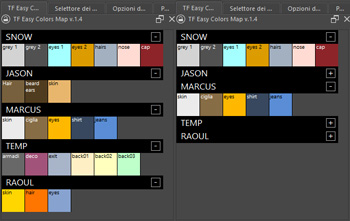
in the new 1.4 version, I added an icon to the right of each Group Title so as to close and open that group (collapse).
Using it for my Krita works, I often have groups of colours I’m not using at that moment, but they take up space in the UI and make my colours list unnecessarily long. Collapsing the groups, I still have my colours available in my palette, but they occupy less space and I can have just the groups I’m actually using quickly accessible.
5 Likes
I think they’re asking to turn off automatic checks for updates because they don’t like software “calling home” without asking for permission.
I would suggest at least not automatically fetching and applying updates as that can be a security risk. Python plug-ins can basically do almost anything a regular user can, including deleting and encrypting files. So if your repository gets compromised by someone pushing ransomware, you could end up pushing malware to all your users before noticing it.
1 Like
I agree with that. For security purpose, it’s better to give the choice to the user.