That sounds and feels great, I really don’t like blues that lean towards purple, thanks oklab for saving the day!
Tbh, I actually never noticed this blue/purple problem with lab until I read about it. Mostly because the way I paint is by first putting down lots of colors on the canvas and then mixing them while painting. And all the modes I tried, be it srgb, linear rgb, lab or whatever else, I almost always have to keep correcting colors from color picker, which I dont like to do too often. The mixing of colors sometimes gets value wrong, sometimes hues start to shift, sometimes they randomly get desaturated, etc.
Lab performed best out of all those, but still not perfect. Oklab however was out of this world. I actually dont even remember needing to open color picker for correction if the original colors were correctly chosen, the brush did all the work on its own !! That is how perfect it is. Now of course, I am quite sure, that it wont be the case when oklab is more widely accepted and everyone gets to work with it, I dont believe it will be 100% perfect. But still, the difference was beyond anything I expected.
4 Likes

Thank you for your profile.
I think currently krita is the only painting software able to do this.
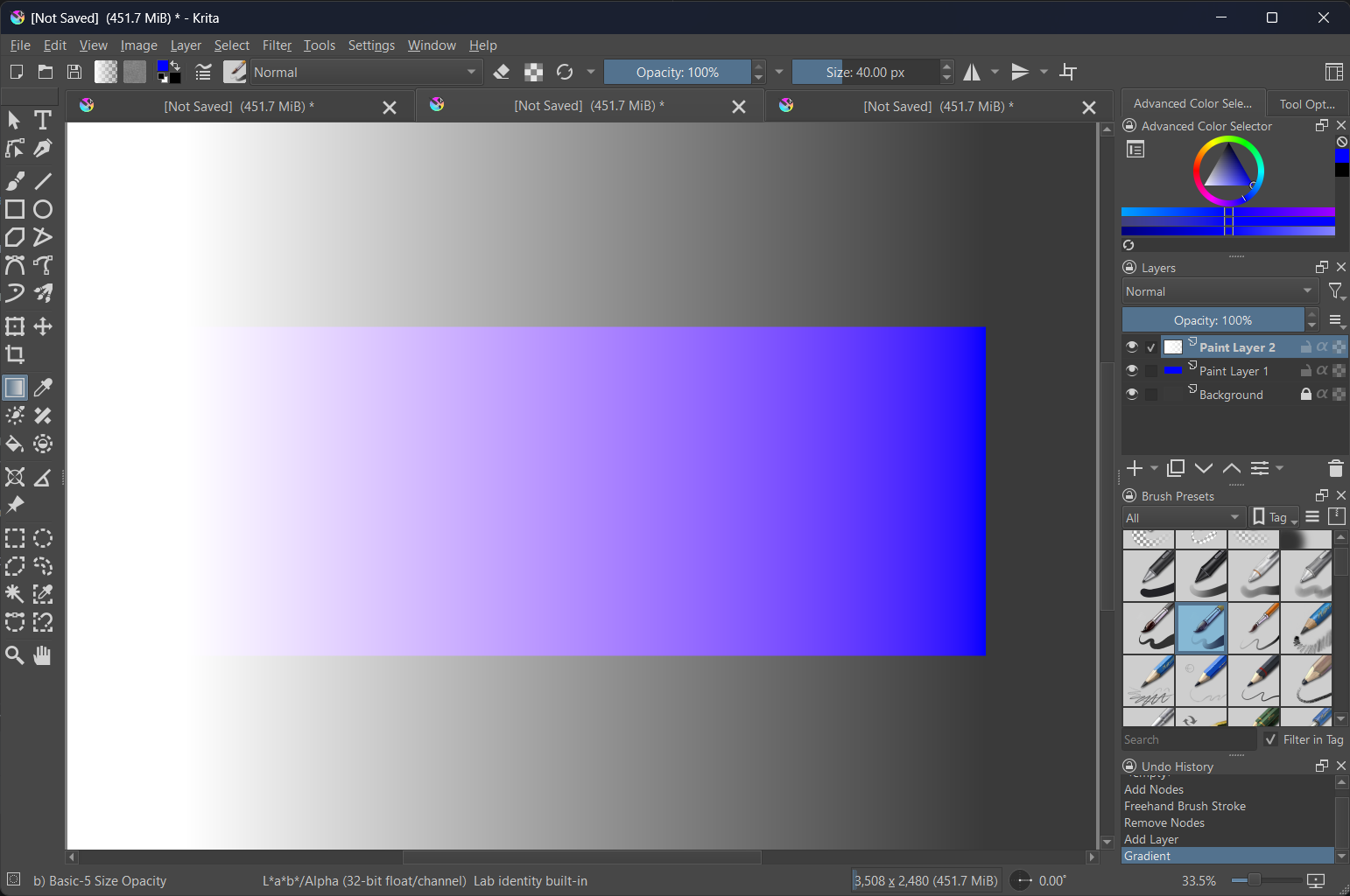
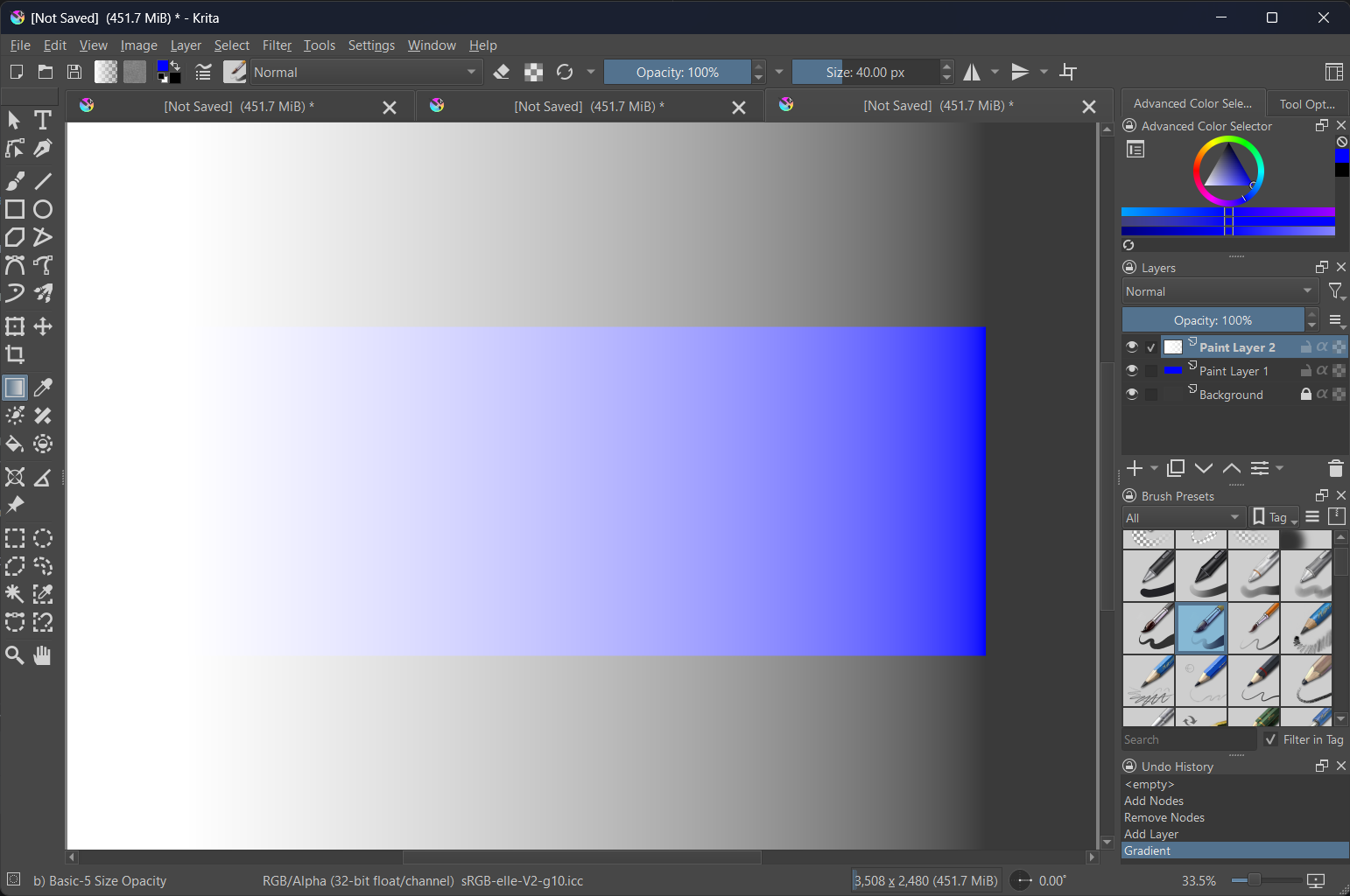
A quick demo, a white 100%-0% gradient on top of pure blue
CIELAB
sRGB linear
OKLab
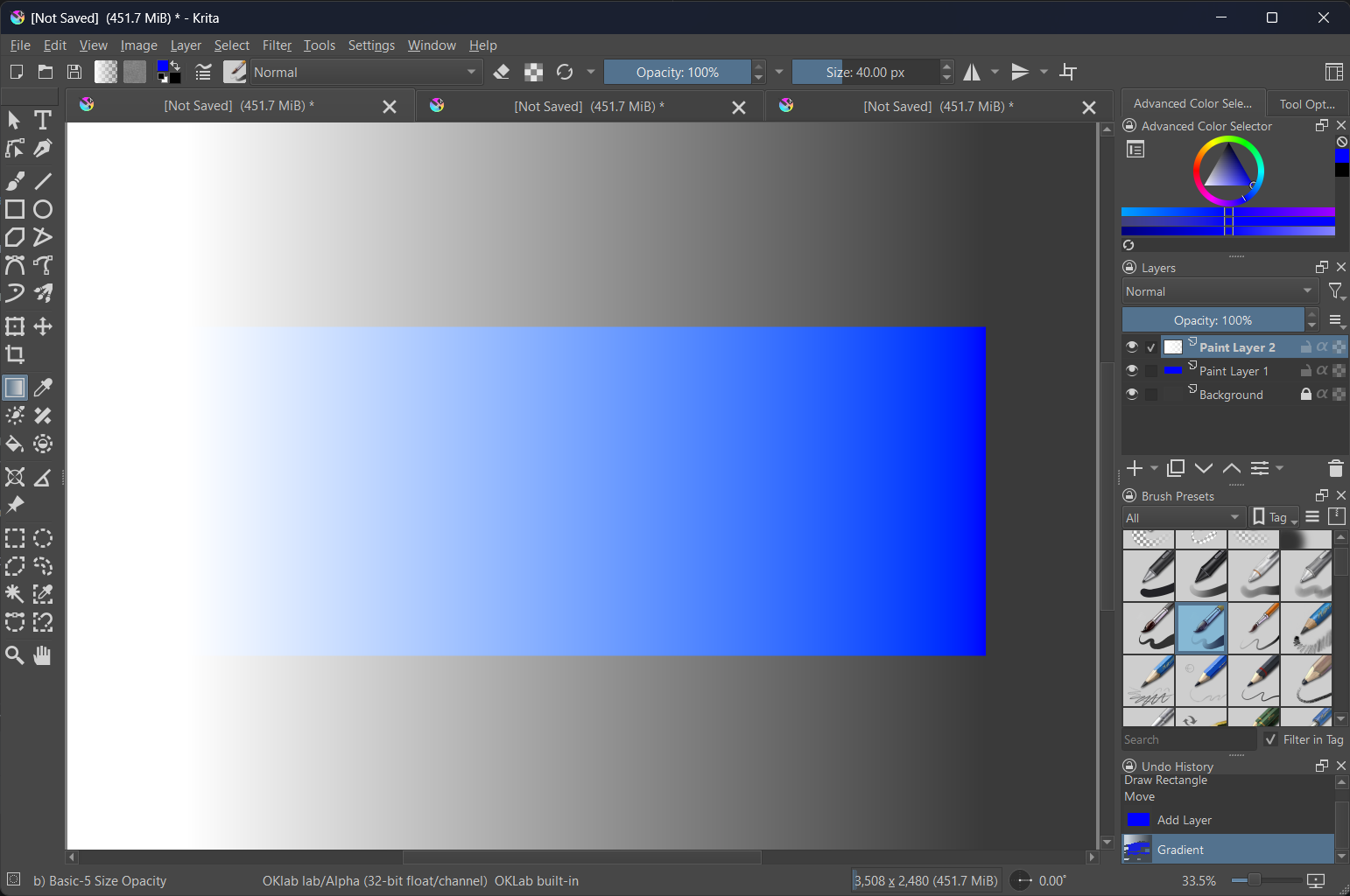
I absolutely love this perceptually uniform clean blend.
5 Likes
Wow, thanks for sharing this, it looks great, from the pictures you provided it looks like you added the new color model OKlab for krita, I’m more curious about how you implemented it, will you be submitting a MR about it?
1 Like
There seems to be a flaw in the profile I provided, it doesn’t have the AToB and BToA tags set, so when littlecms was updated to 2.16 it didn’t work. I’m curious if you made an oklab icc profile that can be saved, or if it was also created directly as I mentioned above, from the pictures it seems to be the latter, but I don’t know if there is any other way. The littlecms2.16 documentation also states that we can’t save oklab config files as icc files, so I don’t know if there’s another way.
I updated krita deps on lcms to 2.16. I then modified pigment libs and lcms2engine of krita to make it support this unconventional virtual profile. Basically it no longer uses rawdata to recreate and use the profile handle directly.
Currently the code is a bit messy. I think I might submit a pr once I’ve tidied it up.
5 Likes
I see, I made some similar changes but didn’t submit MR because I didn’t have much time to organize the code, another reason I submitted the code a couple of times before but the merge process didn’t go well, and there are still a couple of requests that haven’t been merged, maybe it’s because my code level is so low…
Little CMS which krita uses as colour engine has gained oklab support I am making a wild guess that it will be easier now to implement in Krita
3 Likes
It would be a huge amount of work to support oklab better, It will cover most of the functions of krita, and it would be almost impossible to use it properly if we just add a new color model, such as the already existing Lab and Ycbcr models, at least for me I don’t have that much time and energy to do such a huge project.
Hi!
I am pretty new to digital painting and choose Krita. I made an account to participate in this discussion.
I already downloaded the icc file provided, put it in C:\Program Files\Krita (x64)\share\color\icc\krita and created a new file using the suggested settings (Thanks for making it very easy to understand for beginners). I was able to recreate the smooth blend from white to blue.
If I understand the thread correctly there is no OKLAB color picker available yet?
 Hello @SamArte, and welcome to the forum!
Yes you are right, but if I remember it correctly then someone has described an external method to pick colors in OKLAB, in another topic around colors and mixing of colors. Or was it even a complete external color picker in OKLAB? Maybe the forum search, it is found in the upper right corner, can help you to discover that topic.
Michelist
I noticed that Gimp installed on my system (2.10.36) has oklab based blending modes, Oklch-chroma, oklch-hue, oklch-luminosity. But they dont have Oklab-Normal, so cant really test the normal painting with it.
The curve filter also doesnt give any of those options, its even more limiting than Krita which does give Hue and Saturation too in addition to usual ones.
And lastly there is no oklab profile option to pick when creating a new file, I only got rgb and lab. There was an option to use a profile from disk, but I havent tested it with any oklab profiles posted in this topic or anywhere else.
But still, the blending modes available can be useful if you want to compare the results from anything posted here (color profiles etc) with what that is available in Gimp.
3 Likes
When designing my own color picker, I also faced this dilemma about what to do with out of gamut colors. There were several options, like reducing transparency like you did, or choose some of the methods suggested by Bjorn (oklab author) himself.
But in the end I ended up choosing to neither allow picking it nor even display it because I wanted to also guide/train the user (here myself only for now) about what colors are even present at any given brightness (within srgb gamut). This is important in some extreme cases like very bright colors, where only very few colors are possible to be picked.
Here is one example, I am selecting a very bright yellow-green. There is practically only one hue possible at this level of brightness :
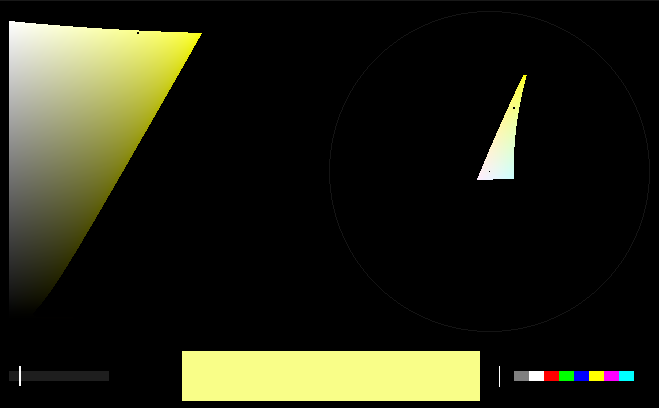
This helps me during painting because if I realize that I need some other hue at this brightness then its something not possible and I need to change something else. If I follow any other out of gamut strategy then the values in the painting will likely be wrong and I will end up realizing it too late. I prefer to get the values in painting as correct as possible, as early as possible.
5 Likes
Yes, I had to deal with that once when someone else was trying to print something I painted which had lots of saturated blue in it and the printer was having lots of trouble with that. I could’ve used some CMYK based tonemapping, not sure, but because I am unfamiliar with that workflow and the tools available, I just resorted to increasing the saturation of yellow almost everywhere which was not blue. That was kind of weird manual hack that sort of worked… 
During painting however, atleast in my workflow, I use canvas not just to put colors but also to discover colors, so I tend to do a lot of blending using the brush itself. This is the reason why I loved oklab-normal blend mode (in my toy paint app) so much. The usual srgb-normal blend mode is quite annoying, especially for beginners, who when experimenting with this method, wrongly assume that they lack the skills to properly blend.
2 Likes
I could not agree more. I first discovered this kind of thing while messing around on the oklch.com color picker. Specifically, I was sliding the lightness control back and forth and observing what colors peaked at each lightness. You can also get a sense of it by looking at the 3D model from the top while doing this.
At first the complex shapes were intimidating, but then I realized that I was simply being directly shown my monitor’s limitations for the first time. The relatively unwarped space that oklab naturally presents is genuinely such a useful reference for what is actually possible in sRGB. It is something that every digital artist could benefit from learning. A standard color picker warps those complex shapes into neat squares, but at the expense of completely obscuring why mixing issues are happening.
2 Likes
@SamArte as well (in case it doesn’t automatically notify you)
It was me that discussed this in my earlier posts in this thread. Although someone could have brought it up earlier in another thread. It was a complete external color picker that I have also mentioned in my post above. There are others but I like it most so far for the reasons stated above - it makes the true shape of the sRGB space very explicit. You can scroll up to Nov 8th & 9th 2023 to see my original posts on the topic.
1 Like
If anyone is interested to use the color picker I have shown in my posts above (here, here and here), I have no problems in sharing it. Its working and quite stable as I’ve been using for over a year now.
The main problem is that I have one big addon for myself where I have implemented many features and the code for this color picker is part of it. And because I’ve developed that entire addon only for myself there are things like manual steps to make it work (as opposed to having a proper installation guide) and even some hardcoded paths. This is why I dont think its a good idea to put this whole addon in a public repo.
So it will require some work to isolate it and then some additional work to test if it works on a Krita installation other than one on my system. This is where I’ll be needing some help with. Feel free to DM me if you are interested. After this step is done, I can post the addon on a public repo with clear instructions on how to install and use (or the other person can also do it if they want).
PS: This addon uses numpy. I dont know if current versions of Krita comes with numpy in there or not, and if it doesnt, then I dont know whats the proper way to install it to make sure Krita addons can find it. So make sure you know how to solve this particular problem. To an average user, this can probably be the most challenging step.
4 Likes
Do you think this could be a GSoC project or do you think it’s too large? Is there quirks in Krita’s code that would need to be fixed first?
There may still be many issues that need to be solved there, such as only supporting 32-bit floating-point, mixing modes suitable for Oklab in addition to regular mixing modes, and so on. At present, for me, I want to allocate more time to other aspects of painting, so I may not have much time to solve those problems.