I am using Linux Mint 22.1 and krita-5.2.11-x86_64.AppImage file open dialog is very slow and can often hang. The problem is identical to this File dialogs are unbearably slow
I have no idea what the reason may be, but perhaps this works as a workaround for you.
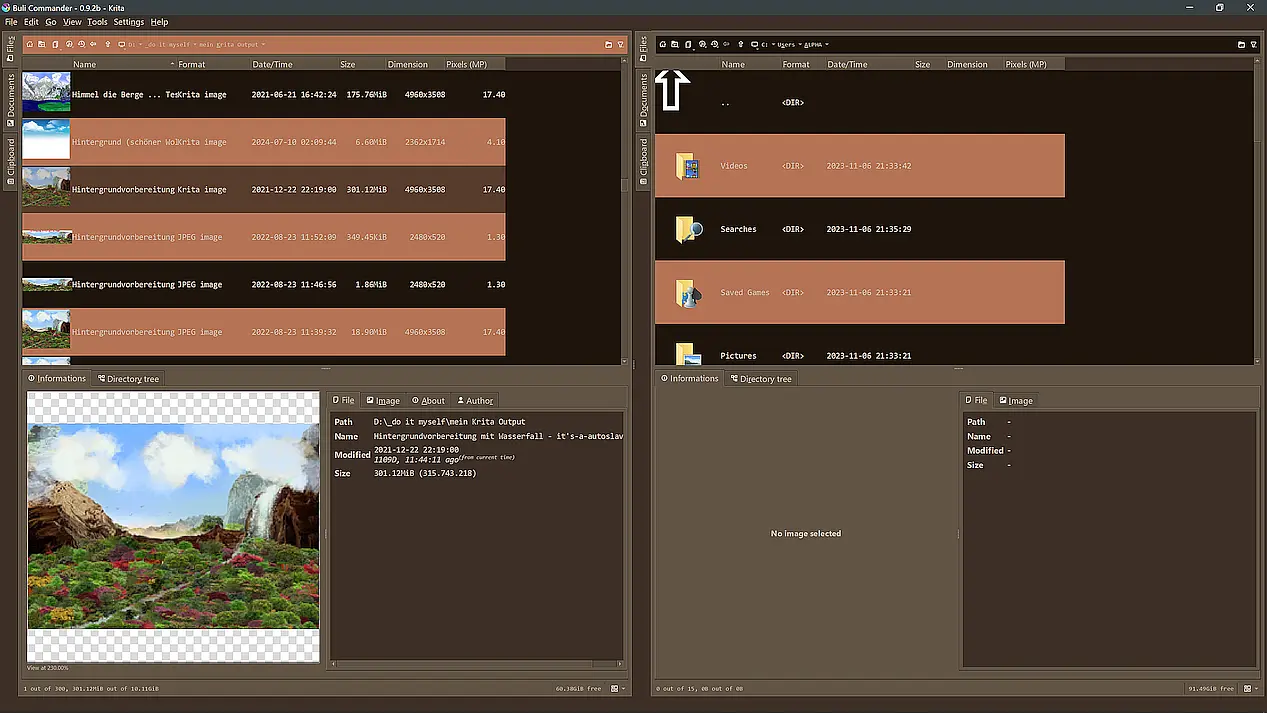
You can try to trick out the standard file open dialog using the excellent plugin BuliCommander from @Grum999, which is an orthodox file manager for Krita like Double Commander or Midnight Commander (this is the version I recommend to you because it is already patched by me after the hint of @Grum999 on what to fix, since his last version v0.9.2b has a little bug. But in case you want to apply the patch yourself, you’ll find the fix described here).
If you want to patch it yourself, you will find the plugin and sources in its most recent version v0.9.2b here at GitHub, or alternatively now here at Codeberg. It is probably the last version because @Grum999 decided to archive these repositories.
Here, a screenshot of my setup, more screenshots and a manual-like description of the plugin is found here in the forum, or in the repositories linked above:
Michelist
I don’t quite understand how to use it. Yes, it’s good, thanks for telling about it. I just don’t quite understand how to use it to replace functions like “Import Layer”, “Export Layer”, “Export File”, “Save File”, “Save File As” and so on.
Oh, sorry, I was mainly fixed to opening files, and did not think about the other actions you just named.
Importing layers may work faster when you try to drop them on your canvas, instead of importing them via the menus, but that only helps for importing layers - if it helps at all and if you are lucky.
Have you perhaps tried downgrading or in the other direction, did you try nightlies to see if they show the same issues?
I initially mentioned to not know what the deeper issue with your Krita is, and unfortunately this did not change.
Michelist
The error appeared suddenly and spread to earlier versions of the program (for example, to 5.2.10). The bug remains in the nightly build of the application. You are registered on the KDE bug tracker, right? Could you send a bug report if it’s not too much trouble? I can provide the necessary logs and hardware data.
I’m sorry, but since I can’t reproduce this situation myself (and since I have more than enough to do dealing with user inquiries and helping these users where possible), I have no choice but to leave this task to you.
You can report more about your bug on request, something I am unable to do.
To report a bug, you must register at https://bugs.kde.org/ to gain access to the “KDE bug tracking system”, i.e. “KDE’s bug tracker”. Keep in mind that the e-mail address you use there must firstly be existing / valid and secondly that it can be viewed by any visitor to the site. But the likelihood of your address falling into the hands of spammers there seems to be very low, because the address I used to register with them, I’m using exclusively for access to the KDE bug tracking system and have not had a single spam mail in my mailbox in the years I have been registered there.
You can read what a bug report should look like under Reporting Bugs in the Krita manual (the input mask looks slightly different today), or the User Guide on KDE.ORG, which I like less. Please use the drop-down menus to select the software, i.e. Krita, the version number, the operating system and try to narrow everything down as much as possible using the drop-down menus available there.
Here you’ll find the mask to report bugs in Krita, that you can call after you registered an account with them and are logged in:
It might be a good idea to include the link to this topic in your bug report so that the developers can read your findings here.
And after completing the bug report, i.e. after you have sent it, please publish the link to the bug report here in this topic.
Thank you!
Michelist
I’m glad I have email notifications on. I have found a solution to this since posting that thread! I realized some time after posting that the issue would occur not just with Krita, but with every app that used the default Qt file dialog, such as MusicBrainz Picard and Qt Creator.
I found, quite literally a few months later, an /r/ArchLinux thread in which the OP had the same issue, and they noticed the presence of file ~/.config/QtProject.conf, which had somehow gotten filled with garbage data, reaching 750MB. I checked and realized I had the same exact thing going on. Deleting the file immediately fixed the issue.
Deleting the file has caused no other issues to my system. I have no idea what it’s actually useful for, but Qt-based stuff does seem to regenerate it. I’m not really able to tell if it’s consistently ballooning in size or not but it might be worth keeping an eye on it afterwards if this fixes your issue and you do’nt want it to happen again.
Hope this helps!
Thank you very much! Everything became as fast as before)