Okay, I just spotted what is responsible behind the color, and why it can’t be styled. It’s a line to draw a rectangle with a hard-coded color value. I don’t know the best way to approach this yet, whether it’s by adding a new setting, but I’ll figure it out 
@slightlyangrydodo - The best way would probably be making it a setting with the KisConfig stuff. That way you could access it and override it more easily. That would probably be cleaner than trying to add some new API methods to Python.
You can kind of see an example of how to create a new setting from the style switcher thing I just did…
The settings are stored in the kritarc file in the end
Very cool. I was checking how Krita stores settings, but that saves me research time 
Just adding my opinion. By default the background of the color wheel should be from the docker background color of the theme in use. So for example if the user is using the light theme the background color can be light gray according to the theme of their choice. And in addition to this default behavior we can give an option to choose custom background.
To solve the issue of color not being clear or color being mixed to the background we can have a stroke of black or white around the wheel to differentiate it.
Yup, I totally agree.
@slightlyangrydodo - If you have any issue with modifying C++, feel free to hop on to the Krita IRC channel. That is where all the developers hang out and we could help you out.
I think I can manage, I like a good challenge I do have just one question though, and that is in terms of the overall organization of the plugin. I still believe that a plugin is the best way to go about this, but what if certain parts of the plugin code become dependent on a change to source code? In my mind, the optimal flow would be to create a Phabricator Task, discuss there, create a pull request, get it merged in Krita’s master branch, and that would be it. What do you think?
Yes. there is going to be a back and forth between what can be done now with a plugin, and what is going to need a newer version of Krita with newer functionality (like this new setting).
I would say always work off master and develop the plugin with the very latest to keep things simple. This idea is still in its infancy, so I would just focus on adding what we need before we worry about compatibility issues with versions.
I probably wouldn’t even create a phabricator task. I would just update your fork and do a merge request. Phabricator is good for things that need a lot of discussion. If you think this needs more discussion open a Phabricator ticket. If you think it is ready to code, just code it.
For sure. I’ll keep rebasing my fork on the latest version from Krita.
Regarding the colour selector - I don’t have a problem with enabling customisation, but I do think the current mid-grey background is most appropriate as a default.
I quite like the suggestion of being able to average out the canvas colour as a background, but then - perception is complicated; it will be affected by local colours and values adjacent to where you’re laying brush strokes. It might help in terms of judging against the overall key etc.
Would be an interesting experiment if it’s feasible. 
So here’s what I have so far, I think it’s looking pretty good!
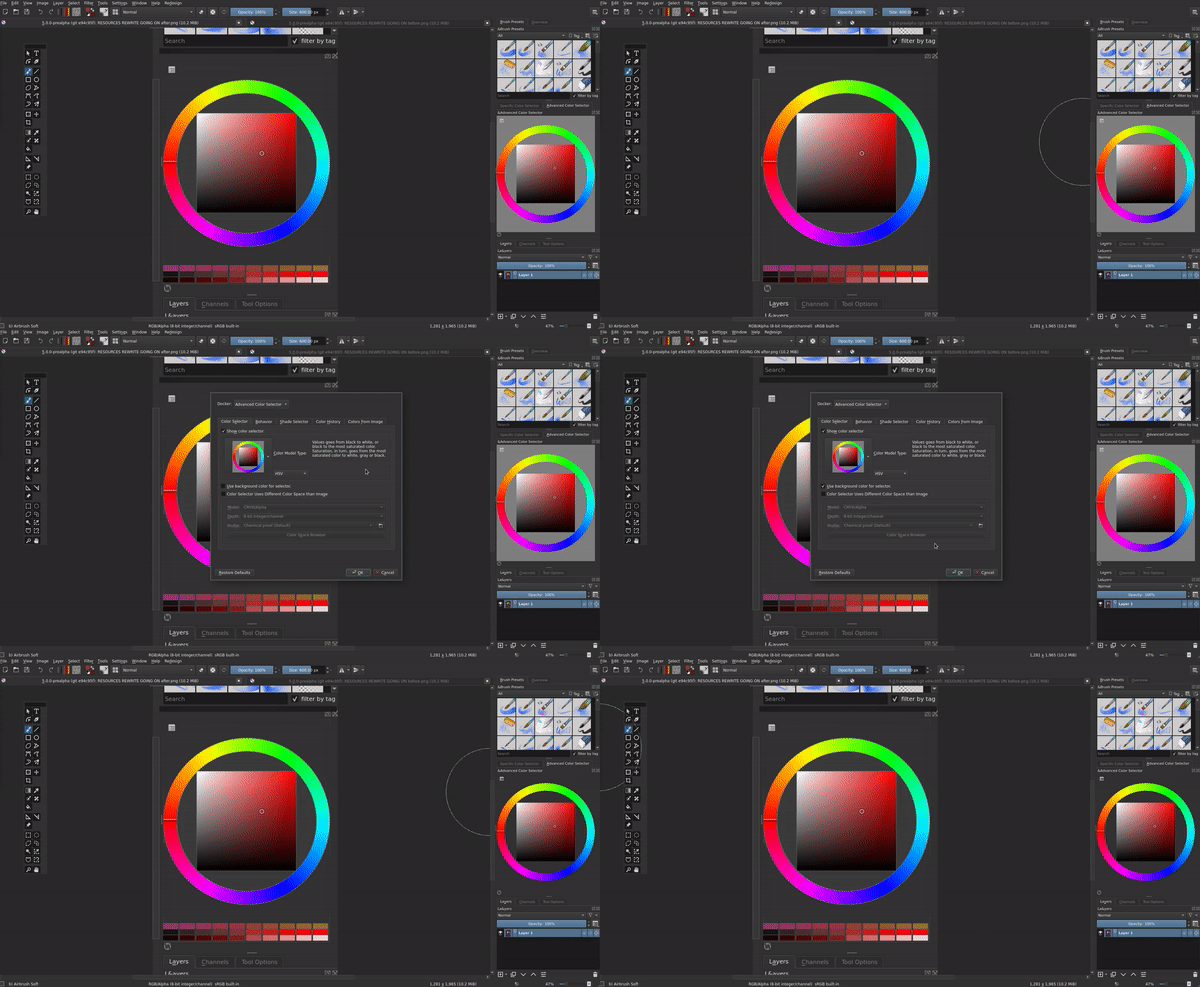
One thing that testing showed, is that the background color does not update when changing theme. I have to manually retick the “Use color from background” in order for it to update. When I have that part done, I still need to tweak a few more things to make sure that the code is up to snuff, and then submit a pull request.

That looks sooo good man!
Absolutely great! Does the “show color selector(shift+i)” already work well after the change? I suppose it should, as it inherits most of the options, but it can happen that this requires a separate change.
Fantastic!
Does it set the background color of the wheel to the background color of the UI, or does it turn the wheel background transparent? Just thinking the latter could be useful for the Shift + I pop-up
@slightlyangrydodo - Nice. If you are interested in how to make updates with a theme change, there is a signal in the code you can listen to when the theme changes. In most of the areas of Krita, they listen to this event and update icons and colors as needed… See this…
@Kapyia and @wojtryb, nice of you to remind me, and yup, works as expected with the background getting the same colour as the Docker.
@scottyp Once again, thank you for the pointer! I’ll start to look in this direction, let’s see if I can finish this tonight, that would be amazing
@tiar When this is done, should I do a Phabricator task and a pull request, or just the pull request?
EDIT: Welp, I hit a brick wall. I had to alter a file that is on the build folder, and therefore not present on the main Krita .git repo. I’m a bit stumped on this issue, anyone know how to fix this?
Well, just a pull request with a good explanation what have been done and why and why it should be merged. And all changes should be in different commits in case some changes were fine to merge and others weren’t.
Btw for testing, please check out color comboboxes in Tool Options for Fill Tool and magic wand tool. The thing is, they use a new QStyle object taken from the factory to be able to use the style proxy. The change to the style needs to be there in the combobox too (and it must not crash after closing just one image).
And for your question, you need to say exactly which file.
Regarding the pull request, that’s awesome! I’ll get on it as soon as I finish this.
The build file in question is: build/plugins/dockers/advancedcolorselector/ui_wdg_color_selector_settings.h. The tweaks aren’t that big, it’s just to specify the checkbox and add it into the layout of the Color Selector settings.
Ahh yes, all ui_…h files are generated. There is a file called
plugins/dockers/advancedcolorselector/wdg_color_selector_settings.ui
that is the one that the ui…h is being generated from, but you might want to use a Qt Creator (ijn the Design section) for that.