PathShape re-paint/caching animation issue

Hey everyone,
I hope this is the right place for this. I have been hacking away at Krita for quite some time now, trying to implement animated path shapes (KoPathShape, KoPathPoint, etc). As it stands now, moving points/shapes around at different keyframe times works and the animation docker tracks the movement of the path points fine, including the interpolation of each keyframe channel.

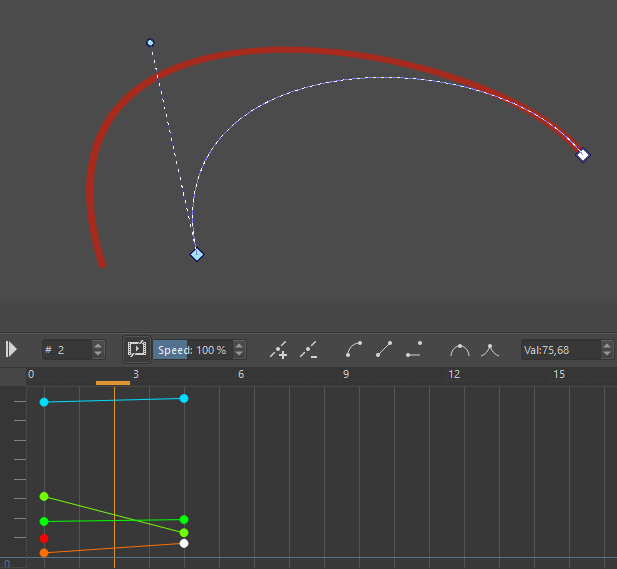
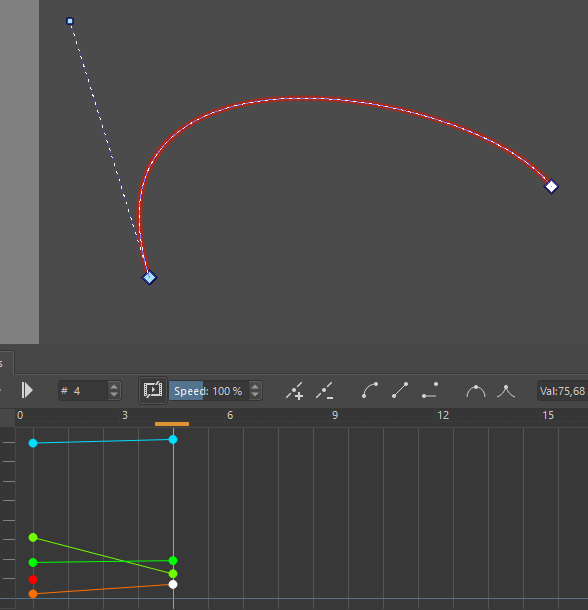
In the pictures you can see a simple path with two path points. One of the path points has its location and control point changing over time. Even when hovering over the curve it is being displayed where it should be as the time is changing

What is not working is the repainting of the interpolated shape when changing frames or letting the animation run. I’ve been digging around the code base for quite some time now, leaving me more confused the longer I read.

Shapes are contained within the KisShapeLayer, which has its own canvas (KisShapeLayerCanvas) which is used to project the shapes onto. Calling original() on the shape layer does return the projection of said canvas.

Now, the KisImage has a KisImageAnimationInterface which (to my understanding) calls upon the KisRegenerateFrameStrokeStrategy whenever frames are dirty such that they are being regenerated and updated for the frame cache that is used to play the animation. And here the updating/repaint of shape layers does not seem to happen, which is understandable as they haven’t featured any animated behaviour in the past.

For caching all frames for an animation, in KisRegenerateFrameStrokeStrategy::initStrokeCallback() the times for external layers are set for which later in doStrokeCallback() is called. In there all nodes are being visited and QRects are being computed with KisFullRefreshWalker::collectRects(•) which then are merged with a KisAsyncMerger.startMerge(•)

The KisAsyncMerger is using a KisUpdateOriginalVisitor to visit each layers original() method from which it fetches the region of interest and copies it to the cache? I can’t find where parts of the layers are actually refreshed. Do I need to refresh the shape layer when the KisUpdateOriginalVisitor is visiting?

On a different tangent, the canvas and its projection (KisPaintDevice) contained in each KisShapeLayer has its own KisPaintDeviceFramesInterface which is not being used from what I could see. Now I don’t know if cached versions of the shape layer would need to be stored in said interface or not.

Now I don’t know whether to create and populate a separate cache for shape layers or if its just a missing call to repaint the shapes on the shape layer to get functioning animated path shapes?

Many thanks in advance!
~orange

Hi there, @ContextualOrange! ( Sorry I missed you on IRC, but answering here is more searchable anyway. :slight_smile: )

I’ve worked quite a bit on Krita’s animation stuff since I got involved in the project, but I have to admit I don’t know too much about Krita’s shape layers and haven’t given much thought into animating them up until now.

Anyway, let me try to break this topic up into a few points:

  • As of now, Krita is mostly geared towards raster/pixel animation in a “traditional” animation workflow (i.e.: drawing frame by frame animations like you’d do on paper). This functionality is mostly handled by the KisPaintDevice itself, as each frame is pre-rendered into the PaintDevice and swapped between (using a KisRasterKeyframe id). The KisRasterKeyframeChannel stores the id changes over time (and re-uses id’s to implement clone frames, kind of like a pointer). Because of this, raster animation is a little bit different and mostly pretty straight-forward. (With that said, we’ll gladly accept patches to improve/add vector/shape animation features! :smile: )
  • As for opacity, animated opacity changes are handled at the projection level, meaning that when each animation frame is composited the opacity at that frame is used. In the code, you can see how KisProjectionLeaf::opacity gets the value from KisAnimatedOpacityProperty::get.
  • The application of the animated TransformMasks might be the best in-code example that you can look at, and the heart of that process happens in TransformStrokeStrategy::doStrokeCallback. (In Krita-codespeak, “Stroke” actually means an asynchronous/concurrent job that can be threaded, and Animated transform mask jobs are threaded for performance sake.) Looking through this code, you may be able to determine if how you’re requesting frame regeneration is along the lines of how it’s being done for the trans mask.
  • Finally, animation caching is kind of a layer on top of all of this stuff, for the most part. You can find most of the important animation caching code in KisAnimationFrameCache and KisAnimationCachePopulator. For debugging/development/testing purposes it might also be useful to disable background caching (Settings Menu > Configure Krita > Performance > Enable Animation Cache) and/or disable the caching entirely in code, because off the top of my head I believe this should all work normally without caching (just at a performance cost).

That’s about all that I can think of right now to hopefully point you in the right direction at least! :slight_smile:

Animating various vector shapes is new territory for Krita to my knowledge, so I wouldn’t be surprised if you run into an occasional pain point or inflexibility with the existing codebase. So please let me know if you run into more issues and I’ll be happy to try to help out (of course, another great reference for all things Krita is @dkazakov, who wrote a lot of this stuff over the years!).

Also, if you have any ideas or suggestions for how to improve the design/flow/flexibility of Krita’s animation systems to make animating various things easier, I think we’d all be happy to get a conversation going about that too. :smiley:

Hopefully that helps a bit!
Emmet

Hi, @ContextualOrange!

Your path shape should use value from KisShapeLayer::m_d->paintDevice->defaultBounds()->currentTime() for fetching the current time.

Threre is also a special boolean in KisShapeLayer::m_d->paintDevice->defaultBounds()->externalFrameActive(), which is true when Krita calculates the cache in the background. I bet your problem is that you need to call KisPaintDevice::setProjectionDevice on the paint device inside the shape layer (though I don’t think it’ll work right out of the box, you’ll probably have to take it into account in caching in KisShapeLayerCanvas)

Thank you so much for the replies already!

I equipped path points (KoPathPoint) with KisScalarKeyframeChannel which are able to fetch the KisScalarKeyframeChannel::currentValue() of the current time of the animation interface, so theres no issue having the data structure updated to the current time.

As of right now, I am triggering a repaint whenever KisShapeLayer::accept(KisNodeVisitor& visitor) is called by the KisAsyncMerger. This repaints the shape nicely, when jumping around in time manually. It does not feel like a proper solution yet and more like a hack. The problems start when multiple frames are being regenerated at the same time (e.g. you press play on the animation).
I used print statements to see when the KisRegenerateFrameStrokeStrategy::doStrokeCallback and KisRegenerateFrameStrokeStrategy::finishStrokeCallback happening and they confirmed that frames are being rendered concurrently (which makes sense from a performance standpoint :smiley: ).
So the repaints of the shape canvas are being triggered multiple times and rendered to the corresponding singular projection plane (i think) at the same time from where the result is then being copied by the merger. Typical race condition.

I’ve looked a bit into the way the TransformStrokeStrategy does jobs/strokes. It has a lot of barriers which allow for proper synchronization (e.g. forceAllHiddenOriginalsUpdate and forceAllDelayedNodesUpdate with addJobBarrier). I have no stroke strategy at hand which would be able to schedule jobs, as path shapes just change when the time changes.

I now need to find a way to concurrently redraw shape layers which most probably will revolve around copying shapes in time which I’d rather not do.

Time for a status update.

I enabled the raster keyframe channel of the paint device of the shape layer canvas (KisPaintDevice::createKeyframeChannel) hoping that using it will help.

As of right now, whenever the shape layer is visited the animation interface of the image is queried for the current time. Internally the shape layer saves the last time update. If the time of the current visit is different from the last visit, it will trigger a method repainting the target time.

The projection/paint device is asked for its raster channel. Should a keyframe already exist for that time, the existing one will be used, otherwise a new one is created. As each keyframe has an internal FrameID it can be used for the frames interface (KisPaintDeviceFramesInterface) which need a FrameID and a paint device to upload new data to a specific frame.

Thus I wrote a function which is simply called repaintFrame(int time) that repaints the shape layer contents onto a temporary paint device and returns it so it can be uploaded to the frames interface.

This did not work out.

After some digging and debugging I found out that whole image (KisImage) is being cloned when a cache regeneration is triggered (KisAsyncAnimationRenderDialogBase). That lead to some issues as the cloning of shape layers and subsequently the cloning of the paint device (m_projection) did not copy the frames internally as it only would do a “shallow” copy. After fixing that, the cloned images which were running the frame regeneration would no longer try to write to nullptrs as now the raster keyframe channel exist.

There’s still some issue with how the rendered frames from the shape layer canvas raster layer are being fetched into the final cache for rendering.
Changing the amount of max worker threads in the animation cache render dialog to just 1 does work at times and produces a smooth animation, but its not very stable. Mutli-threading be cursed.

Tangent: When I first saw that the whole image is being cloned several times I wasnt sure whether that is actually a good thing. During the cache regeneration the user cannot change anything due to the UI being locked, and during the frame export/save the open dialog would also block any input. The only problem child is the storyboard docker which seems to need updated thumbnails for each point in time.

Regarding what you @emmetpdx mentioned regarding making the animation pipeline more robust would be to be able to ask each node/layer: “What do you look like at time T” and get a keyframe/paintdevice back with the representation. Have such a function accept some options whether it should return its contents with/-out masks, filters, decorations, layer-styles etc.

As of right now it feels like there is a lot of logic far outside of the actual node regarding how it is rendered (needRects, projections, masks, filters, visitors, async mergers, etc).
All of that could live within the node and could be resolved within itself, removing bloat/boilerplate code when interacting with it.

I’m sure there is reasons as to why it is the way it is right now, but to someone who is new to this it’s very complicated and convoluted.