I just got a new laptop and I’m trying to figure out a problem I’ve never had before. I am having pen pressure issues. I have changed my setting from Wintab to Windows Ink and back again and nothing works. I know its not the pen I have because I’ve did a pen test on chrome and it worked fine.
I have a ROG Flow X16 Gaming Laptop with Windows 11, RESNAISSER Taiwan Raphael 520C Stylus Pen and Krita 5.2.6
I had instability on my Wacom because of this activation of Windows Ink, as I reported in this topic. The thing is that it is not enough to disable it only in the options of your tablet: you also need to disable other options in Windows itself.
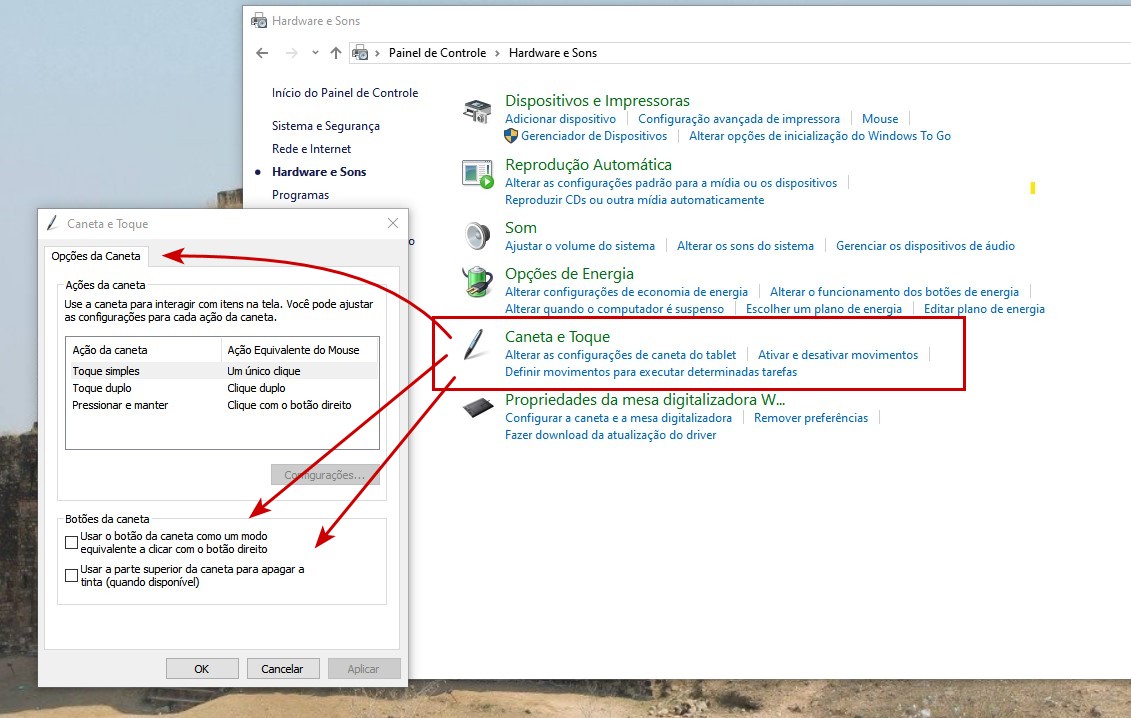
So, you need to go to “Pen and Touch” and in “Pen Options”, disable the options. I use Windows 10 and in Brazilian Portuguese… but I believe that these options should still be in the “Control Panel” of your Windows:
In case it helps, these still exist even in Windows 11 24H2. You can open Start, type Control Panel and then these settings are found in Hardware and Sound > Pen and Touch.
I have everything disabled there, and for settings such as Press and Hold you need to select it and open Settings… below to really disable it.