Type of device* : Screenless tablet
Brand and version of the device: Veikk Tablet VK1060PRO with driver version 2.1.4.2
System** : Windows
* graphics tablet/display tablet/2-in-1 laptop/Android tablet
** Windows/Linux/Mac/Android, + version (you’ll find it in Help -> Show system information for bug reports)
I tried everything from what I knew! But it doesn’t work! This happaned when I updated Krita to the lastest 5.2.1 version, previously it worked like a charm! Now it lags behind & not able to tell pen pressure, please help!
In the first screenshot using 5.2.0, at the left side of the canvas, the stroke looks like it was made with medium pressure correctly detected.
The tablet tester output shows pressure signals being received.
I’m not sure sure this was conveyed clearly enough, so I’ll take the liberty to stress it.
I’ve spoken with OP on discord and they said that this pressure issue was introduced in 5.2.1 when they updated from 5.2.0. Personally, I’ve never seen that before - Krita simultaneously interpreting the pen input as both mouse and stylus.
Yes, I see it all the time on Windows and so do many other people.
I don’t know why it happens but as long as the correct positions and pressure signals are being sent, it all works out.
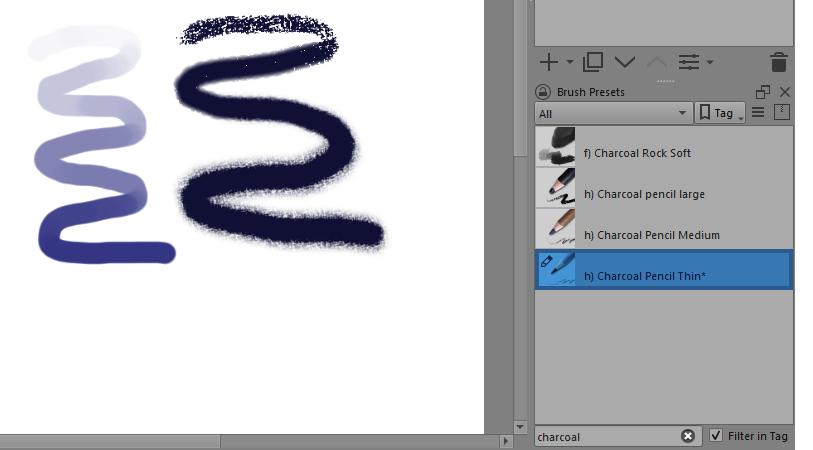
Using 5.2.1 on Windows 1:- The left side dark blue stroke is painted with the Basic-2 Opacity brush preset starting with very light pressure at the top of the stroke, building up evenly (to the best of my finger’s ability) to maximum pressure at the bottom of the stroke.
The right side black stroke is Charcoal Pencil Thin, as used by @FAR_Official, with me making the same increasing pressure effect:
Charcoal Pencil Thin goes very quickly from textured to solid then slightly fuzzy at the edges. It has a steep ‘S’ shaped transfer curve for Opacity with Pressure.
So, to see that textured part, you need to apply very low pressure on the stylus.
The original screenshot shows lines with all those characteristics in different places. Hence my puzzlement.
When testing for correct pressure response, you should always use Basic-2 Opacity or Basic-5 Size and take care to start with very low pressure and then carefully increase it over quite a large stroke distance to maximum pressure.
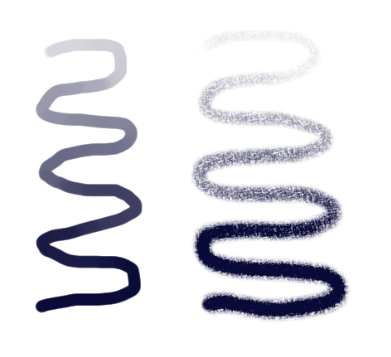
However, version 5.2.0 shows the Charcoal Pencil Thin like this with the same (or very similar) pressure increase over distance:
I agree that I should have asked @FAR_Official to demonstrate the issue with with a clearer brush. However,
Correct me if I’m not understanding the output of the tablet tester correctly, but isn’t it the case that mouse events always correspond to a full pressure dab? Since simple brushes usually have their features become more prominent with higher pressure (e.g. opacity for Basic-2 Opacity), if we place a dab at some pressure p < 1, and right next to it a dab at full pressure, we will only see the second one. So, if we’re simultaneously reading stylus events (with correct pressure) and mouse events (with full pressure), we will only see the full pressure stroke, potentially with some holes. So, how can it work out?
Use of a mouse alone, which has no pressure signal, does result in a 100% pressure effect.
However, this particular behaviour when using a stylus with a stylus signal mixed in with a mouse signal is common on Windows and does not cause me any problems or anyone else. It’s just confusing and puzzling.
As you can see from my screenshots of the Basic-2 Opacity brush preset in particular, there is no problem with painting at very low pressure.
I’ve no idea why that is and I assume that the stylus signal is given priority.
You’d have to ask a developer for a better and more accurate explanation.
Yes, this and pretty much any masked brush would be affected by the same problem, and can be fixed with the same workaround, of enabling the masked opacity and flow. The bug is also now fixed in the Nightly (Stable and Unstable) builds.
I doubt there’s any change between 5.2.0 and 5.2.1 that would affect pen pressure itself.
As for the mouse and stylus events both showing, I don’t recall whether I’ve seen that before, maybe it happens only on certain setups. But if it works, I would also guess Krita is ignoring the mouse events in favor of the stylus events.