Yeah sadly a known limitation. Your on Linux so this can happen because of OS differences. Install a “Pyqt5-svg” module or with similar name I don’t record the exact name off the top of my head. It is the SVG module missing there. After the install it will boot up.
So, from python and svg related packages, I have packages installed below:
qt5-svg 5.15.3+kde+r12-1
python-svg.path 4.1-3
python-svglib 1.2.1-1
Via pip freeze:
svg.path==4.1
svglib==1.2.1
PyQt5==5.15.6
PyQt5-sip==12.9.1
pysvg==0.2.2
The same issue persists, not sure what package I’m missing. However when I type “yay py svg”, I have this list:
$ yay py svg
24 aur/python-drawsvg 1.6.1-1 (+0 0.00)
    A Python 3 library for programmatically generating SVG images (vector drawings) and rendering them or displaying them in a Jupyter notebook
23 aur/svgbob-git 0.5.0alpha.8.r389.503f303-1 (+0 0.00)
    Convert your ascii diagram scribbles into happy little SVG
22 aur/python-svgpathtools-git r179.45dc873-1 (+0 0.00)
    manipulate and analyze SVG Path objects and Bezier curves
21 aur/svgbob 0.6.2-1 (+0 0.00)
    Convert your ascii diagram scribbles into happy little SVG
20 aur/python-sphinxcontrib-svg2pdfconverter 1.2.0-1 (+0 0.00)
    Sphinx SVG to PDF converter extension
19 aur/python-svgwrite-git 1.1.12.r1.g5ce5ed5-1 (+0 0.00)
    write svg files
18 aur/python2-pygal 2.4.0-1 (+1 0.00)
    pygal is a dynamic SVG charting library written in python
17 aur/python2-cairosvg 1.0.22-1 (+1 0.00)
    Convert your SVG files to PDF and PNG.
16 aur/gpx2svg-git r11.47d2251-1 (+1 0.00)
    Python script to convert GPX data to SVG
15 aur/python-svg2mod-git r219.9355f87-1 (+1 0.07)
    Convert Inkscape SVG drawings to KiCad footprint modules
14 aur/python2-svg.path 3.0-1 (+2 0.00) (Orphaned)
    SVG path objects and parser
13 aur/python-svg.path 2.2-1 (+5 0.00) (Orphaned) (Out-of-date: 2020-02-13) (Installed: 4.1-3)
    SVG path objects and parser
12 aur/python2-rsvg 2.32.0-17 (+11 0.02)
    Python bindings for librsvg
11 aur/python-pyqrcode 1.2.1-4 (+16 0.18)
    A QR code generator written purely in Python with SVG, EPS, PNG and terminal output (fixed for python3)
10 aur/python-weasyprint 53.4-1 (+16 0.31)
    Convert web documents (HTML, CSS, SVG, ...) to PDF
9 aur/python2-pyqrcode 1.2.1-4 (+16 0.18)
    A QR code generator written purely in Python with SVG, EPS, PNG and terminal output (fixed for python3)
8 community/python-ziamath 0.4-1 (754.8 KiB 2.0 MiB)
    Render MathML and LaTeX Math to SVG without Latex installation
7 community/python-ziafont 0.2-3 (35.0 KiB 141.0 KiB)
    Convert TTF/OTF font glyphs to SVG paths
6 community/python-svgwrite 1.4.1-2 (105.1 KiB 637.2 KiB)
    A Python library to create SVG drawings
5 community/python-svglib 1.2.1-1 (52.2 KiB 209.5 KiB) (Installed)
    Read SVG files and convert them to other formats
4 community/python-svg.path 4.1-3 (35.4 KiB 156.0 KiB) (Installed)
    SVG path objects and parser
3 community/python-railroad-diagrams 1.1.1-1 (28.5 KiB 118.0 KiB)
    Generate SVG railroad syntax diagrams, like on JSON.org.
2 community/python-pygal 1:3.0.0-1 (175.2 KiB 948.7 KiB)
    A Python SVG graph plotting library
1 community/python-cairosvg 2.5.2-3 (79.6 KiB 345.1 KiB)
    SVG converter based on Cairo. It can export SVG files to PDF, PostScript and PNG files
If you need entire list from pip freeze, I’ll post it below:
pip freeze
appdirs==1.4.4
bottle==0.12.19
btrfsutil==5.16.2
CacheControl==0.12.6
cffi==1.15.0
chardet==4.0.0
colorama==0.4.4
conan==1.46.0
contextlib2==0.6.0.post1
cryptography==36.0.1
cssselect2==0.5.0
distlib==0.3.4
distro==1.7.0
dnspython==2.2.0
fasteners==0.16.3
html5lib==1.1
idna==3.3
importlib-metadata==4.8.1
isodate==0.6.1
Jinja2==3.0.3
lensfun==0.3.3
lxml==4.7.1
Markdown==3.3.6
MarkupSafe==2.0.1
meson==0.61.2
more-itertools==8.10.0
msgpack==1.0.3
node-semver==0.8.0
ordered-set==4.0.2
packaging==20.9
patch-ng==1.17.4
pep517==0.12.0
Pillow==9.0.1
pluginbase==1.0.0
ply==3.11
progress==1.6
pyaaf2==1.4.0
pybind11==2.9.1
pycparser==2.21
Pygments==2.11.2
PyGObject==3.42.0
PyJWT==2.2.0
pyliblo==0.10.0
pyOpenSSL==21.0.0
pyparsing==3.0.1
PyQt5==5.15.6
PyQt5-sip==12.9.1
pysvg==0.2.2
python-dateutil==2.8.2
PyYAML==6.0
rdflib==6.1.1
reportlab==3.6.6
requests==2.27.1
resolvelib==0.5.5
retrying==1.3.3
six==1.16.0
svg.path==4.1
svglib==1.2.1
team==1.0
tinycss2==1.1.1
toml==0.10.2
tomli==2.0.0
tqdm==4.63.0
urllib3==1.26.8
webencodings==0.5.1
zipp==3.7.0
Any ideas, what I’m missing here?
Krita and Pigmento is currently working on my machine (windows) and that module UVD has been stagnated on that section for more than a year, I think since the beginning of the project almost. so I find these sudden bug reports very strange in the last month. And always in unknown distros with odd names. I am even prone to make a list of Linux distros that have issues with this.
I will take a peek at that distro and see how it is however my machine hates linux so I cant promise anything. This will be already a long way out of my way considering my available time.
And I’ve noticed something really interesting, while pacman-installed Krita on Arch has trouble loading the plugin due to mentioned error, the Appimage version… loads fine
1 Like
Everyone recommends using the Appimage over the versions in repositories.
So everything is working well now @Outer_Mind ?
So far, it works, however there are some performance issues, you can take a look on the video: https://drive.google.com/file/d/1H-5H6bT4ivB0oPVmJMVsPkC0vzKbF575/view
Also, I think you could try testing the plugin on Linux distros like Arch or Ubuntu (and based distros) via virtual machine (e.g. VirtualBox). I have tested that on Windows 10 (IEUser) virtual machine and interestingly, it performs pretty ok.
Well I am just glad it boots up now. I knew it was not really a problem.
But yeah bad performance on Linux. I really cant help you with that. It seems just another day in the Linux world unless you have an absolute beast of a computer to over compensate.
Currently I think Pigmento runs faster than those naturally inside Krita which I still find odd to happen, but is just my opinion. Advance Color Selector and Small Color Selector are notoriously LAGGY and do not play good with other color selectors or update properly (also my opinion). Having them all populate your workspace is asking for lag. You need to choose only one of them and use that alone. The other Krita selectors are actually much lighter to use I think.
Regardless I have tested Pigmento on Kubuntu and Neon (and I think once on Ubuntu) and it works just like in Windows in terms of performance now a days for what I could use. And I am more than happy with performance currently and I don’t know what else could be done even. And Pigmento only uses what is strictly necessary at all times. Also I am not gonna test on every distro… Python is a high level language if the distro can’t run Python like others might as well not use the plugin as it asks a bit.
But that lag is like my reaaaally old versions of Pigmento where it would stop any Linux OS. I am surprised you can actually go that slow with it still considering all the work I put in. Any advice would be appreciated.
I suggest also taking a look at the manual and seeing the performance options to see if any of them suits you.
One more interesting thing, I think, I have sort of “hacked” performance - while I have both pigment.o and advanced color selector docks next to each other and when I pick color from the ACS, the pigment.o plugin updates colors pretty fast, so in conclusion - it’s faster to use advanced color selector 
video link here: https://drive.google.com/file/d/1szHuFtUSqeA-IPzKA7hLcDV2zS8b242k/view?usp=sharing
PS: Despite the issues mentioned, I really appreciate all the hard work you put into this powerful plugin <3
1 Like
Update:
- Feature, UI and Bug fixes
So a big bug was detected while I had pigmento in a WIP state. so here is a small update to solve the issue. some things were removed in order to clean up and will return later on probably reworked.
Since I am starting to have a couple of plugins with enough features to have need of settings, I started to stream line the UI elements to be consistent between them.
Feature:
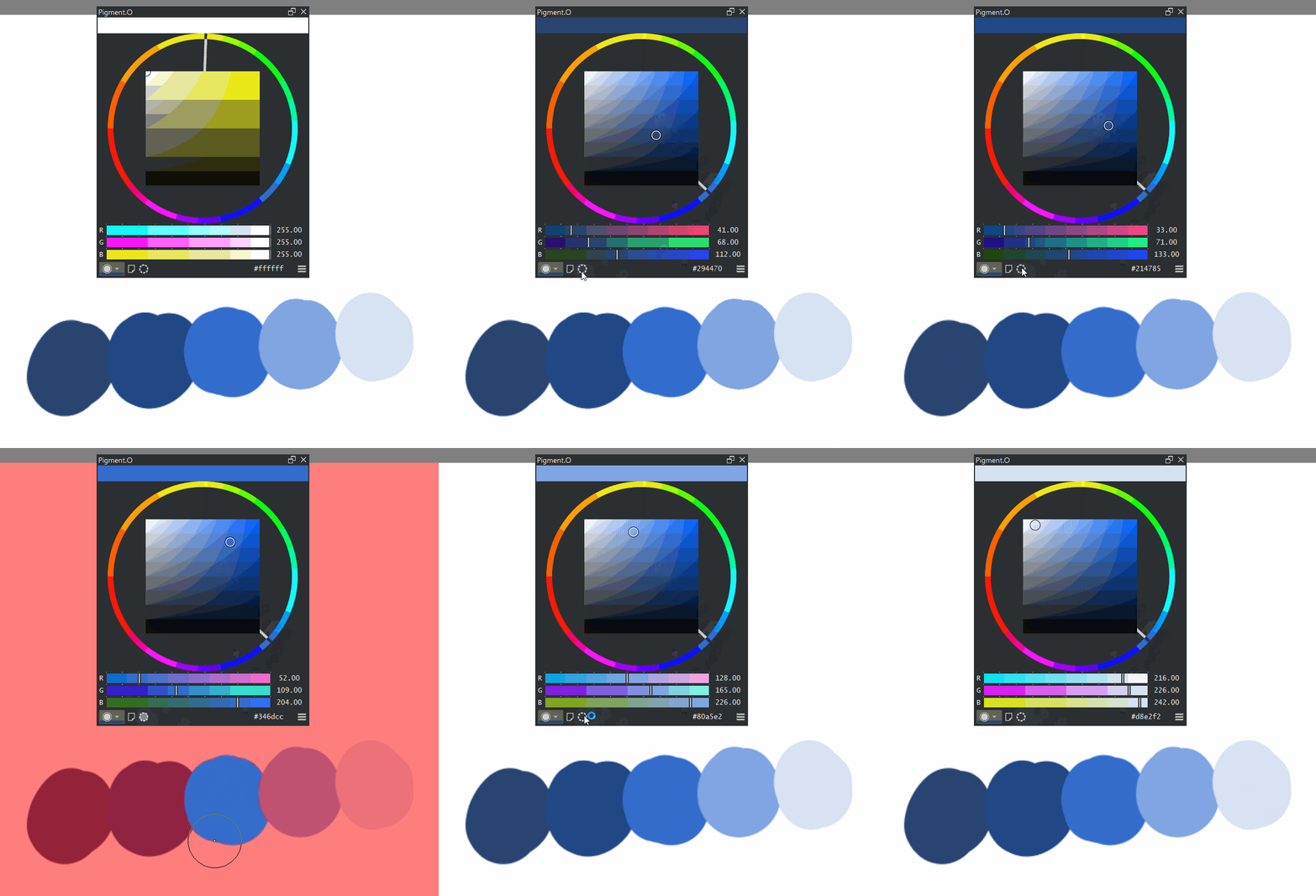
- Select a color and press the dotted circle to make a selection of that color on the canvas. Can only display selection in red highlight mode. wip.
UI:
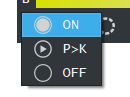
- On off switch now is a combobox with icons. Nice because it is small and still displays text as I wanted.
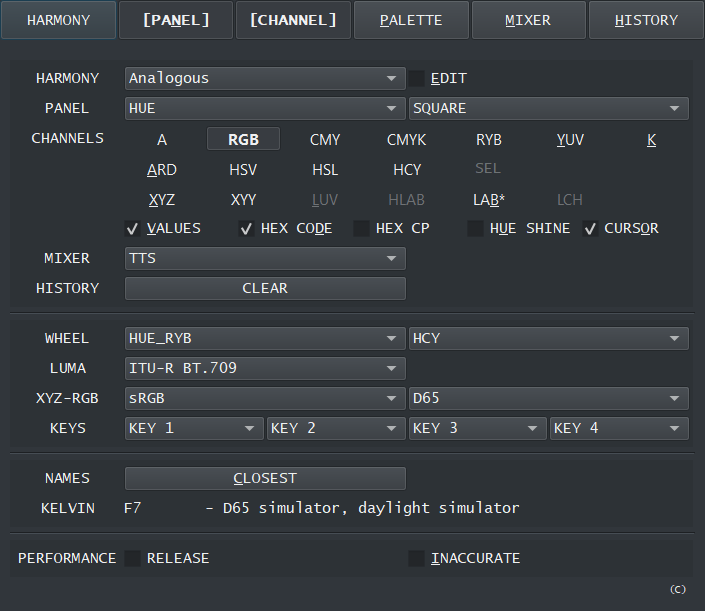
- Settings and save system face lift.
- BG color swap area is larger.
- Harmony is wip.
- SEL is wip.
- TTS option is now a Mixer option.
- COTD is removed
- Panel = [ YUV, HCY ] is removed
Bug Fixes:
- Sync with Krita fix.
- Panel DOT load fix.
- Quick complementary color swap fix.
5 Likes
Just tried installing this plugin, and it’s caused Krita to crash during the splash screen, preventing Krita from loading entirely 
Here’s a paste of the crash error:
I’m using Manjaro.
edit: I’m currently going to try changing from python 3.10 to 3.9.0 since a few web searches have me suspecting this might be the issue, I’ll change this to reflect the outcome
edit: no dice  same error
Use an Krita appimage and install the python3.pyqty5.svg module and it should work.
Hello, I´m using Krita 5.02 on Windows 10.
I´ve just installed Pigmento. When I try to select the img dropdown in Harmony Panel I get an error message and Krita crashes.
here is the message:
ZeroDivisionError
Python 3.8.1: C:\Program Files\Krita (x64)\bin\krita.exe
Sun Apr 10 12:39:56 2022
A problem occurred in a Python script. Here is the sequence of
function calls leading up to the error, in the order they occurred.
C:\Users???\AppData\Roaming\krita\pykrita\pigment_o\pigment_o_modulo.py in paintEvent(self=<pigment_o.pigment_o_modulo.Panel_IMG object>, event=<PyQt5.QtGui.QPaintEvent object>)
5509 painter.drawImage(ox, oy, qimage.scaled(self.qimage_w * self.zoom, self.qimage_h * self.zoom, Qt.KeepAspectRatio, Qt.SmoothTransformation))
5510 else: # Drop File Here
5511 var_w = self.panel_width / self.default_w
5512 var_h = self.panel_height / self.default_h
5513 if var_w <= var_h:
var_w undefined
self = <pigment_o.pigment_o_modulo.Panel_IMG object>
self.panel_width = 292
self.default_w = 0
ZeroDivisionError: division by zero
cause = None
class = <class ‘ZeroDivisionError’>
context = None
delattr = <method-wrapper ‘delattr’ of ZeroDivisionError object>
dict = {}
dir =
doc = ‘Second argument to a division or modulo operation was zero.’
eq = <method-wrapper ‘eq’ of ZeroDivisionError object>
format =
ge = <method-wrapper ‘ge’ of ZeroDivisionError object>
getattribute = <method-wrapper ‘getattribute’ of ZeroDivisionError object>
gt = <method-wrapper ‘gt’ of ZeroDivisionError object>
hash = <method-wrapper ‘hash’ of ZeroDivisionError object>
init = <method-wrapper ‘init’ of ZeroDivisionError object>
init_subclass =
le = <method-wrapper ‘le’ of ZeroDivisionError object>
lt = <method-wrapper ‘lt’ of ZeroDivisionError object>
ne = <method-wrapper ‘ne’ of ZeroDivisionError object>
new =
reduce =
reduce_ex =
repr = <method-wrapper ‘repr’ of ZeroDivisionError object>
setattr = <method-wrapper ‘setattr’ of ZeroDivisionError object>
setstate =
sizeof =
str = <method-wrapper ‘str’ of ZeroDivisionError object>
subclasshook =
suppress_context = False
traceback =
args = (‘division by zero’,)
with_traceback =
The above is a description of an error in a Python program. Here is
the original traceback:
Traceback (most recent call last):
File “C:\Users???\AppData\Roaming\krita\pykrita\pigment_o\pigment_o_modulo.py”, line 5511, in paintEvent
var_w = self.panel_width / self.default_w
ZeroDivisionError: division by zero
I was not able to trigger that issue but I cleaned the math up.
try downloading it again to see if you can crash it on your side.
Also on another note:
- I adjusted the State button for Linux users so the display should be corrected now.
- Added a note of requirements for Linux users on the Github page.
The SVG module is a integral part of this plugin and I am constantly warning people to install it, as it does not come included in Linux for some reason while in windows it does. Also using Krita that is not a Appimage seems to be even worse for some reason, why it is? I have no clue.
1 Like
Great - now it works. Thank you very much!
After loading the the “drop file here.png” manually it works.
1 Like
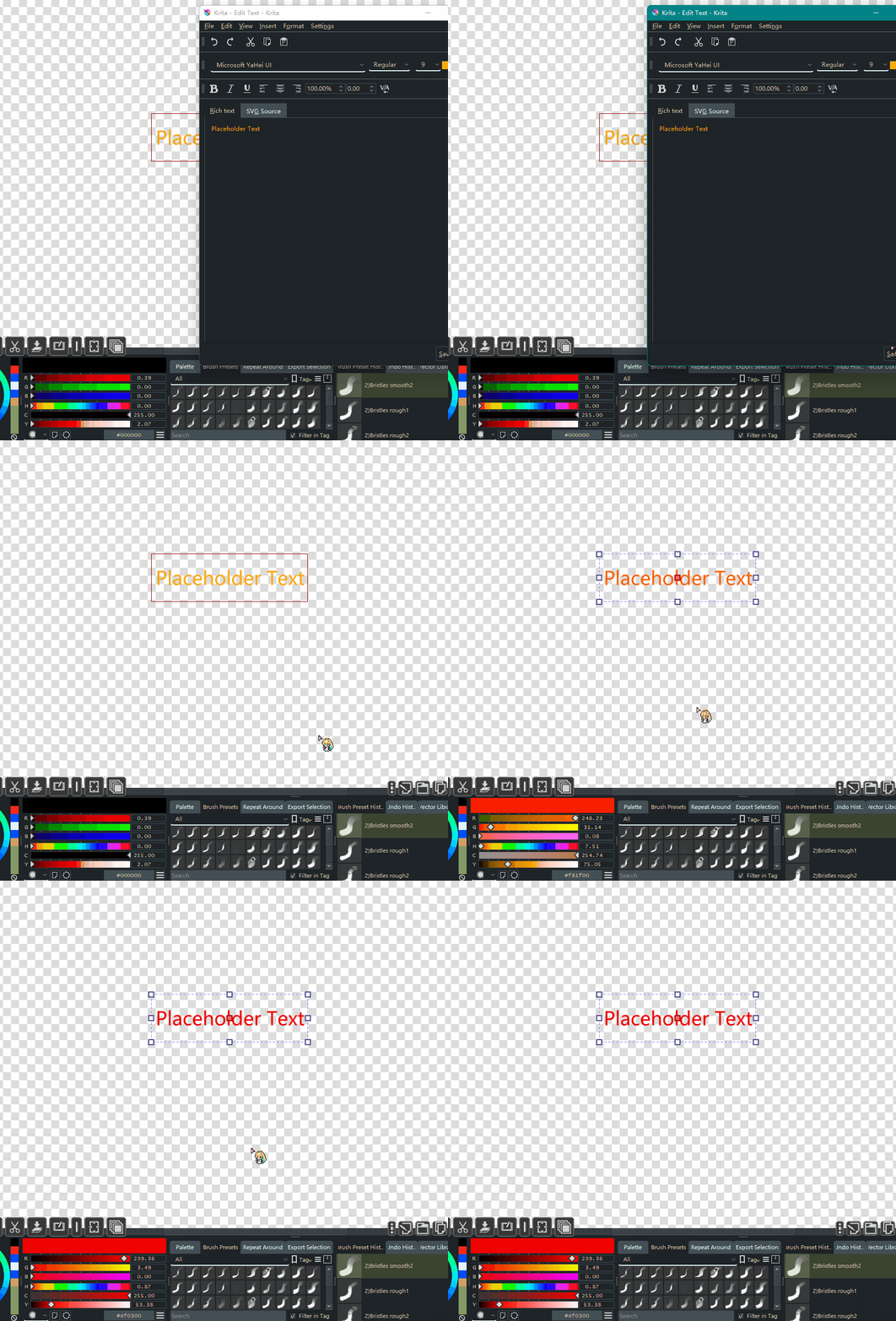
Regarding the problem of “on” mode causing exceptions in text tool that was mentioned a long time ago, is it possible to automatically switch to “p>k” when switching to text tool and switch back when exiting text tool?
Without the documentation website I have no idea. It is not the tool but vector itself. And coding around something that seems to me a krita bug is not very appealing either. I just switch when I go into vector layers.
The only difference between on and p>k is that:
- on reads and applies.
- p>k only applies.
Thing is if I do a work around and they fix it. Then the work around will be active with no need. A while back all vector tools and objects worked that is why I am so unwanting to do this.
Yes I’m having the same issue for ages. The workaround is just to turn off Pigment.O when editing text
hello friend. I am using Mac and a new krita user, I would LOVE to use the color sphere plugin, can you walk me through if its possible to install on Mac? I tried to go to resource management and cannot figure it out, thanks!
Hellos @okeypokes and welcome to the forum.
Honestly I have no idea because I don’t use Mac nor am I planning too. Installing it on Mac should be the same as installing plugins on other platforms. I think there are a couple of YouTube videos already on how to install plugins now. Also the krita manual website has the step by step instructions in text form.
thanks for the response. I was able to get it into the pykrita folder im getting closer lol.
once its installed how do I find pigment color wheel?