Hi! Seems like I’m missing something but it seems that I am no longer able to select a subpanel for the hue panel in the new settings window. I have tried removing the lines in kritarc related to Pigment.O but it doesn’t seem to do anything. Any pointer would be greatly appreciated, thanks for the great work you put out for the community!
right click the hue circle to access the sub.panel context menu.
1 Like


Thank you!
Why is the Github download is 200 mb? the last version was like 1.9M I think
I deleted the old version and Is till get errors with 5.2 
NameError
Python 3.10.7:C:\Krita\bin\krita.exe
Wed Oct 18 13:10:34 2023

A problem occurred in a Python script.  Here is the sequence of
function calls leading up to the error, in the order they occurred.

C:\Krita\lib\krita-python-libs\krita\dockwidgetfactory.py in createDockWidget(self=<krita.dockwidgetfactory.DockWidgetFactory object>)
   14         super(DockWidgetFactory, self).__init__(_id, _dockPosition)
   15         self.klass = _klass
   16
   17     def createDockWidget(self):
   18         return self.klass()
self = <krita.dockwidgetfactory.DockWidgetFactory object>
self.klass = <class 'pigment_o.pigment_o_docker.PigmentO_Docker'>

 C:\Users\USER\AppData\Roaming\krita\pykrita\pigment_o\pigment_o_docker.py in __init__(self=<pigment_o.pigment_o_docker.PigmentO_Docker object>)
   87         self.Timer()
   88         self.Extension()
   89         self.Settings()
   90         self.Loader()
   91
self = <pigment_o.pigment_o_docker.PigmentO_Docker object>
self.Settings = <bound method PigmentO_Docker.Settings of <pigment_o.pigment_o_docker.PigmentO_Docker object>>

 C:\Users\USER\AppData\Roaming\krita\pykrita\pigment_o\pigment_o_docker.py in Settings(self=<pigment_o.pigment_o_docker.PigmentO_Docker object>)
 1572
 1573         # Colors
 1574         self.Dict_Copy( har_01, self.Set_Read( "EVAL", "har_01", har_01 ) )
 1575         self.Dict_Copy( har_02, self.Set_Read( "EVAL", "har_02", har_02 ) )
 1576         self.Dict_Copy( har_03, self.Set_Read( "EVAL", "har_03", har_03 ) )
self = <pigment_o.pigment_o_docker.PigmentO_Docker object>
self.Dict_Copy = <bound method PigmentO_Docker.Dict_Copy of <pigment_o.pigment_o_docker.PigmentO_Docker object>>
global har_01 = {'aaa_1': 0, 'aaa_d1': 0, 'active': False, 'ard_1': 0, 'ard_2': 0, 'ard_3': 0, 'cmy_1': 0, 'cmy_2': 0, 'cmy_3': 0, 'cmyk_1': 0, ...}
self.Set_Read = <bound method PigmentO_Docker.Set_Read of <pigment_o.pigment_o_docker.PigmentO_Docker object>>

 C:\Users\USER\AppData\Roaming\krita\pykrita\pigment_o\pigment_o_docker.py in Set_Read(self=<pigment_o.pigment_o_docker.PigmentO_Docker object>, mode='EVAL', entry='har_01', default={'aaa_1': 0, 'aaa_d1': 0, 'active': False, 'ard_1': 0, 'ard_2': 0, 'ard_3': 0, 'cmy_1': 0, 'cmy_2': 0, 'cmy_3': 0, 'cmyk_1': 0, ...})
 1782             read = setting
 1783             if mode == "EVAL":
 1784                 read = eval( read )
 1785             elif mode == "STR":
 1786                 read = str( read )
read = 'HSL,0,0,0,0,0,0'
builtineval = <built-in function eval>

C:\Krita\<string> in <module>

NameError: name 'HSL' is not defined
    __cause__ = None
    __class__ = <class 'NameError'>
    __context__ = None
    __delattr__ = <method-wrapper '__delattr__' of NameError object>
    __dict__ = {}
    __dir__ = <built-in method __dir__ of NameError object>
    __doc__ = 'Name not found globally.'
    __eq__ = <method-wrapper '__eq__' of NameError object>
    __format__ = <built-in method __format__ of NameError object>
    __ge__ = <method-wrapper '__ge__' of NameError object>
    __getattribute__ = <method-wrapper '__getattribute__' of NameError object>
    __gt__ = <method-wrapper '__gt__' of NameError object>
    __hash__ = <method-wrapper '__hash__' of NameError object>
    __init__ = <method-wrapper '__init__' of NameError object>
    __init_subclass__ = <built-in method __init_subclass__ of type object>
    __le__ = <method-wrapper '__le__' of NameError object>
    __lt__ = <method-wrapper '__lt__' of NameError object>
    __ne__ = <method-wrapper '__ne__' of NameError object>
    __new__ = <built-in method __new__ of type object>
    __reduce__ = <built-in method __reduce__ of NameError object>
    __reduce_ex__ = <built-in method __reduce_ex__ of NameError object>
    __repr__ = <method-wrapper '__repr__' of NameError object>
    __setattr__ = <method-wrapper '__setattr__' of NameError object>
    __setstate__ = <built-in method __setstate__ of NameError object>
    __sizeof__ = <built-in method __sizeof__ of NameError object>
    __str__ = <method-wrapper '__str__' of NameError object>
    __subclasshook__ = <built-in method __subclasshook__ of type object>
    __suppress_context__ = False
    __traceback__ = <traceback object>
    args = ("name 'HSL' is not defined",)
    name = 'HSL'
    with_traceback = <built-in method with_traceback of NameError object>

The above is a description of an error in a Python program.  Here is
the original traceback:

Traceback (most recent call last):
  File "C:\Krita\lib\krita-python-libs\krita\dockwidgetfactory.py", line 18, in createDockWidget
    return self.klass()
  File "C:\Users\USER\AppData\Roaming\krita\pykrita\pigment_o\pigment_o_docker.py", line 89, in __init__
    self.Settings()
  File "C:\Users\USER\AppData\Roaming\krita\pykrita\pigment_o\pigment_o_docker.py", line 1574, in Settings
    self.Dict_Copy( har_01, self.Set_Read( "EVAL", "har_01", har_01 ) )
  File "C:\Users\USER\AppData\Roaming\krita\pykrita\pigment_o\pigment_o_docker.py", line 1784, in Set_Read
    read = eval( read )
  File "<string>", line 1, in <module>
NameError: name 'HSL' is not defined
The size is okay, if you look into the archives and compare them together with the old manual and the new wiki, then you’ll see from where this difference arises.
Michelist
+1 ,I think i get same error on 5.2
1 Like
Did you both clean up your “kritarc” after uninstalling the old Pigment.O and before installing the new Pigment.O? So, did you remove all entries belonging to Pigment.O from the “kritarc”?


Michelist
3 Likes
removing pigmento.0 section from kritarc did the trick. Thx!
1 Like

Life could be so simple and easy if users would follow the manuals and installation instructions for the products they use…


Michelist
2 Likes
well, yes, buts it will never happen. I know from experience (I do not read docs, and my customers do not read my docs too  ) . What I usually do, is - if given bug happens often - then wrap code into try catch - and print / display cause of bug, and solution in popup panel.
Bug: Sometimes when using the gamut mode, regardless of type (circle, square, etc), when clicking anywhere near the hue wheel parameter, one of the points will fly far outside the bounds of the color picker and it’s impossible to retrieve it. I did not experience this prior to the update.
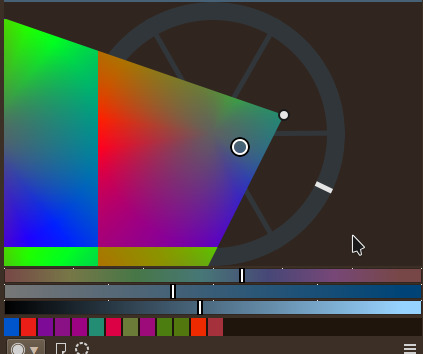
This can be fixed by resetting, but it’s not really ideal to do
2 Likes
Does anyone know of a tutorial or a video that shows how to use this plugin? I am not sure if I am doig it right.I cant pick color from this, it does not seem to set the brush color at all. The harmony bar does not do or show much of anything for me either. I have it set to on and write
@Awez
I replicated the bug it is some form of clipping I will see what I can do
@karemuvar
Click on the manual button in the settings.
2 Likes
Thanks but I still do not get why I cant set a color for real. How do I pick a color to be the color of the brush?
What do you even mean ?
All colours are real and pigmento syncs automatically.
It might be better to send me a full screenshot of krita and pigmento because your questions are really not very descriptive of what is happening.
Any chances we could get rid of these lines on left? And make the hue wheel bigger - like on right?

I was also thinking - maybe in the Gamut wheel, outer ring could show - value picker - something like:

Keep up great work.
Those lines tell you in what wheel mode your in and also where are the colour primaries and secondaries just like gamut does. Your in analog mode so you can see where your red, green or blue are perfectly despite being uneven on the circle. And I am not increasing the hue ring section to decrease the cursor readability it would need another design probably.
As for the gamut value channel. I doubt I would ever do something like that. This because it is the cursor now and there is no space for it. Also you have the channels that are the one dimensional sliders already so making another on the panel sounds a bit redundant. Not to mention you have third axis control on all panels already just not the representation of it. And being cursor it helps with harmony.
I pick a color in the plugins color pane, but the color I pick in there is not the color of the brush like the regular color panels do in Krita. Basically I just want to use it to select/pick colors but it is not happening. What I pick there just stays there. What I pick in gthe plugins color panel is not synced to actual Krita color panel. I am not sure if this addon is just to play with colors.