yeah don’t worry. I know what you mean. I also did a plugin for blender and if someone has errors I have no idea why. Since it’s working on my computer 
1 Like
A bit of an update on the issue.
When I resize the panel(make it smaller), everything starts to move faster.
When I resize to make it larger…it starts to lag again.
So my guess is that something connected to the rendering of the panel is lagging things. Or maybe the Color Picking from the framebuffer, method you are using. I don’t know much about OpenGL color picking…so I’m just shooting in the dark here.
2 Likes
That is interesting behaviour. I donno if I am seeing but it looks faster because it is a shorter distance?
Regardless I am gonna check that out when I get to the computer again. I did some minor changes to the gradient code that I think are no longer necessary. Pigmento lite uses slighter incorrect way that is faster but incorrect throughout the gradient.
I will try and see how much I can revert it back and or improve/correct.
But once you resize it stays calculated. It’s just a background color gradient in css. The calculation of the color is done by the widget length and the location X of your click on it. No open gl anywhere. Ussualy the issue is in PyQt5 signal that comes out instead.
Maybe installing PyQt5 on the side would help with the modules? I know the Linux version is bugged. Also placing it on the UI instead of floating makes it a tiny bit faster. Another you can do is clicking instead of dragging.
I am curious if I can find something to solve it.
1 Like
Maybe making a panel that shows the selected color big and a option to block the sliders gradient colors like in the panels.
1 Like
Update:
- Foreground Color Display Panel
- Slider no Gradient Display
- UI tweaks + UI Bugs clean
- Display color optimizations in the code
- Tiny FAQ update and cross checks
FGC - Foreground Color Display (Rainbow Shift Epileptic Warning!).
FGC0 - Foreground Grey Display.
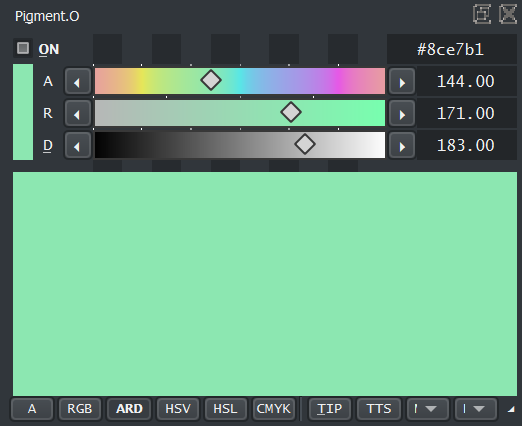
Sliders no Gradient Display - Creates a significant performance boost. It is even noticeable on my computer. The button is the one on the bottom right that has always been inactive but now is interactable.
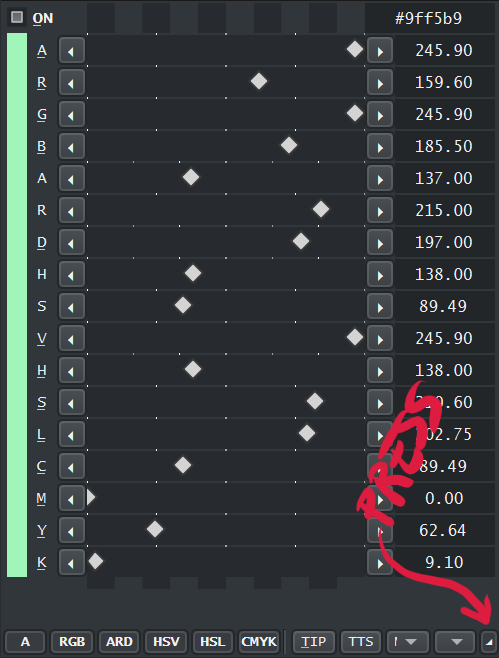
Since there is no inherent error anymore on the UVD color display I deleted a color display function that ensured no color breaks as it is now internalized on the color conversion itself remaining accurate by default. No extra steps should help it go back to it’s old pre UVD speed or closer.
@okuma_10
Check if disabling the gradients improves your performance at least.
I did a check on the gradient displays themselves and they did not seem to call anything unnecessary as it was optimized previously. The only way to make them better would be to make them display colors incorrectly with less steps but that would only work for the RGB sliders alone. I can revert them back but the others would be kinda stuck on the lag zone.
Also did a tiny logo because I was a bit bored.

2 Likes
Yup, disabling the gradients did the trick. I made the panel large as my screen width and had only a minor lag. But on “normal” size…that I use it works fine. Well…python being python it’s not butter smooth but it’s definitely something I wouldn’t mind while working. Thanks…and that FG color thing is super.That’s something I wanted ever since I found out Pigment.io .
Edit: one bug I found is that clicking on the slider buttons for + and - or the <> . The panel registers only one click on that button. All other clicks are ignored. When I click away from the panel and then click back at one of the buttons, again one click is registered and all others are not.
2 Likes
I am glad something is working at least. if you have any ideas that would help you out considering you cant see the other channels tell me about it.
The FGC is something I always avoided because I thought it would be too simple to be used. All color picker panels have a RMB zoom on them that make that role. But since your a bit on the dark on the sliders I thought it would be a boon.
strangely enough the < and > buttons are working as intended. what color space are you clicking on? maybe I clicking on the wrong one.
P.S.- Yes there is a typo there. but that causes lag I am unsure. I am updating it again in a bit.
1 Like
Ah I see, it’s only the D slider <> buttons in ARD. All others work fine.
About anything that can help…well the gradients were a nice visual guide, but I guess I can see things in the panel below the sliders. And those are relatively responsive. HSV and HSL have good response, and the UV slice thing you made takes a second upon first click but then moves pretty well, as long as I don’t change the slice’s position(shape).
So I guess the only thing is to see why the gradients are so slow. But it might be a Qt thing.
2 Likes
I just updated the file just now.
it was a bunch of < and > buttons updating wrong. HSV and HSL where updating with the RGB update instead of their own, but somehow it was just having a 0.01 error and even so it would correct back to 0.00 after a couple of clicks. thanks for warning me I don’t even know how it was working so well despite the conversions.
the ARD takes a bit because it calculates a imaginary unit polygon to convert. and when the panel is up it scales it up into the size of the panel you have. that is why I am not inclined in placing ARD/UVD on the lite version. too much trignometry.
I think it might be a Qt thing yes :\
1 Like
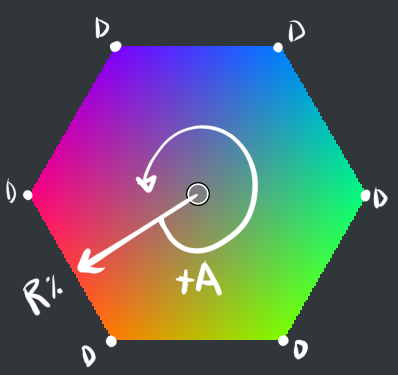
Some Diagrams I made while playing with the UVD
RGB in UVD:
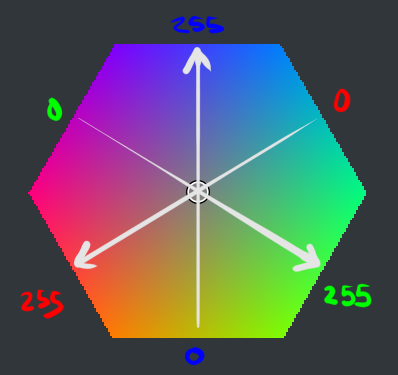
ARD in UVD:
3D RGB Diagonal Axis
1 Like
After updating, the following problems occurred for the first time. After that, krita can be opened normally. Since I don’t understand programming and English, maybe I should give feedback
Blockquote
IndexError
Python 3.8.1: C:\GAMES\STEAM\steamapps\common\Krita\krita\bin\krita.exe
Thu Aug 13 18:04:39 2020
A problem occurred in a Python script. Here is the sequence of
function calls leading up to the error, in the order they occurred.
C:\GAMES\STEAM\steamapps\common\Krita\krita\lib\krita-python-libs\krita\dockwidgetfactory.py in createDockWidget(self=<krita.dockwidgetfactory.DockWidgetFactory object>)
10 super(DockWidgetFactory, self).init(_id, _dockPosition)
11 self.klass = _klass
12
13 def createDockWidget(self):
14 return self.klass()
self = <krita.dockwidgetfactory.DockWidgetFactory object>
self.klass = <class ‘pigment_o.pigment_o.PigmentODocker’>
C:\Users\123\AppData\Roaming\krita\pykrita\pigment_o\pigment_o.py in init(self=<pigment_o.pigment_o.PigmentODocker object>)
91 self.Mixers()
92 self.Style_Sheet()
93 self.Settings_Load()
94
95 # Construct Plugin}
self = <pigment_o.pigment_o.PigmentODocker object>
self.Settings_Load = <bound method PigmentODocker.Settings_Load of <pigment_o.pigment_o.PigmentODocker object>>
C:\Users\123\AppData\Roaming\krita\pykrita\pigment_o\pigment_o.py in Settings_Load(self=<pigment_o.pigment_o.PigmentODocker object>)
7885 self.layout.tts.setChecked(eval(ui_split[7]))
7886 self.layout.mixer_selector.setCurrentIndex(int(ui_split[8]))
7887 self.layout.panel_selector.setCurrentIndex(int(ui_split[9]))
7888 self.layout.gray.setChecked(eval(ui_split[10]))
7889 else:
self = <pigment_o.pigment_o.PigmentODocker object>
self.layout = <PyQt5.QtWidgets.QWidget object>
self.layout.panel_selector = <PyQt5.QtWidgets.QComboBox object>
self.layout.panel_selector.setCurrentIndex =
builtinint = <class ‘int’>
ui_split = [‘True’, ‘True’, ‘False’, ‘True’, ‘False’, ‘False’, ‘False’, ‘0’, ‘4’]
IndexError: list index out of range
cause = None
class = <class ‘IndexError’>
context = None
delattr = <method-wrapper ‘delattr’ of IndexError object>
dict = {}
dir =
doc = ‘Sequence index out of range.’
eq = <method-wrapper ‘eq’ of IndexError object>
format =
ge = <method-wrapper ‘ge’ of IndexError object>
getattribute = <method-wrapper ‘getattribute’ of IndexError object>
gt = <method-wrapper ‘gt’ of IndexError object>
hash = <method-wrapper ‘hash’ of IndexError object>
init = <method-wrapper ‘init’ of IndexError object>
init_subclass =
le = <method-wrapper ‘le’ of IndexError object>
lt = <method-wrapper ‘lt’ of IndexError object>
ne = <method-wrapper ‘ne’ of IndexError object>
new =
reduce =
reduce_ex =
repr = <method-wrapper ‘repr’ of IndexError object>
setattr = <method-wrapper ‘setattr’ of IndexError object>
setstate =
sizeof =
str = <method-wrapper ‘str’ of IndexError object>
subclasshook =
suppress_context = False
traceback =
args = (‘list index out of range’,)
with_traceback =
The above is a description of an error in a Python program. Here is
the original traceback:
Traceback (most recent call last):
File “C:\GAMES\STEAM\steamapps\common\Krita\krita\lib\krita-python-libs\krita\dockwidgetfactory.py”, line 14, in createDockWidget
return self.klass()
File “C:\Users\123\AppData\Roaming\krita\pykrita\pigment_o\pigment_o.py”, line 93, in init
self.Settings_Load()
File “C:\Users\123\AppData\Roaming\krita\pykrita\pigment_o\pigment_o.py”, line 7887, in Settings_Load
self.layout.panel_selector.setCurrentIndex(int(ui_split[9]))
IndexError: list index out of range
2 Likes
@TheTwo
updated a fix for that error. thank you.
sorry for the hassle.
1 Like
I guess I’m on a roll, but I have a suggestion that won’t involve much coding.
The hex code field - I like that it only deals with RGB hex colors, unlike Krita’s specific color selector that has unique hex colors for every color space(makes sense but those hex colors aren’t that popular).
But the issue I have is pasting a hex code without the # gives out Error and does nothing. PureRef for example will copy only the hex code without the #. So my suggestion is to add the ability to insert code both with a # and without. From my attempts to convert hex code to RGB floats or ints , I know that the whole conversion happens without the # symbol.
So I don’t think it’s necessary , but if you are using a third party converter that demands it…adding an if statement that will add it if the user does not insert a #, is a must.
Oh yeah and the D field still does not work. I mean if I click and drag on the slider and then click on the <> buttons, it works fine. But if I click away from the panel and then click on the buttons it just registers one click. If I drag the slider, then the buttons start working normally again.
2 Likes
Well Pigment.O reads and outputs hex codes in 3 modes:
- 1 channel. BW for greyscale and alpha maps
- 3 channels. RGB and such
- 4 channels. CMYK.
the # just ensures I know how long the code acctually is when comming in and it is not a typo or random text. I am not sure it that would work well.
Okay now I see what you mean with the D channel O_O! I think i need some time for it. Not sure but might be a tricky fix.
1 Like
Updated: I created a button pressed exception for that case. The < and > are working but I am not sure if I affected something else but I think not. However still if you color pick a -1 or +1 D axis value it will not change, just with the buttons now it does make sense like that. I did not notice i made these buttons useless by design as the check included it still. I thought I was outside of unit range.
1 Like
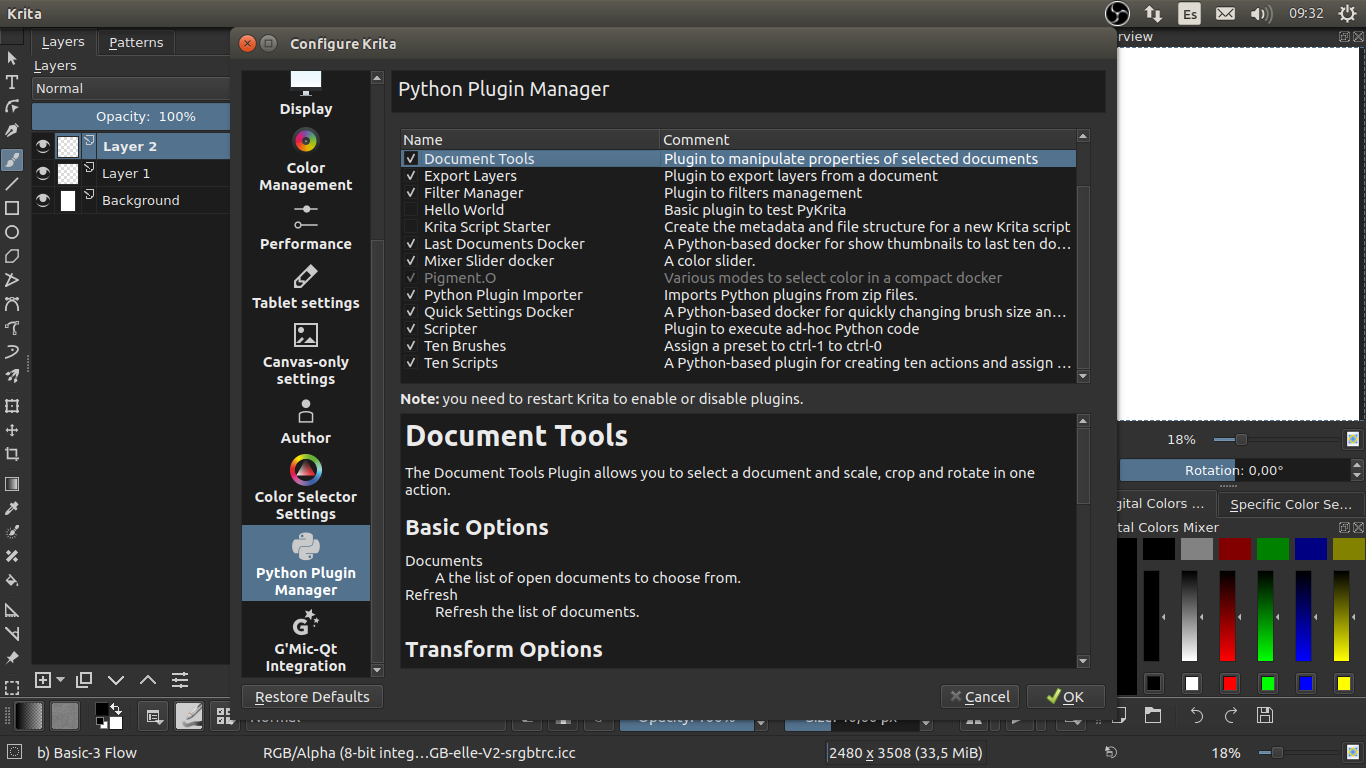
Hi, I’m trying to use the plug-in but somehow is grayed out and I can’t find it anywhere, I restarted the program twice and didn’t solve it. This may be a beginners question, but I’m new to Krita and already looked allover the web and found nothing about it. It happens with both, standard and lite versions.
I’m using Linux Ubuntu 18.04 and Krita 4.3.0
Thanks!!
1 Like
@Art.RS
hover your mouse over the addon entry to see what is the matter as the dialog box opens.
I wrote it on the manual on how to solve common problems where your at(manual).
Considering by the screen shots your a Linux user you have a couple of issues that can cause that (my blind guesses) and it is mostly stuff Linux incomplete installs on the given modules, so install this:
- pyqt5 svg
- symbola font
After that it should work. if not I will need the response of krita on what is the issue.
1 Like
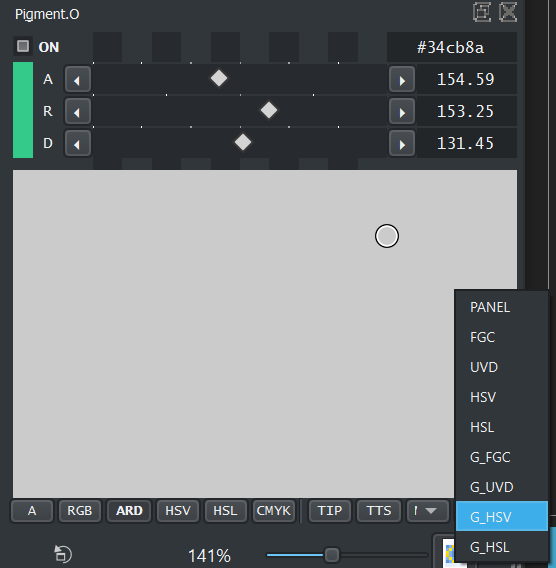
update: minor stuff
- grey panels have more consistent display between them (value display) and some organization
- bug fixes on the agnostic scaling.


1 Like
Update: Performance Upgrades and UI
- Did changes on how sliders are rendered, and now it is much much much lighter. The grey sliders speed is almost the same as with colors on my end. @okuma_10
- Pressing RMB on a slider will activate panels zoom cursor.
1 Like
Yes the speed of the gradient sliders is now almost identical to the gray sliders. Thanks!
2 Likes