[Plugin] Batch exporter from .kra to .png

Hi, I’m Joseph and I am pleased to join the Krita community.
What I’ve brought you today is a Krita plugin that enables you to batch export a list of .kra files in the folder into .png files.

Batch exporter from .kra to .png

Where you can find the plugin in gitHub

*GitHub - Joseph-Park-dev/BatchExportKraToPNG: This plugin gets the list of .kra files in the folder, exports them into .png files.

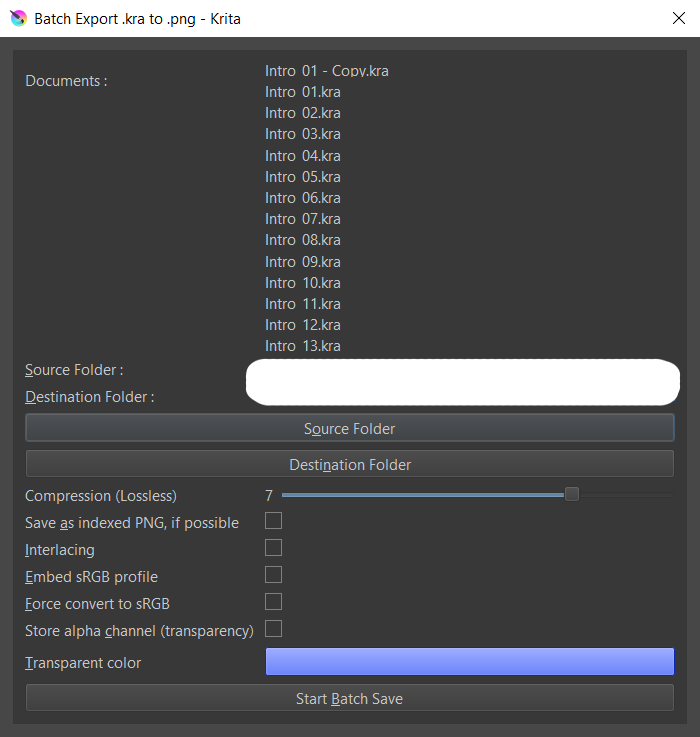
How it looks

You can browse and get the folder directory where you keep the .kra files,
then browse again to set the destination folder where the exported .pngs will be saved.
Press “Start Batch Save”, and voila, you get the .pngs out of .kra files.

Hope this helps!

7 Likes

:slight_smile: Hello @JosephPark1654, and welcome to the forum!

Thank you for sharing your work with the community!

I think it is okay for you when I move your plugin in our category for plugins, this will help other users help to find and use it?!

Here in this category, it is about questions for the further development of plugins and other features, so if someone is stuck, the user can ask for support by other devs in this category.

Michelist

Add/Edit: By the way, do you plan to add features like chooseable compression, or size adjustment for the exported pictures?

1 Like

Hi, @Michelist thanks for the help re-assigning the post to the correct category.

  • This plugin was built to assist my game dev. project and your suggestion to add features seems nice since I needed variations of .png files that I batch export.
    Thanks for the idea. That sure looks appealing!
2 Likes

I think ImageMagick could be your friend for such. :wink:

Michelist

1 Like

Welcome, @JosephPark1654. Thank you for sharing your plugin.

1 Like

Having chooseable compression, and size adjustments for the exports would make this SUPER useful for re-exporting Web Comic pages too. Especially if someone uploads to multiple websites with different size requirements.

Thanks for sharing!

2 Likes

Resizing okay, that can be useful, but compression? PNG compression is lossless, and therefore it should always be set to maximum.
For JPEG export, choosable compression is a must, but the JPEG Export Plugin already has that.

Michelist

You were the one that brought up choosable compression earlier? Figured this is what you meant?

That or you meant choosing the resize filter. Which would also nice to be able to do. (Especially as I’m personally a fan of Lanczos3 over Nearest Neighbor)

No :slight_smile:

For example, internal KRA file preview is a PNG with compression level 3

Reducing the compression level allows to get faster encoding process

Example on a file saved 10times (avg, min, max) with different compression level 0, 3, 9

png0        :  2.285 --  2.206  2.521
png3        :  4.783 --  4.752  4.832
png9        : 39.239 -- 38.978 39.512

Grum999

Where there is no need to calculate / no calculation, you are of course finished faster than where you calculate. And the more complex the calculation, the more time I need, of course.
Therefore, my statements may be confusing or may seem contradictory, but initially it was about the plugin of the topic creator and possible extension suggestions from me, my answer, which you both are concerned with, was about the fact that the images are intended for web export, and normally, as a rule of thumb, you should always rely on smaller files for web export.

Michelist

Hi, I hope y’all having a great day.
I have revised my previous plugin for Krita, which batch-exports the list of Krita files in a folder to .png files. In addition to the last version, now you can decide how the files should be exported.
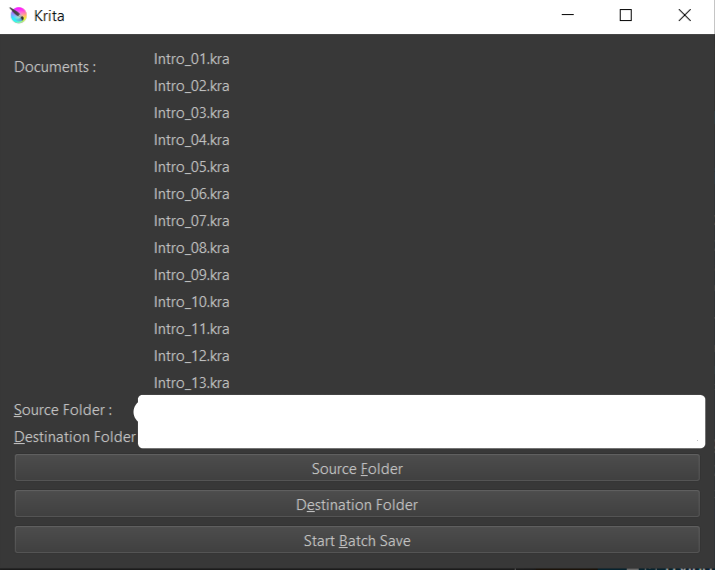
Here is the updated version of the plugin.

Batch exporter from .kra to .png - Updated

Where you can find the plugin in gitHub

*GitHub - Joseph-Park-dev/BatchExportKraToPNG

How it looks

Updated Features

  • Sliders & Checkboxes to modify the supported png export parameters.

Reminder

  • The plugin allows the modification of the supported parameters only, as described in the link below.
    https://api.kde.org/krita/html/classDocument.html#abda324b9beee9384879af8b7e7807cfa
    That means some of the parameters you can see in the save-as window for single .png file could not be included.
  • If there is something that is not working as it should be,
    Please let me know. Feedbacks are welcomed & appreciated.

Hope this helps!

Joseph.

1 Like

Thank you for sharing the update info. I’ve closed the new thread you made and appended this post to the original thread.

2 Likes

nice but has some bugs

AttributeError
Python 3.12.5: /usr/bin/python3
Fri Sep  6 15:34:00 2024

A problem occurred in a Python script.  Here is the sequence of
function calls leading up to the error, in the order they occurred.

 /home/troberto/.local/share/krita/pykrita/BatchExportKraToPNG/BatchExportKraToPNG.py in batch_save_kra_files(self=<BatchExportKraToPNG.BatchExportKraToPNG.BatchExportKraToPNG object>)
  109             return
  110         if self.message_conversion_confirm():
  111             self.convert_kra_to_png()
  112             self.message_conversion_finish()
  113 
self = <BatchExportKraToPNG.BatchExportKraToPNG.BatchExportKraToPNG object>
self.convert_kra_to_png = <bound method BatchExportKraToPNG.convert_kra_to....BatchExportKraToPNG.BatchExportKraToPNG object>>

 /home/troberto/.local/share/krita/pykrita/BatchExportKraToPNG/BatchExportKraToPNG.py in convert_kra_to_png(self=<BatchExportKraToPNG.BatchExportKraToPNG.BatchExportKraToPNG object>)
   97         for filename in self.directoryList:
   98             currentDocument = Krita.instance().openDocument(self.ui_layer.src_folder.text() + "/" + filename)
   99             currentDocument.setBatchmode(True)
  100             save_directory = self.ui_layer.dest_folder.text() + "/" + filename.rstrip(".kra") + ".png"
  101             currentDocument.exportImage(save_directory, exportParameters)
currentDocument = None
currentDocument.setBatchmode undefined
AttributeError: 'NoneType' object has no attribute 'setBatchmode'
    __cause__ = None
    __class__ = <class 'AttributeError'>
    __context__ = None
    __delattr__ = <method-wrapper '__delattr__' of AttributeError object>
    __dict__ = {}
    __dir__ = <built-in method __dir__ of AttributeError object>
    __doc__ = 'Attribute not found.'
    __eq__ = <method-wrapper '__eq__' of AttributeError object>
    __format__ = <built-in method __format__ of AttributeError object>
    __ge__ = <method-wrapper '__ge__' of AttributeError object>
    __getattribute__ = <method-wrapper '__getattribute__' of AttributeError object>
    __getstate__ = <built-in method __getstate__ of AttributeError object>
    __gt__ = <method-wrapper '__gt__' of AttributeError object>
    __hash__ = <method-wrapper '__hash__' of AttributeError object>
    __init__ = <method-wrapper '__init__' of AttributeError object>
    __init_subclass__ = <built-in method __init_subclass__ of type object>
    __le__ = <method-wrapper '__le__' of AttributeError object>
    __lt__ = <method-wrapper '__lt__' of AttributeError object>
    __ne__ = <method-wrapper '__ne__' of AttributeError object>
    __new__ = <built-in method __new__ of type object>
    __reduce__ = <built-in method __reduce__ of AttributeError object>
    __reduce_ex__ = <built-in method __reduce_ex__ of AttributeError object>
    __repr__ = <method-wrapper '__repr__' of AttributeError object>
    __setattr__ = <method-wrapper '__setattr__' of AttributeError object>
    __setstate__ = <built-in method __setstate__ of AttributeError object>
    __sizeof__ = <built-in method __sizeof__ of AttributeError object>
    __str__ = <method-wrapper '__str__' of AttributeError object>
    __subclasshook__ = <built-in method __subclasshook__ of type object>
    __suppress_context__ = False
    __traceback__ = <traceback object>
    add_note = <built-in method add_note of AttributeError object>
    args = ("'NoneType' object has no attribute 'setBatchmode'",)
    name = 'setBatchmode'
    obj = None
    with_traceback = <built-in method with_traceback of AttributeError object>

The above is a description of an error in a Python program.  Here is
the original traceback:

Traceback (most recent call last):
  File "/home/troberto/.local/share/krita/pykrita/BatchExportKraToPNG/BatchExportKraToPNG.py", line 111, in batch_save_kra_files
    self.convert_kra_to_png()
  File "/home/troberto/.local/share/krita/pykrita/BatchExportKraToPNG/BatchExportKraToPNG.py", line 99, in convert_kra_to_png
    currentDocument.setBatchmode(True)
    ^^^^^^^^^^^^^^^^^^^^^^^^^^^^
AttributeError: 'NoneType' object has no attribute 'setBatchmode'