This is not just cool factor. It probably allows a couple of entirely new workflow use cases for krita and outside of it too. Not to mention a connection like this makes a open source workflow stronger as a whole because of the bond. Software interconnection is a big thing ussually ignored in open source spaces and with blender non the less too. So much hype at least for me.
I can’t wait to try this. This only works with Blender 3.6?
Would this allow projecting paint back into blender or like eventually? Am I being too hopefull?
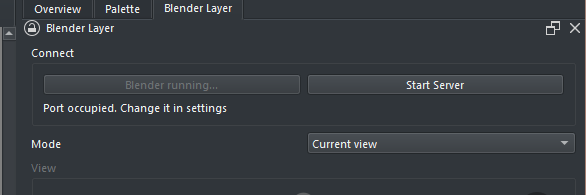
Doesn’t matter which port you choose, as long as it’s free (just try increasing the number until it works).
If you start Blender using the Start Blender button you don’t have to manually install the companion add-on (It gets passed as a command line argument to blender)
3.6 is only required if you want to have transparency
I have been thinking about adding maybe some live texture painting features or something similar.
Would it be possible to have a multi-layer .kra file open and have one of the layers be declared to be the ‘Blender live layer’.
Then, you could do multi-layer artwork and make a New Layer from Visble then copy-paste the content of it onto the Blender live layer.
Or, be able to change the Blender live layer by declaring a different layer, such as the latest New Layer from Visible layer to be the new Blender live layer.
If the Blender live layer was a group then you could have the entire .kra file in a group and have live multi layer painting from krita into Blender.
what does “waiting for Blender(timer)” mean? it seems I am stuck on that and nothing happens. view > connect to Krita is non existent on Blenders side.
Plasticity teased live streaming to and from Blender as a proof of concept, so it should be possible (in theory).
Maybe Plasticity developer could open source part of the code, but that’s wishful thinking on my end, besides he still has to actually produce a stable working version of it.
This is absolutely amazing work! I didn’t know Python plugins could do something so advanced. Like, wow. I totally see myself using it to set up a difficult perspective shot, although I’d probably have to brush up a bit on my Blender knowledge.
@EyeOdin as far as I can tell, if you disconnect once, then you will have to either restart Blender, or toggle off and on the plugin’s client part in Blender (if you added it, in Blender’s Add-On settings). That will prompt it to reconnect to the server in Krita.
As far as I can see I never achieved a connection. It just keeps counting with nothing happening as it seems to wait for blender. Also the blender script is impossible to install manually as it throws an error.
If the addon throws an error when installed manually, it probably won’t work when installed automatically either.
If you’re still getting the error from you’re earlier post, that seems to be numpy related, not necessarily specific to my code. Based on a quick google search for the last error message (DLL load failed: %1 is not a valid Win32) there might be a mismatch between 32 bits / 64 bits versions of your system and python environment.
Hmm, might be a different problem then,
but just to make sure open blender and go to the scripting tab. See if it says 64 bit in the console, something like:
PYTHON INTERACTIVE CONSOLE 3.10.9 (main, Dec 8 2022, 14:09:03) [MSC v.1928 64 bit (AMD64)]
maybe also try typing
import numpy
in the console, if numpy really is your problem, this should give the same error as when trying to import my addon.
Also, I’m a bit curious about the error message you got, because apparently, it’s using numpy in G:\Python\Blender\pyblender instead of the one from the integrated python that comes with Blender…
Have you somehow configured Blender to use a different Python environment?
According to some more googling it’s also possible you’re missing a Microsoft Visual C++ 2015 DLL. This usually gets installed with numpy but hey, you can try installing it
PYTHON INTERACTIVE CONSOLE 3.10.9 (main, Dec 8 2022, 14:09:03) [MSC v.1928 64 bit (AMD64)]
seems I need to check these path on my system and see if I can fix this
>>> import numpy
Traceback (most recent call last):
  File "<blender_console>", line 1, in <module>
  File "G:\Python\Blender\pyblender\modules\numpy\__init__.py", line 140, in <module>
    from . import _distributor_init
  File "G:\Python\Blender\pyblender\modules\numpy\_distributor_init.py", line 26, in <module>
    WinDLL(os.path.abspath(filename))
  File "C:\Program Files\Blender Foundation\Blender 3.5\3.5\python\lib\ctypes\__init__.py", line 374, in __init__
    self._handle = _dlopen(self._name, mode)
OSError: [WinError 193] %1 is not a valid Win32 application
P.S.
Seems that something I did 5 years ago managed to bite me in the ass now.
I was loading up a custom script folder on Blender that had numpy and PyQt5 on blender as I was trying to make PyQt5 scripts work there too but numpy was probably old or something by now. I cleared the paths to the script folder and the connection was successful.
Thank you so much for the help to establish the connection.
amazing plugin, a huge step forward. i love it. just wanted to report a bug, the plugin freezes blender 3.5
when you add a grease pencil object into it.



 I totally see myself using it to set up a difficult perspective shot, although I’d probably have to brush up a bit on my Blender knowledge.
 trying not to start an essay blabbering.