Plugin: Blender Layer - Live 3d View in Krita

Wow that is possible ha?
I tried it on the nightly builds I use and as all plugins build on the non nightly builds I get errors that Qt wants ints but python is giving it floats. Thus requires explicit int(casting)

Python 3.10.7: G:\Backup\02Krita\build\Nightly\bin\krita.exe
Sat Apr 22 10:24:22 2023

A problem occurred in a Python script.  Here is the sequence of
function calls leading up to the error, in the order they occurred.

 C:\Users\Nikola\AppData\Roaming\krita\pykrita\blender_layer\navigateWidget.py in paintEvent(self=<blender_layer.navigateWidget.NavigateWidget object>, e=<PyQt5.QtGui.QPaintEvent object>)
  291             painter.setBrush(self.palette().light())
  292         painter.drawEllipse(QPointF(x, y), r3, r3);
  293         instance.icon('tool_zoom').paint(painter, x - s * 0.5, y - s * 0.5, s2, s2, Qt.AlignCenter, QIcon.Normal if self.isEnabled() else QIcon.Disabled)
  294         if self.highlight == 2:
  295             painter.setBrush(brush)
global instance = <PyKrita.krita.Krita object>
instance.icon = <built-in method icon of Krita object>
).paint undefined
painter = <PyQt5.QtGui.QPainter object>
x = 225.0
s = 20.7
y = 21.0
s2 = 22.5
global Qt = <class 'PyQt5.QtCore.Qt'>
Qt.AlignCenter = 132
global QIcon = <class 'PyQt5.QtGui.QIcon'>
QIcon.Normal = 0
self = <blender_layer.navigateWidget.NavigateWidget object>
self.isEnabled = <built-in method isEnabled of NavigateWidget object>
QIcon.Disabled = 1
TypeError: arguments did not match any overloaded call:
  paint(self, QPainter, QRect, alignment: Union[Qt.Alignment, Qt.AlignmentFlag] = Qt.AlignCenter, mode: QIcon.Mode = QIcon.Normal, state: QIcon.State = QIcon.Off): argument 2 has unexpected type 'float'
  paint(self, QPainter, int, int, int, int, alignment: Union[Qt.Alignment, Qt.AlignmentFlag] = Qt.AlignCenter, mode: QIcon.Mode = QIcon.Normal, state: QIcon.State = QIcon.Off): argument 2 has unexpected type 'float'
    __cause__ = None
    __class__ = <class 'TypeError'>
    __context__ = None
    __delattr__ = <method-wrapper '__delattr__' of TypeError object>
    __dict__ = {}
    __dir__ = <built-in method __dir__ of TypeError object>
    __doc__ = 'Inappropriate argument type.'
    __eq__ = <method-wrapper '__eq__' of TypeError object>
    __format__ = <built-in method __format__ of TypeError object>
    __ge__ = <method-wrapper '__ge__' of TypeError object>
    __getattribute__ = <method-wrapper '__getattribute__' of TypeError object>
    __gt__ = <method-wrapper '__gt__' of TypeError object>
    __hash__ = <method-wrapper '__hash__' of TypeError object>
    __init__ = <method-wrapper '__init__' of TypeError object>
    __init_subclass__ = <built-in method __init_subclass__ of type object>
    __le__ = <method-wrapper '__le__' of TypeError object>
    __lt__ = <method-wrapper '__lt__' of TypeError object>
    __ne__ = <method-wrapper '__ne__' of TypeError object>
    __new__ = <built-in method __new__ of type object>
    __reduce__ = <built-in method __reduce__ of TypeError object>
    __reduce_ex__ = <built-in method __reduce_ex__ of TypeError object>
    __repr__ = <method-wrapper '__repr__' of TypeError object>
    __setattr__ = <method-wrapper '__setattr__' of TypeError object>
    __setstate__ = <built-in method __setstate__ of TypeError object>
    __sizeof__ = <built-in method __sizeof__ of TypeError object>
    __str__ = <method-wrapper '__str__' of TypeError object>
    __subclasshook__ = <built-in method __subclasshook__ of type object>
    __suppress_context__ = False
    __traceback__ = <traceback object>
    args = ("arguments did not match any overloaded call:\n  p...Icon.Off): argument 2 has unexpected type 'float'",)
    with_traceback = <built-in method with_traceback of TypeError object>

The above is a description of an error in a Python program.  Here is
the original traceback:

Traceback (most recent call last):
  File "C:\Users\Nikola\AppData\Roaming\krita\pykrita\blender_layer\navigateWidget.py", line 293, in paintEvent
    instance.icon('tool_zoom').paint(painter, x - s * 0.5, y - s * 0.5, s2, s2, Qt.AlignCenter, QIcon.Normal if self.isEnabled() else QIcon.Disabled)
TypeError: arguments did not match any overloaded call:
  paint(self, QPainter, QRect, alignment: Union[Qt.Alignment, Qt.AlignmentFlag] = Qt.AlignCenter, mode: QIcon.Mode = QIcon.Normal, state: QIcon.State = QIcon.Off): argument 2 has unexpected type 'float'
  paint(self, QPainter, int, int, int, int, alignment: Union[Qt.Alignment, Qt.AlignmentFlag] = Qt.AlignCenter, mode: QIcon.Mode = QIcon.Normal, state: QIcon.State = QIcon.Off): argument 2 has unexpected type 'float'

Hmm, I have tried it with blender 3.4 and 3.6 and adding a grease pencil object seems to be fine for me… Does this occur reliably for you? Otherwise, the problem might be caused by something else :thinking:

I’m honestly not sure why this didn’t cause any problems in any of the other builds, but anyways I’ve added the casts now :smiley:

1 Like

Yes it’s odd. Apparently the Krita team did some update to Qt, that ends up complaining if an int is not an int.
I have the same issue with other plugins like Pigment.O for example.

@yuntoko
I downloaded the updated version and now loads fine. However I get this message in the plugin

Turn off transparent background. Usually, the addon should detect whether transparency is supported based on Blender version, but I assume you’re using Blender 3.6 alpha from more than a week ago, so my pull request isn’t in your Blender yet xD

3 Likes

Thanks @Yuntoko that solved the issue

2 Likes

THE PLUGIN I WANTED TO MAKE IS REAL??? Epic! Can I still make my own version of this though?

5 Likes

Why not, who hinders you to do so? It is all about you. You decide, make or not, do or not. As said, it is all about you. :slight_smile: :+1:
And the good thing of two such plugins is, respectively could be, there will be two coders wanting to make their plugin better, maybe better as the other one plugin, concurrence is often good for innovation. It can be fun.

Michelist

2 Likes

Or, you could try and see whether this plugin can be further optimised in terms of speed, rework the UI or even try to make a C++ port that could be merged with Krita. :wink:

3 Likes

Sure, why not. Go for it, it’s a fun little project and now you even know for sure that it is possible :smiley:
Depending on your level of experience with coding, it could also be a good idea to just mess around with the code from this plugin and see if you can add some cool features on top of it.

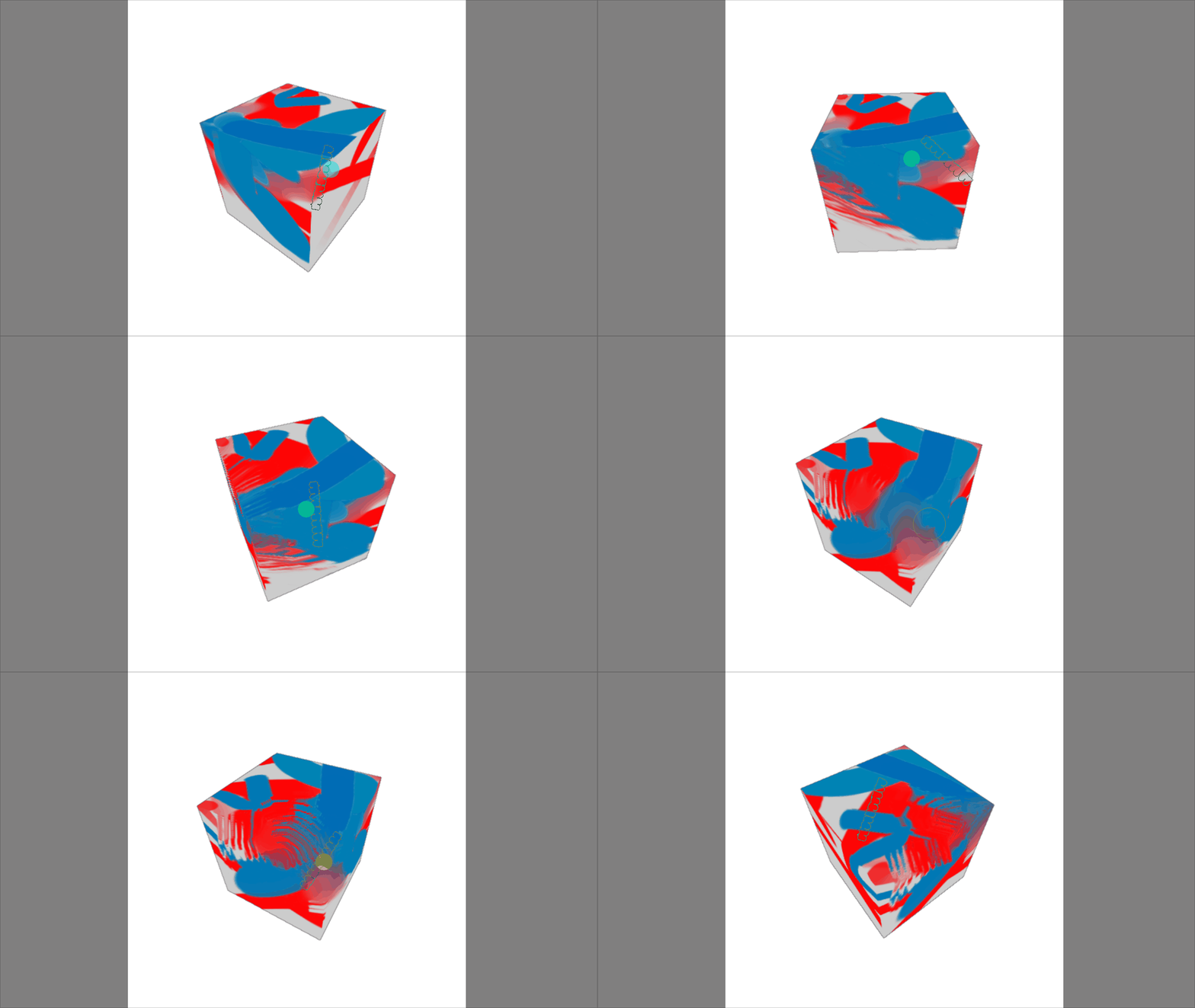
@EyeOdin To my own surprise, it turns out even some basic projecting painting isn’t that difficult to achieve. (Although it will be somewhat limited) Guess there might be a version 1.1 soon:

projection

24 Likes

H-how do you make these??? They’re like magic!

Holley Molly! That is super amazing! Honestly I am in awe.
I can’t wait to go back to 3d and create a character to test that out for reals.

Not gonna lie that is a big deal.

2 Likes

“Krita can now work with Blender” - How great would it feel to announce that?

Just spitballing, but I say, we should spend a year to get this plugin working smoothly, and have this feature be THE main draw of the next major Krita release. It might even be good to wait for Krita 6 as a “fresh slate” thing. Two-way Blender integration is a killer feature. I think people have avoided requesting it more because they got the impression that it was impossible.

It would be a huge PR coup if Krita was the only good painter program that works in and out of Blender. Then we get some of that sweet studio money and an influx of pro users. CSP will never offer Blender support - this is a golden opportunity for us to pull ahead of them and beat them.

Of course if Krita links arms with Blender, then people will start begging for Krita to clone Substance Painter and put in nodes, but I bet it’s worth the tradeoff. And hey, if Krita can paint into Blender, maybe even nodes are easier than we thought. Sky’s the limit.

4 Likes

I don’t know how good that last one could be, I really don’t know if it’s necessary too, I like the features but as long as krita doesn’t bloat everything is fine, I like this plugin because it doesn’t make Krita heavy.

2 Likes

I really want this!

My current workflow to get painted textures into blender is exporting frames, then drawing over in krita and projecting them back in blender.
But then you are limited by the direction of the projection (of course you can fix this by going back and forth but the process isn’t smooth).

This would be so much easier and more fun.

1 Like

Painting over 3d models looks awsome!
Just wondering, did you post any of this on Blenderartists or on devtalk? I couldn’t find it, so I would like to encourage you to post it there to expose this workflow to more people. See if there are other developers out there who might get some inspiration out of this, perhaps. Please also tag Julien Kaspar who is in charge of the Texture Paint module, he might be interested in this as well.

7 Likes

I just created a new account to say that this is probably the best Krita plugin I’ve ever seen, I can’t wait to see this be the next big thing in open-source software :3c

That being said, I do have a bug that needs to be fixed; there’s an error message that says “‘Document’ object has no attribute ‘setModified’”, does anybody know what that means and how I can fix it? Thank youuu

4 Likes

You probably don’t have the newest version of krita. However, the function causing the problem isn’t vital anyways, so I’ll just ignore it in older versions for compatibility.
Try reinstalling the plugin, it should be fixed now.

I still want to built some ui and add a few more minor features, but I might post it over there it once I have finished up that functionality. (Performance is also even worse than syncing Blender → Krita, apparently reading pixels from Krita’s layers is much slower than writing to them?)

5 Likes

It works now, thank you so much!! Wish you all the support for you and your plugin ^^

3 Likes

Thank you for taking the time to build this amazing plugin.

I didn’t know that this plugin is a thing omg… Thank you very much for this… I kinda miss this feature after moving from CSP to Krita

2 Likes