Hello,
I use Krita and Blender each in the latest version on Linux Mint.
I get the error message:
Attribute Error: module “errno” has no attribute “WSAECONNRESET”.
Is the performance a problem already, or just could be better? I’m not sure how it would behave on a lower-end system.
If the current method allows Python direct access to the data, then it’s probably the bottleneck, although it should be measured first to be sure. If the script is indeed the problem, then probably implementing this sort of shared memory interop and exposing it as a native Krita feature (SharedMemoryLayer, or something?) would probably work great. And could maybe be a building block for other plugins.
Oops, the error code I check for might be Windows only. I’ve updated the addon, so try reinstalling. Anyways, if you got this when trying to start blender (rather than after the connection) this probably just means that the port is occupied by some other program and you have to change it in settings (button at the bottom of the docker), just try a few different numbers.
I might have to handle this case a bit more automatic in the future
It’s not like the interface freezes or anything, just seeing the update takes a while.
For normal uv painting this should be fine, however painting directly on models becomes a bit less practical in my opinion (And way less fun). I’ll just try and see how fast I can make it.
Even with a canvas size of just 1024x1024, it’s already a bit painful, especially considering updating from Blender is so much faster
EDIT: Turned out to be mostly my fault after all, with a bit more work I should be able to make it about as fast as syncing the other way around
i got a crash when using “camera” mode in krita with a grease pencil line art modifier being used in blender 3.5. i also get a crash when adding a grease pencil blank object while in “camera” mode in krita. in “current view” mode this does not happen. this also happens in blender 3.6.
Thanks for the follow up
Camera mode seemed to be the issue, apparently, I had previously only tried it in current view… Now I’m able to reproduce the problem.
I’ve made a little change which seemed to fix this for me, (Although I’m still not 100% sure what exactly the issue was, perhaps a redraw being triggered while drawing resulting in an infinite loop, maybe?).
Try reinstalling and see if it works now.
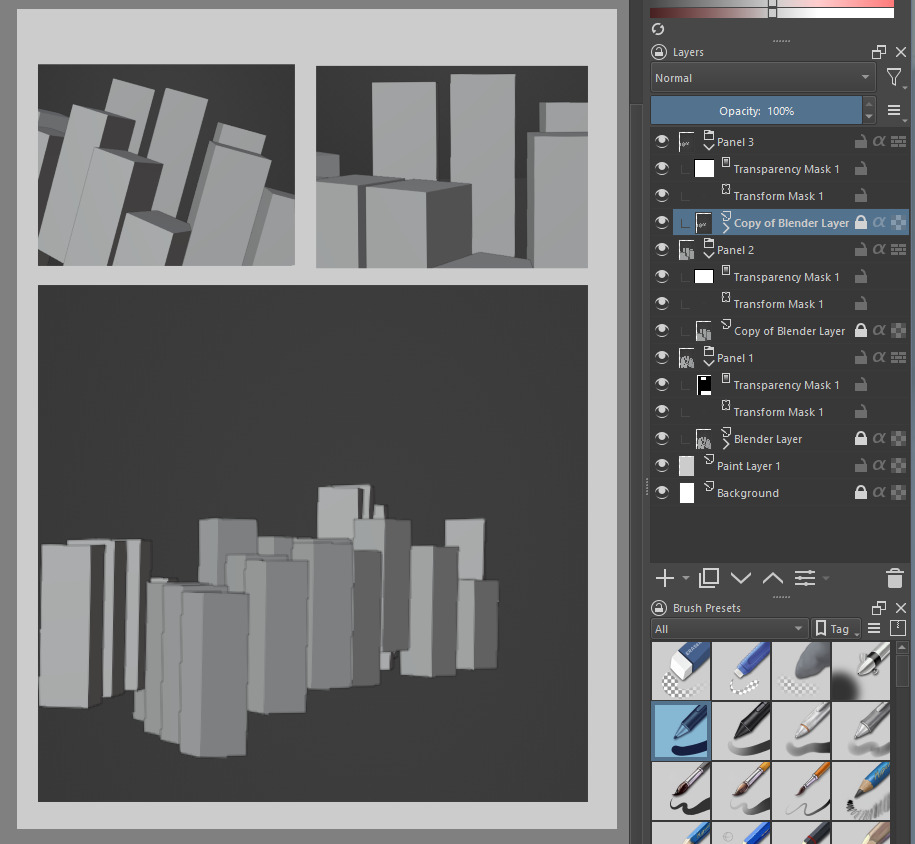
Yes, that’s exactly what this Plugin does, the ‘Blender Layer’ that shows the 3d view is ALWAYS just a normal raster layer (that gets overwritten/ updated in the background when the view changes).
Once you disconnect from Blender you’re left with a layer just like any other. And you can always copy the layer to get a ‘screenshot’ of the current view (Although you have to unlock it with the pad symbol in order to be able to draw on it)
this thing is a complete game changer. if the developers put some effort and support into this, this thing could easily surpass clip studio paint and its 3d options.
Glad it works now!
Well for a single frame, you could use the ‘Render Result’ mode to trigger a render that will be directly imported…
Fully supporting a different render engine in Blender isn’t straightforward as resolution / aspect ratio (or even viewport) of the document in Krita doesn’t necessarily match the current viewport so I have to do an independent render of the scene from python… which MALT doesn’t seem to support that out of the box, so this is a bit out of scope right now
Based on the way MALT is implemented actually it should be possible to completely bypass Blender and just directly connect the engine to Krita… But you would have to setup the scene and materials yourself, making that a completely different project XD.
here panel 1 has the blender layer and panel 2/3 has the copied blender layer (that is now rasterised)
If you want to preserve the view for all panels, I think using the camera mode and then keyframing all the panel views in blender so you can go back and easily redo a panel if needed
I like that you can also greenscreen the object in blender and color to alpha in krita
Right! this is so good for comic. I made a whole school layout before and i need to screenshot one by one to use it as background guide, but this - this will allow what you do.
Also can you imagine us sharing resources - such small cityscape, cafe, bridge layout for comic background so ones who are not very into blender modeling could still harness its power.
I imagine this will be very useful for comics. Can’t wait to see what people will be doing with this
By the way you could also limit the Blender view to a panel by ticking the small ‘Limit image region’ box at the bottom of the docker.
I think I might also add support for multiple cameras in the future, like adding a ‘new camera from view’ and ‘view to camera’ isn’t too difficult to implement and would make managing different angles much easier.
Blender 3.5+ already supports using the compositor in the viewport, you just have to enable it in the shading options. I’ve tested it and it also works in Krita. (However, it sometimes crashes Blender for me… it also does that with some sample code entirely from the Blender docs, so I might have to file a bug report right there, maybe that’s just a 3.6 preview thing though…)
In fact, there already is a ‘render result’ mode which will trigger a full render, that should work as well.
The second feature sounds a lot like the texture painting stuff I’m working on right now
Is it ok to have the Blender plugin enabled even if I am not using it? I am just worried that it would affect Blender’s performance when I am not using the Krita interaction, given there seems to be a server of some kind is running inside Blender.
Unless I’ve screwed somewhere up there should be basically no overhead while not connected. All the handlers and communication stuff gets registered on connect and unregistered on disconnect (If you were connected previously it might take some time before python decides to free some of the memory, but blender should be able to handle that).
The automatic connection works because of some command line parameters which tell the addon to connect immediately, not because there is a server running at all times