So, this seems to be caused by the shared memory file… (And there is another error due to improper error handling xD) Try disabling shared mem by going to the settings in the docker (button at the bottom right of the blender layer docker, under connection untick ‘use shared memory buffer’). This will probably make things slower, but if that fixes it, we at least know what’s causing the problem 
1 Like
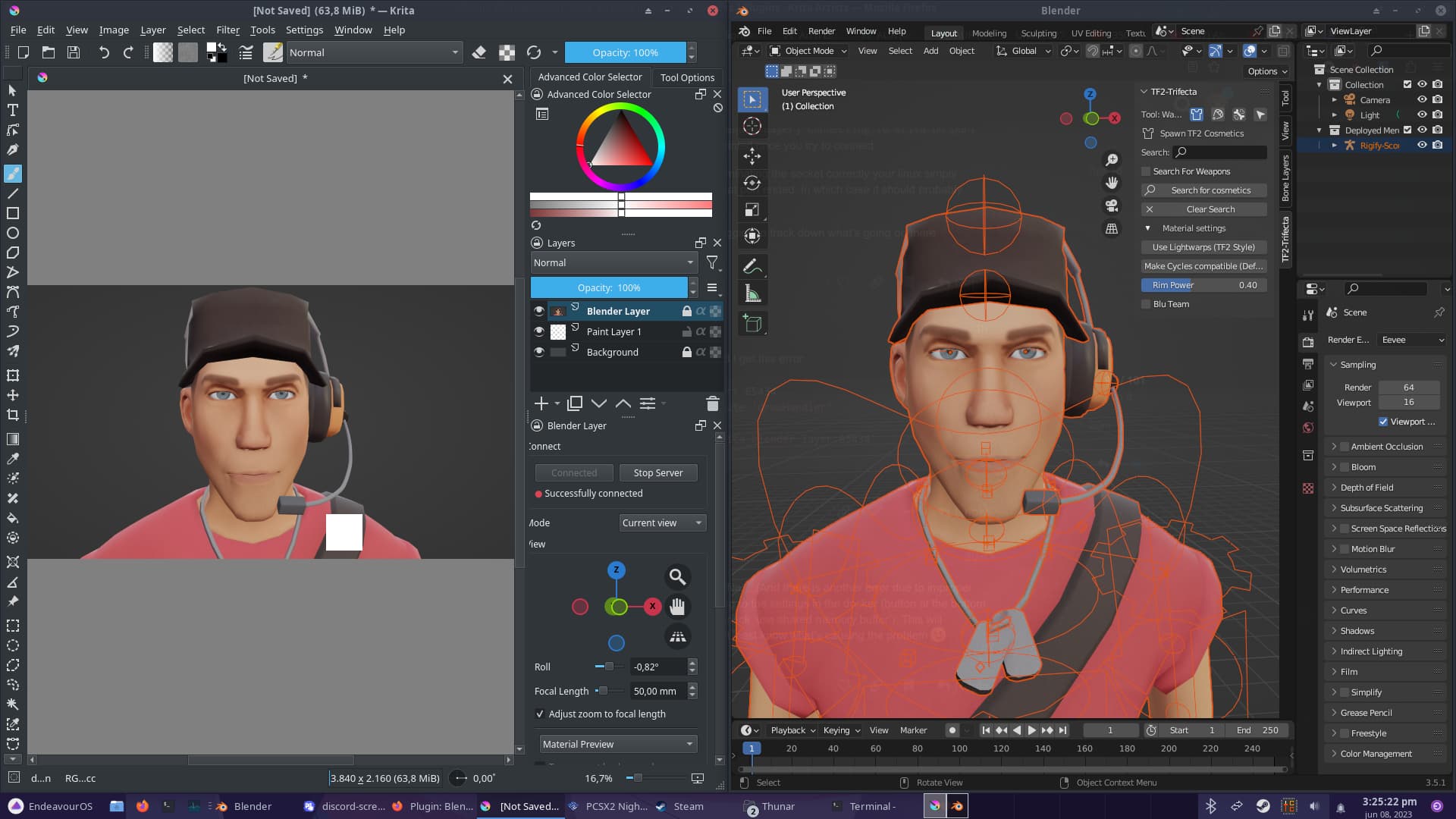
Try disabling shared mem
That seems to fixed it! I can now open krita, do my stuff, open blender later and start a server without issue!
I also don’t notice any reduction in performance, so in the mean time I will just leave that disable
2 Likes
Hi @Yuntoko, I wanted to share a quick bug report today. It has to do with using a named blend file and then switching to a new file. To reproduce:
- Create a new blend file and save it as a.blend
- Close Blender
- Run Krita and create a new document
- Drag a.blend file into the canvas, thus connecting the blender layer
- Save the Krita file b.kra
- Close Krita and Blender
- Open the b.kra file and connect to Blender, it will open a.blend scene as well
- Now create a new file in blender
- Switch to Krita, an error message will open in a popup window (it may be behind other windows).
As far as I could tell, the problem is that the “file” message is sent with an empty string argument, because the new Blender file has no name yet. Here’s the message I got:
Error message (expand)
ValueError
Python 3.8.1: C:\Program Files\Krita (x64)\bin\krita.exe
Tue Jun 27 23:38:06 2023

A problem occurred in a Python script.  Here is the sequence of
function calls leading up to the error, in the order they occurred.

 C:\Users\Maciek\AppData\Roaming\krita\pykrita\blender_layer\blenderLayer.py in handleMessage(self=<blender_layer.blenderLayer.BlenderLayer object>, msg=('file', ''))
  979             file = msg[1]
  980             self.setStatus(i18n("Successfully connected")+ '<br/>'+os.path.basename(file))
  981             self.saveFilenameToLayer(file)
  982         elif type == 'engine':
  983             self.updateCyclesWarning(msg[1], self.settings.shading)
self = <blender_layer.blenderLayer.BlenderLayer object>
self.saveFilenameToLayer = <bound method BlenderLayer.saveFilenameToLayer of <blender_layer.blenderLayer.BlenderLayer object>>
file = ''

 C:\Users\Maciek\AppData\Roaming\krita\pykrita\blender_layer\blenderLayer.py in saveFilenameToLayer(self=<blender_layer.blenderLayer.BlenderLayer object>, fileName='', overwrite=True)
 1299         name = fileName
 1300         if self.settings.relPath and self.activeInFile:
 1301             name = os.path.relpath(name, os.path.dirname(self.activeInFile))
 1302
 1303         if len(l.childNodes()) == 0:
name = ''
global os = <module 'os' from 'C:\\Program Files\\Krita (x64)\\python\\python38.zip\\os.pyc'>
os.path = <module 'ntpath' from 'C:\\Program Files\\Krita (x64)\\python\\python38.zip\\ntpath.pyc'>
os.path.relpath = <function relpath>
os.path.dirname = <function dirname>
self = <blender_layer.blenderLayer.BlenderLayer object>
self.activeInFile = r'C:\Users\Maciek\Desktop\b.kra'

 C:\Users\Maciek\Desktop\ntpath.py in relpath(path='', start=r'C:\Users\Maciek\Desktop')

ValueError: no path specified
    __cause__ = None
    __class__ = <class 'ValueError'>
    __context__ = None
    __delattr__ = <method-wrapper '__delattr__' of ValueError object>
    __dict__ = {}
    __dir__ = <built-in method __dir__ of ValueError object>
    __doc__ = 'Inappropriate argument value (of correct type).'
    __eq__ = <method-wrapper '__eq__' of ValueError object>
    __format__ = <built-in method __format__ of ValueError object>
    __ge__ = <method-wrapper '__ge__' of ValueError object>
    __getattribute__ = <method-wrapper '__getattribute__' of ValueError object>
    __gt__ = <method-wrapper '__gt__' of ValueError object>
    __hash__ = <method-wrapper '__hash__' of ValueError object>
    __init__ = <method-wrapper '__init__' of ValueError object>
    __init_subclass__ = <built-in method __init_subclass__ of type object>
    __le__ = <method-wrapper '__le__' of ValueError object>
    __lt__ = <method-wrapper '__lt__' of ValueError object>
    __ne__ = <method-wrapper '__ne__' of ValueError object>
    __new__ = <built-in method __new__ of type object>
    __reduce__ = <built-in method __reduce__ of ValueError object>
    __reduce_ex__ = <built-in method __reduce_ex__ of ValueError object>
    __repr__ = <method-wrapper '__repr__' of ValueError object>
    __setattr__ = <method-wrapper '__setattr__' of ValueError object>
    __setstate__ = <built-in method __setstate__ of ValueError object>
    __sizeof__ = <built-in method __sizeof__ of ValueError object>
    __str__ = <method-wrapper '__str__' of ValueError object>
    __subclasshook__ = <built-in method __subclasshook__ of type object>
    __suppress_context__ = False
    __traceback__ = <traceback object>
    args = ('no path specified',)
    with_traceback = <built-in method with_traceback of ValueError object>

The above is a description of an error in a Python program.  Here is
the original traceback:

Traceback (most recent call last):
  File "C:\Users\Maciek\AppData\Roaming\krita\pykrita\blender_layer\blenderLayer.py", line 981, in handleMessage
    self.saveFilenameToLayer(file)
  File "C:\Users\Maciek\AppData\Roaming\krita\pykrita\blender_layer\blenderLayer.py", line 1301, in saveFilenameToLayer
    name = os.path.relpath(name, os.path.dirname(self.activeInFile))
  File "ntpath.py", line 694, in relpath
ValueError: no path specified
Thank you for your support! I wanted to use Blender to deal with a bit tricky perspective shot. At first I did it without the plugin, but then it’s problematic to get the image back into Krita and deal with the low resolution and getting things aligned. The plugin really helps to do that effortlessly!
Here’s the correction I did:
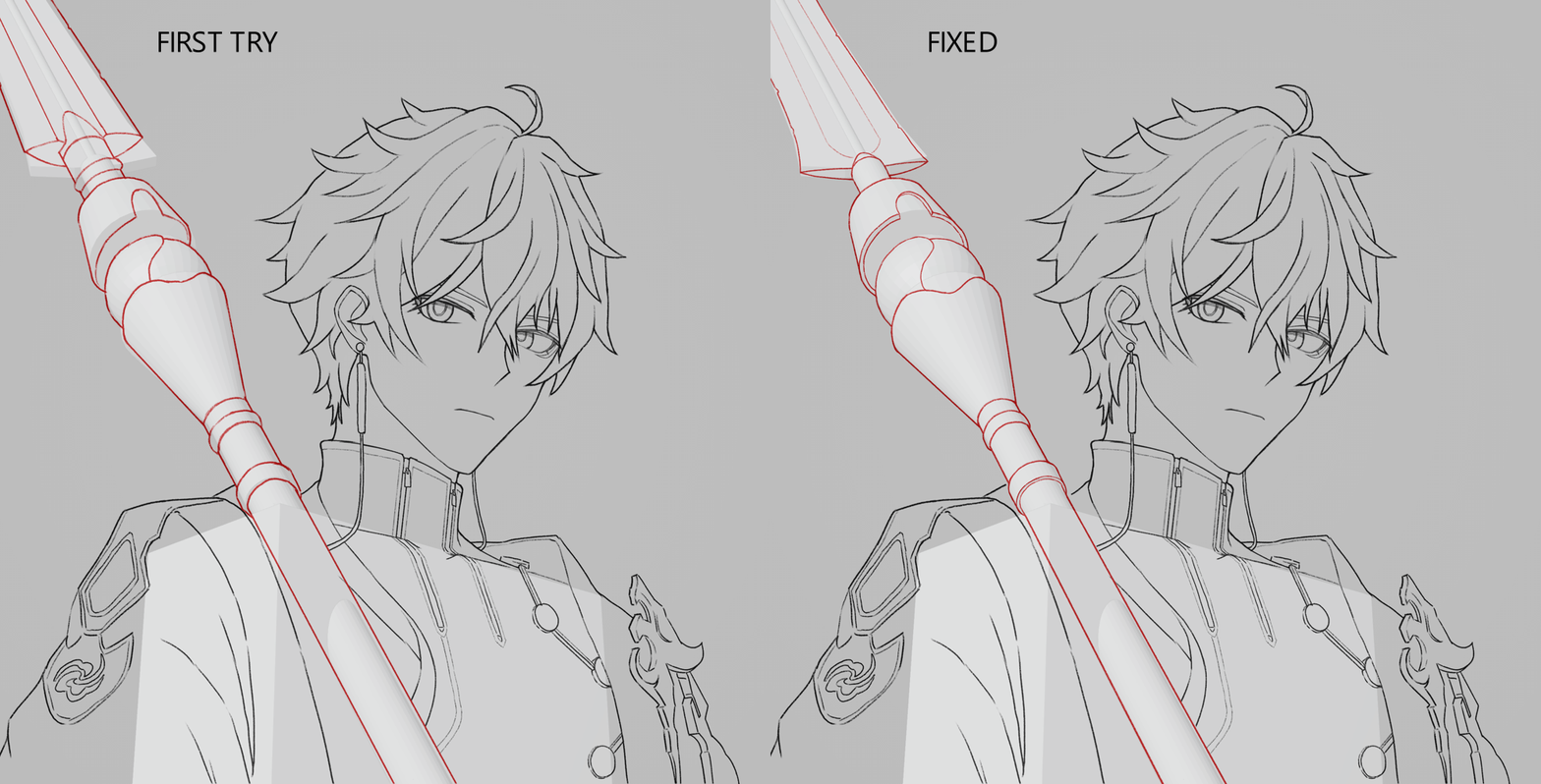
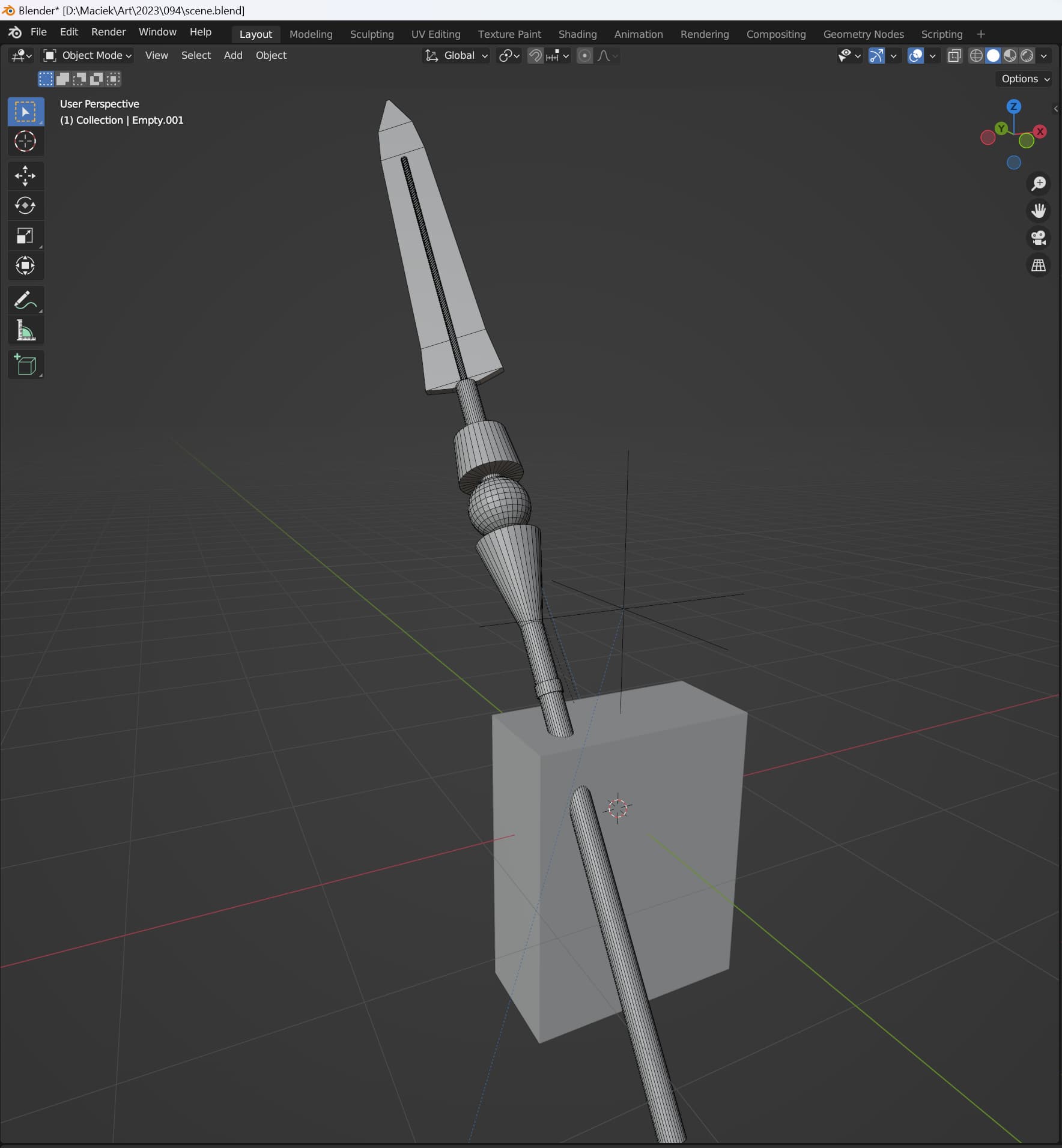
Mad modelling skills  but honestly, just a few rough shapes work just fine for a guideline.
5 Likes
Someone might have missed this but Blender together with its community in the latest release also released free cc0 license humanoid models for anyone to use: Base Meshes - Free Asset Bundle - YouTube these could be very helpful for anyone looking into characters with this plugin or more.
9 Likes
Glad you found this plugin useful and thanks for reporting!
Turns out, an empty filename on its own is fine, just trying to get the relative path to it isn’t xD. Should be fixed now.
1 Like
- Install Blender
- Make sure the ‘Blender Layer’ add-on is installed and enabled in Krita
- Open a document
- Connect to Blender:
- Drag and drop a .blend File into Krita. This will start Blender, connect and directly open the .blend file. - Once I do the last part nothing happens, blender and krita are open but drop the .blend file in krita doesn’t make it open like in the gif at the top.
Edit: Ok there is a blender layer on my krita, but after I click connect to blender It keeps saying waiting for blender. direclty opening the .blend does not wwork.
@Murillo_Daniel: Only for being absolutely sure, you did install the plugin after you downloaded it from GitHub?
@Yuntoko, I think your advice is needed.
Michelist
Hmm if blender opens, but it just keeps waiting for the connection in krita, there probably is some problem on the blender side.
Could you see if there is an error in the console? After trying to connect, in Blender goto Window->Toggle System Console. (Might be on windows only, if you’re on linux/mac maybe try running krita from the terminal to get the output there)
There should be a message like
[Blender Layer] Connecting to krita on port 65434...
1 Like
I’m pretty sure I did, the Blender-Layer shows up when I open Krita, I also installed the .zip on Blender, but nothing new shows up.
this is what shows up in the terminal:
(process:62189): Gtk-WARNING **: 16:33:42.362: Locale not supported by C library.
Using the fallback ‘C’ locale.
No “breeze” available.
Set style “fusion”
Invalid profile : “/usr/share/color/icc/colord/Crayons.icc” “Crayon Colors”
Invalid profile : “/usr/share/color/icc/colord/x11-colors.icc” “X11 Colors”
NOT COOL: Duplicated action name from xml data: “blender_layer_blender”
NOT COOL: Duplicated action name from xml data: “blender_layer_update”
NOT COOL: Duplicated action name from xml data: “blender_layer_update_animation”
NOT COOL: Duplicated action name from xml data: “blender_layer_render”
NOT COOL: Duplicated action name from xml data: “blender_layer_render_animation”
QObject::startTimer: Timers cannot have negative intervals
/usr/lib/x86_64-linux-gnu/krita-python-libs/krita added to PYTHONPATH
Color management: using fallback mode for management
Color management: Error could not find role data role.
Warning: Falling back to the standard locale (“C”)
Read prefs: /home/PC/.config/blender/3.0/config/userpref.blend
Color management: scene view “Filmic” not found, setting default “Standard”.
Traceback (most recent call last):
File “/home/PC/.local/share/krita/pykrita/blender_layer/blenderLayerClient.py”, line 2, in
import bpy, gpu, numpy as np
ModuleNotFoundError: No module named ‘numpy’
Error in sys.excepthook:
Traceback (most recent call last):
File “/usr/lib/python3/dist-packages/apport_python_hook.py”, line 153, in apport_excepthook
with os.fdopen(os.open(pr_filename,
FileNotFoundError: [Errno 2] No such file or directory: ‘/var/crash/_usr_bin_blender.1000.crash’
Original exception was:
Traceback (most recent call last):
File “/home/PC/.local/share/krita/pykrita/blender_layer/blenderLayerClient.py”, line 2, in
import bpy, gpu, numpy as np
ModuleNotFoundError: No module named ‘numpy’
Traceback (most recent call last):
File “/usr/lib/python3.10/multiprocessing/resource_tracker.py”, line 199, in main
cmd, name, rtype = line.strip().decode(‘ascii’).split(‘:’)
ValueError: too many values to unpack (expected 3)
Read blend: /home/PC/Downloads/test.blend
wow, this is a great project
1 Like
This seems to be the main culprit
ModuleNotFoundError: No module named ‘numpy’
(To make sure this is the problem go to the scripting tab in blender and type ‘import numpy’, if this really is what’s missing, it should give you the same error)
I believe by default, numpy should come installed with Blender, perhaps you have configured Blender to use you system python instead of the integrated one? (It mentions usr/lib/python3.10/ in the log…).
You could just try manually installing numpy, but to avoid version mismatches it might be a better idea to use the bundled version
I fixed it, since I’m on Linux I downloaded Blender through the Mint Store, I uninstalled it and decide to install through Blender website and it worked right away, the Mint store must an old and imcompatible version, thanks for the help though.
1 Like
In case you got Krita through the Mint Store too, it is highly recommended to drop it and use the AppImage instead, it is the only Krita-Version for Linux built by the makers of Krita. There was more than one request for support from Mint-Users, only because the maintainers of Mint thought it would be a good idea not to follow the build-guidelines for Krita and to omit the especially patched Qt-Libraries Krita needs to work without issues. I don’t know if the Mint repo maintainers have fixed this problem in the meantime, but as far as I know they were at least informed about this fact.
And if I remember this correctly, they also omitted to add G’MIC into their build, not obeying the fact that it is now part of Krita and can’t be loaded manually like it was back in the days of Krita 4.x, but this can be me mixing this up with the many distributions that did exactly this, it is an error made by many repo maintainers.
By the way, in case you are using Wayland, it is not recommended to use Wayland with Krita (and some other apps out of the graphics area), because Wayland isn’t yet fully usable for these applications, and you may face quirks in some situations.
So, if you are on Wayland it may be a good idea to choose X11 instead, at least for sessions with apps like Krita until Wayland is “ripe”.
Michelist
4 Likes
Great plugin you created, alas, I am a cinema 4d user. 
I believe if you export your Cinema 4D models as .obj, .fbx, or .dae files, you can import them to Blender.
I have not used Cinema 4D myself, but I was able to that with Maya to Blender model transfers in the past. You might lose some details depending on your settings, but you’ll have your models!
1 Like
Or USD, should also work.
I’m curious about how to correctly interact with this.
So the goal is that Krita can Paint in a layer, that I can later export back to blender and use it? I am trying to wrap my head around if I should texture paint using Krita (for Blender’s benefit), or use Blender to help Krita draw layers using a 3D model by tracing over it?
It is meant for getting 3d models as reference, posing blocking out shapes for your digital painting. Like how you can have 3D mannequins in clip studio paint. I don’t know if it works for texture painting from krita to blender
1 Like
Thank you for clarifying that.