@sydwil91 Your newest topic has been merged into the post where you originally requested help.
4 Likes
Oh, yeah…  It’s easy for me to forget that people don’t live inside of computer screens and are in the same time zone as me. I completely understand people have their own lives and jobs and I should’ve been more mindful of that. I was just really eager for the plugin to be fixed because it was the closest thing to Krita’s old reference docker and I liked Krita’s old reference docker. I thought that maybe I could fix on my own (sorta- with ChatGPT’s help) despite the lack of coding knowledge (that’s why I asked for help in the plugin development section). But yes, I do realize these things take quite a bit of time. That’s a lesson I should’ve have learned. I don’t mind waiting patiently for it! I think it’s best that the developer fixes it anyway, or at least someone skilled enough in programming.
1 Like
Thanks!
1 Like
I have run into this issue as well and might have a work around for until Freyalupen is able to take a look at it.
Try rotating the reference image first, and then flip it. This makes the error stop for me.
2 Likes
Thank you so much! Your work around stopped the error for me! Now the stupid error won’t keep popping up. Hopefully Freyalupen can resolve this issue easily.
2 Likes
Yes, it seems I made a silly mistake when I added rotation that made mirroring not work unless rotation was set first. Thanks for reporting it, I’ve pushed a fix now.
3 Likes
Oh that makes a lot of sense now! Thank you so much for fixing it! Will update it now. And no problem! 
An update; I just pushed several changes.
On the user side:
- Fixed some layout issues. There’s now less space between the menubar and tabbar, and around the image buttons area on the bottom. This leaves more space for the image; notice how fit-to-view goes from 33% to 35% here.
Before and after:
(Example image is an old drawing of mine based on a photo from Wikipedia.) - Added an attempt at zoom/pan/rotate mode shortcuts; Space to pan, Ctrl+Space to zoom, Shift+Space to rotate. It seems to mostly work okay, except Rotation mode is very jittery because I don’t currently have a way to keep it centered.
- Added a ‘Center view’ button to the scrollbar corner (which is visible in the above screenshot).
- Added an option to Change Background Color of the view, useful for transparent images. (It’s under the Image Settings menu, which Zoom Setting has been moved under, and which is not visible in the screenshot because I made the change later.)
- Disabled buttons in empty tabs.

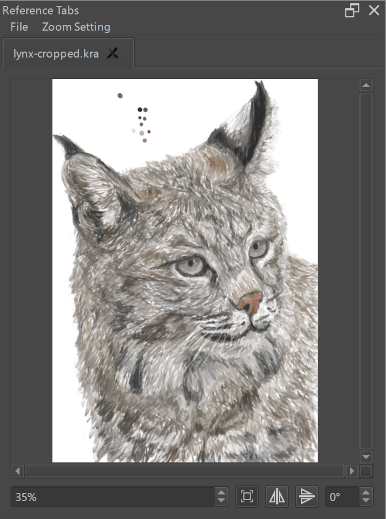
On the technical side:
- Did some code cleanup, split classes into different files. That shouldn’t affect anything userwise, but it should make it easier to maintain, probably.
- I also added reference_tabs_standalone.py as a standalone app version for the purpose of quicker testing. To run it requires Python with PyQt5 installed. It lacks access to Krita’s icons, config, and file format support, (and Krita’s style/theme,) but otherwise is the same.
- Oh, and I also finally added a (very basic) README file to the repo.

There’s still plenty of room for future improvements, so we’ll see how that goes.
9 Likes
Plugin update for users of Krita Nightly builds:
- The AngleSelector widget is now used for rotation when using Krita 5.3.0-prealpha (a764b2f4 or later*). Krita <=5.2 will still use the regular spinbox. (*Note there’s no way for the plugin to tell if you’re using an earlier version of 5.3.x, so update Krita first or you’ll get an error!)
(Reference photo of a dragonfly by me)
The functionality is currently available using today’s Nightly Appimage, for Windows it’ll be tomorrow’s build. (For macOS, whenever the builder manages to connect again.)

7 Likes
I fixed a bug introduced by the last update:
- Fix Rotation shortcut (Shift+Space) being broken.
Aside from that, a somewhat major update:
I’ve refactored the plugin to use a different widget, QGraphicsView, which simplified some things codewise. As a result:
- Zooming in no longer uses unnecessarily large amounts of memory.
- Zoom and rotate are now centered (instead of using the topleft).
- The image is now vertically centered (in addition to horizontally).
Additionally, another change:
- Changing rotation now untoggles Fit Image, to avoid constant resizing.
Everything else should work the same as before. Of course, I may have missed something, so if anything broke, please report it.
The last thing is, I added a feature:
- Add scaling mode setting (smooth or sharp).
Example of viewing a large image very zoomed-in, in Sharp scaling mode.
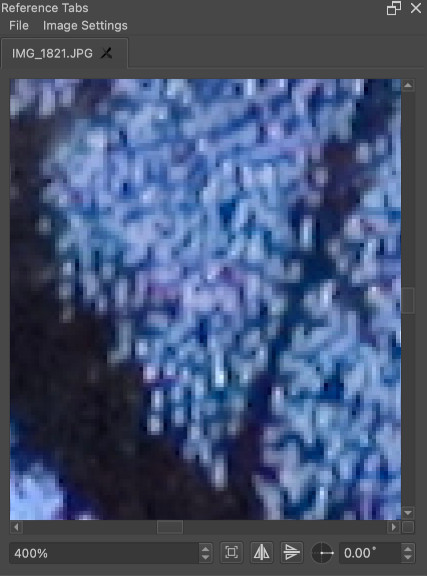
Reference is an extreme closeup of a butterfly’s wing (dark morph tiger swallowtail).
5 Likes
I noticed that now the shortcuts for rotating and zooming no longer work, is that normal?
Ah, I forgot to test the shortcuts, and the refactor broke them. They should be fixed now.
1 Like
Will the ability of copying color from image in the docker be added soon?
I mean Krita actually has a feature where you copy colors from your computer screen, but I doubt this work on transparent images used in the docker lol qwq
“I mean Krita actually has a feature…” Do you mean the Color-Picker (Color Sampler Tool)?
Or is there another tool?
1 Like
Yeah, it’s located at the “Edit” tab at the top of Krita screen. It can be found at the bottom of the menu that appears when you click the “Edit” tab
It’s called “Sample Screen Color”, both versions of it are found here

1 Like
Awesome Tool! 
I had considered adding a color sampler, but didn’t prioritize it because it’s not something I would use myself. However, now I’ve added one.
Update:
- There’s now a color sampler button. Click the button, then click on the image to sample while dragging. Release the mouse button to end sampling. It’s not pixel-perfect however. (I don’t know why, I haven’t investigated it.)
- A short video to demonstrate, with the Small Color Selector to show the foreground color being updated. (Ref photo of a woodpecker by me.)
- A short video to demonstrate, with the Small Color Selector to show the foreground color being updated. (Ref photo of a woodpecker by me.)
8 Likes
Is there a way to use this tool in Android?
No, Krita does not support Python plugins on Android.
Yoooo thanks!!! 