Professional Manga Templates [v2.0 available]

[UPDATED: Release v2.0 available]

Recently I was asked to share my templates for Manga Production and I realized I never actually shared them before in a way that would be easy to use for any Krita user. So here they are.
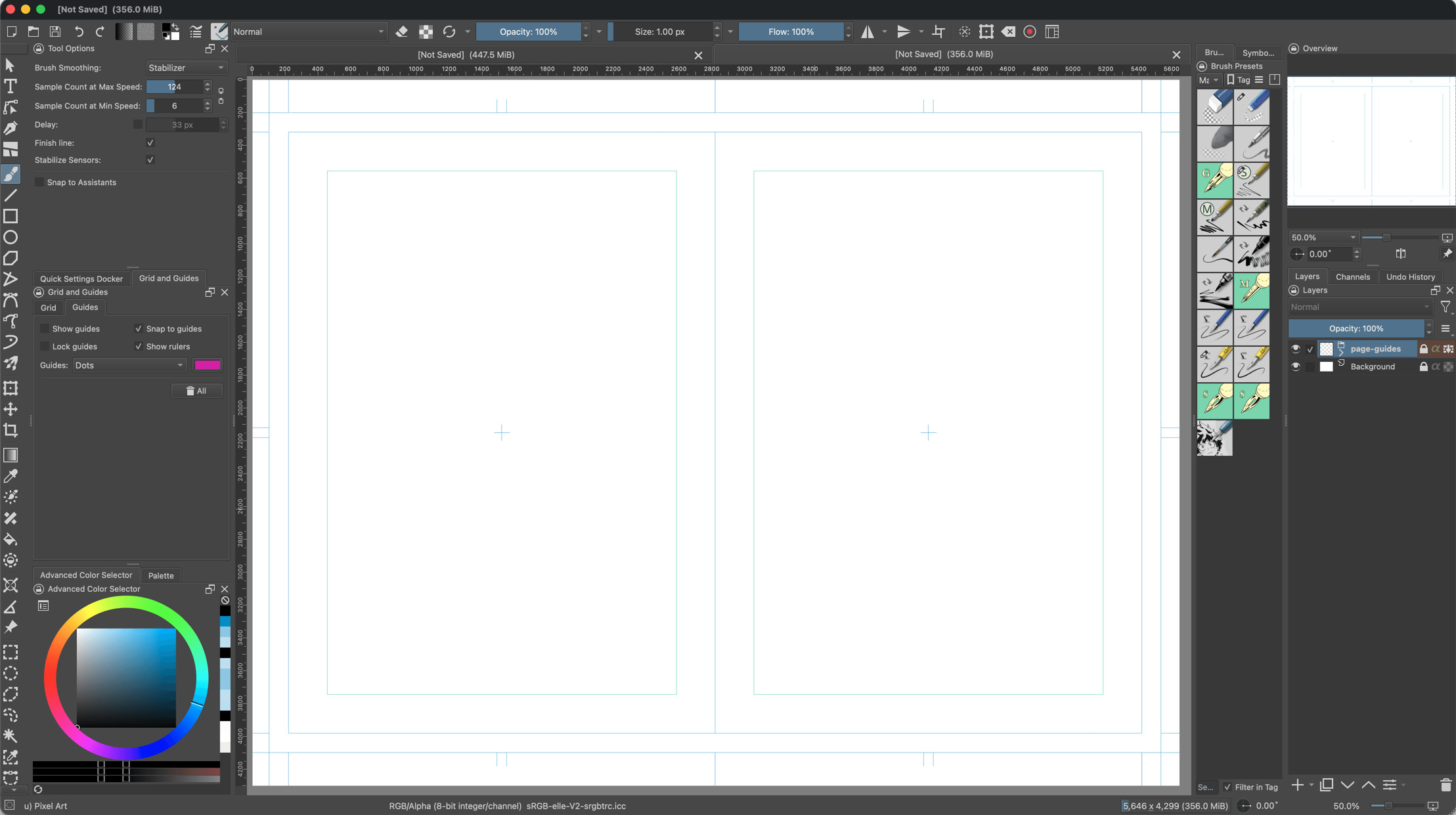
This set provides standardized templates for Japanese manga production, optimized for both
professional and amateur workflows.

I have been using these templates since I moved my Manga Production setup entirely to Krita.

Template Specifications

  • A4: Standard size for Doujinshi and independent publications.

  • B4: Standard professional size for commercial magazine submissions as requested by
    many Japanese publishers.

Resolutions:

  • 600dpi: Recommended for monochrome or grayscale ink work to ensure crisp printing of screentones.
    (Note that Krita does not support indexed 1 bit mode so proper handling of this should be done on a post processing step outside Krita, for example using GIMP)

  • 300dpi: Suitable for web publishing or color illustrations.

Included Files:

Single Pages:

Standard portrait layout for A4 and B4.

  • manga-template-a4-300dpi.kra
  • manga-template-a4-600dpi.kra
  • manga-template-b4-300dpi.kra
  • manga-template-b4-600dpi.kra

Double Spreads:

Pre-joined pages for seamless panoramic action and center-fold layouts. These won’t include gutter space.

  • manga-template-a4-300dpi-double.kra
  • manga-template-a4-600dpi-double.kra
  • manga-template-b4-300dpi-double.kra
  • manga-template-b4-600dpi-double.kra

Guide Layouts:
Each template includes guides and a group layer representing:

Bleed/Trim Size: The very edge of the canvas. Content here may be cut during the binding process.

Trim Line: The intended final size of the page.

Safe Area (Inner Margin): Keep all essential dialogue and critical action within this frame to
ensure it remains legible after binding.

Note that Krita doesnt support proper “printing guides” and thus I decided to add a group layer
that contains the different guides, each on a specific layer for easy toggling on/off.

How to install

Copy the directory “Manga Pages” into your Krita templates folder, usually located at:

Linux: ~/.local/share/krita/templates/

Windows: %AppData%\Roaming\krita\templates\

macOS: ~/Library/Application Support/Krita/templates/

Restart Krita.

Go to File > New and select the Manga pages category to find the new templates.

License

This project is released to the public domain under the CC0 1.0 Universal (CC0 1.0) license. You may copy, modify, and distribute these templates, even for commercial purposes, all without asking permission or providing attribution.

Repository

In case some one wants to fork this and make their own modifications (although you just only need the .kra files, but still)

DOWNLOAD

Download Release v1.0
Download Release v2.0

Clarification on Margins and Crop guides

When I starte drawing comics “professionally” I struggled understanding these concepts. I’m not good at explaining them but in case someone wants to learn a bit about them, this website (external link) explains it very well.

28 Likes

Thank you for making this, and releasing it into the public domain as well. It really simplifies things.

1 Like

[Relesae v2.0 Announcement]

I have released V2.0 of the Manga Templates.

V2.0 contains changes that I’ve been introducing to my own process to better handle the Manga Production.

Please note that while this templates are aimed at Black and White type of comics the files and layer color space is set to RGB so that it’s easy for other types of comics to be produced with it without major issues, as well as to support the colored guides (like the Printing guides layer, and color overlays for drafts)

The reason for this disclaimer is that the templates (specially the 600dpi ones) have grown in size. So as a precaution, unless you have a good amount of RAM avoid using the B4 Double Spread at 600dpi. Of course this will be necessary for professional printing but I will assume that at that point you will have a reasonable capable computer.

For any digital type of publication, 300DPI versions should be more than enough!

Check the original post for the Link to download the new version

2 Likes

Great! Very generous of you to make them, share them and put a CC0 license on it. I hope this template will join the default one on the future releases!

3 Likes

Hello, this is a nice share, thank you!
I wonder, seeing your layout of Krita around your page.

You don’t use the comic-book manager tool? Or is it a tool panel you close when you draw on a single picture?
If you don’t use it, I’m curious about your working method. (Personally, it’s the most important tool for my organization’s creativity on a story.)

1 Like

@Deevad Great! Very generous of you to make them, share them and put a CC0 license on it. I hope this template will join the default one on the future releases!

I would actually be happy with that. I want to make more templates for American Comic as well as standard European BD, but I havent had the time to check on the specifics of printing details and standards on their industries.

@gregorywatine You don’t use the comic-book manager tool? Or is it a tool panel you close when you draw on a single picture?

I use it, although I find it less and less usefull these days. The reason is the Comic Manager is not really well integrated within Krita and there are several features that I consider necessary that are missing.

  • No binding direction setting (RTL or LTR)
  • No integration with Krita’s recent files or knowledge of what is actually opened from the comic
  • Adding pages takes a huge amount of time… adding multiple pages is pretty much impossible if you want to keep your sanity
  • No way to keep a list of recent “projects”
  • Not able to handle double spreads correctly
  • Its UI/UX goes against anything standard in Krita

I’ve been relying on my own DMenu config and a set of scripts to manage my comic projects (Export for Digital magazines, Export for Printing, Export for Web, Watermarking - still a WIP -, etc)

I may release those as well at some point or even delve into Krita’s comic manager plugin development if I have the time (and energy), but given that Making comics using Krita exclusively is pretty much impossible (You need a tool like Inkscape for lettering, Scribus for print publishing, and in the case of professional Manga production, a post process operation to turn every page into indexed 1bit depth images (essentially black and white only), I still think the Comic Manager may not be the best approach for this

Please note that I’m not really complaining here about Krita’s capabilities. I think it sticks to the philosophy of doing one thing and doing it great.

1 Like

I will say the text tool has been changed and improved, so it’s been pretty useful, but I agree the comic manager needs improvement, my only issue with that is no one who’s made an alternative has done it for free, which sucks as an indie with no money.

Text tool now is pretty great. But when producing multiple translations of the same comic, I rather keep each dialog layer as a separate file for easy management, and for Japanese text that still requires adding “reading” hints on some Kanji, Inkscape provides better tooling from my perspective.

Regarding the free tool… well… people still need to eat, even developers. If there is an option worth the money I wouldnt hesitate to buy it, specially if licensing for it is reasonable.

Anyway I think we should aim to keep this thread on-topic

I understand the issues you can have sometimes with the comic-book manager.
If you are interested, there is work on it these days, and the person working on it is really nice and listens seriously to suggestions.

I think that the more light there is on this project, the better it can be, and also it can give more strength to the person working on it.

3 Likes

I didn’t think about translations, which makes sense why you WOULD have issues with it.. I agree with people needing to eat, and If I actually have the funds to purchase said tools, I will, I just also appreciate when free alternatives are available. I wasn’t trying to get off topic, I just thought if you weren’t aware of it’s improvements it would be nice to know about, I definitely would have stuck with inkscape had It not been a hyped up feature.

Anywho, your templates are awesome, and I can’t wait to see what else, if anything, you come up with :slight_smile:

2 Likes

Thank you so much

1 Like