PyQt5 - Non Linear Gradients - What is best way to implement?

I have been doing gradients in one direction or another like horizontal or vertical.

However I got a empty widget and I wanted to paint it pixel by pixel. I know the color it has to be each pixel with math. But what would be the best way to paint it like that?

The only thing that occurs to me is to do a paintEvent and spam a bunch pixel sized squares with the color I want.

But this idea sounds strangely not very light, but I don’t have any other idea on how to make gradients that go in different directions. Would you recommend this path or something else?

I did it this way:

def show(self):
    image = QImage(100, 100, QImage.Format_RGB32)
    for i in range(100):
        for j in range(100):
            color = QColor(i*256/100, j*256/100, 100)
            image.setPixelColor(i, j, color)
    self.imageLabel.setPixmap(QPixmap(image))

imageLabel is just QLabel. Of course you’ll need to replace the

color = QColor(i*256/100, j*256/100, 100)

line with your calculations.

1 Like

Hi

Process pixel by pixel in python could be slow, especially for big area…

On my side I use QGradient
I don’t know which complexity your gradient are, but the QGradient provide some options that may answer your need.

Example 1 (with label as a QLabel)

outputWidth = 100
outputHeight = 100
pixmap = QPixmap(outputWidth,outputHeight)

# diagonal linear gradient, from top-left to bottom-right
gradient = QLinearGradient(QPointF(0, 0), QPointF(outputWidth, outputHeight))
gradient.setColorAt(0, Qt.black)
gradient.setColorAt(1, Qt.white)


canvas = QPainter()
canvas.begin(pixmap)
canvas.fillRect(QRect(0,0,outputWidth, outputHeight), gradient);
canvas.end()

label.setPixmap(qpixmap)

Example 2 (with label as a QLabel)

outputWidth = 100
outputHeight = 100
pixmap = QPixmap(outputWidth,outputHeight)

# linear gradient, from left to right
gradient = QLinearGradient(QPointF(0, 0), QPointF(outputWidth, 0))
gradient.setColorAt(0, Qt.black)
gradient.setColorAt(0.125, Qt.white)
gradient.setColorAt(0.25, Qt.red)
gradient.setColorAt(0.375, Qt.yellow)
gradient.setColorAt(0.5, Qt.green)
gradient.setColorAt(0.625, Qt.cyan)
gradient.setColorAt(0.75, Qt.blue)
gradient.setColorAt(0.875, Qt.magenta)
gradient.setColorAt(1, Qt.red)

canvas = QPainter()
canvas.begin(pixmap)
canvas.fillRect(QRect(0,0,outputWidth, outputHeight), gradient);
canvas.end()

label.setPixmap(qpixmap)

Grum999
1 Like

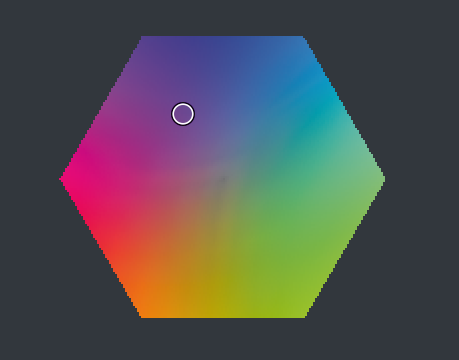
I was aiming for a gradient like this. all over the place. several points and connect them.

@Grum999 those look like linear Gradients by what I can read.
This was my attempt to implement with what @tiar said.

def UVD_Gradient(self, distance, half):
    image = QImage(distance, distance, QImage.Format_RGB32)
    for w in range(distance):
        for h in range(distance):
            rgb = self.uvd_to_rgb((w-half)/distance, (h-half)/distance, self.rgb_d)
            r = rgb[0]*kritaRGB
            g = rgb[1]*kritaRGB
            b = rgb[2]*kritaRGB
            # if (r<0 or r>1):
            #     r=round(r)
            # if (g<0 or g>1):
            #     g=round(g)
            # if (b<0 or b>1):
            #     b=round(b)
            color = QColor(r, g, b)
            image.setPixelColor(w, h, color)
    self.layout.panel_rgb_uvd_input.setPixmap(QPixmap(image))

this however is quite cost intensive to update, to the point I need to limit the size of the widget. and I have so much code for it to scale up and down, a bit of a shame.
And I commented out the limit constraint so it sticks to a real color.

I need to fool around more to see if I can find something that will ease it.

My big issue is that I use a different RGB color space which slows down alot. it might limit my decision despite it looking really good. I had with a solid color previously and it was smooth enough to fool around naturally but it was a epilepsy hazard to keep it that way.

I am just imagining now as I say this but if I could make a vertex color grid like it blender would be the ideal case. I need to explore Qt Threadding and Python Variable change detection to see if it helps to update less often.

Ok, it’s a little bit more clear about what you mean by non linear gradient…

Using the setPixelColor() and QColor() is very slow:

  • Python is slow by nature
  • Using object decrease performances
  • According to t Qt documentation, the setPixelColor is not recommended for fast operations because it’s an expensive time method

You can work directly in an array of bytes, it will be faster:

from PyQt5.Qt import *
from PyQt5 import QtCore
from PyQt5.QtCore import (
        QPointF
    )
from PyQt5.QtGui import (
        QColor,
        QImage,
        QPixmap,
    )
from PyQt5.QtWidgets import (
        QApplication,
        QDialog,
        QLabel,
        QVBoxLayout
    )
import time


def gradient():
    distance = 200
    
    ts=time.time()
    image = QImage(distance, distance, QImage.Format_RGB32)
    for w in range(distance):
        for h in range(distance):
            color = QColor(w*256/distance, h*256/distance, 100)
            image.setPixelColor(w, h, color)    
    
    pixmap = QPixmap.fromImage(image)
    print('setPixel time: ', time.time() - ts)
    
    ts=time.time()
    # pixel is stored on 4bytes
    # Bits[index] = blue
    # Bits[index + 1] = green
    # Bits[index + 2] = red
    # Bits[index + 3] = alpha
    imgBits = bytearray((distance * distance)<<2)
    index=0
    for w in range(distance):
        for h in range(distance):
            # blue
            imgBits[index] = 100
            index+=1
            # green
            imgBits[index] = int(h*256/distance)
            index+=1
            # red
            imgBits[index] = int(w*256/distance)
            index+=1
            # alpha
            imgBits[index] = 0xFF
            index+=1
            
            
    pixmap = QPixmap.fromImage(QImage(imgBits, distance, distance, QImage.Format_RGB32))

    print('bits time: ', time.time() - ts)
    return pixmap


dlg = QDialog(Application.activeWindow().qwindow())
dlg.setModal(True)
layout = QVBoxLayout(dlg)
lbl = QLabel("")
lbl.setFixedHeight(200)
lbl.setFixedWidth(200)
lbl.setPixmap(gradient())
layout.addWidget(lbl)
dlg.exec()

Execution on 200x200 pixels image (~9 times faster)
setPixel time: ~0.305s
bits access time: ~0.034s

Execution on 800x800 pixels image (~8 times faster)
setPixel time: ~4.857s
bits time: ~0.618s

Use of multithreading can speedup execution, but not the time to test it before tuesday (and need to verify if gain is really better or not)

You also have to check if uvd_to_rgb can be improved… You can have a small gain by doing calculation directly in the gradient build loop (not a ‘clean’ code but calling a method cost time, and here I think that performance is better than a code properly defined with methods)

Additional question, I’m wondering:

  • What is the kritaRGB value ?
  • Why r, g, b can be less than 0 or greater than 1 ?
  • You’re working in RGB32 [4 bytes per pixels], so why trying to work with float value and not int?

Grum999

1 Like

I did some speed improvements but they are still not good enough to be enjoyable, I implemented:

  • only when mouse button is released.
  • then compares if rgb_d is still the same or not

by golly is going much faster.
Today I will be doing thread testing.

@Grum999
bytearrays that seems interesting, I will test it as soon as I go around the threads things just to compare with the slow that I have now to compare any performance increases.
to answer your questions:
1- Yes i could pull out the code just so he does not call self.uvd_to_rgb() everytime. This function is just a matrix multiplication done manually.
2- kritaRGB is the scalar 255. it ensures agnostic code.
3- r, g, b can be less than zero because of the color conversion I am doing. I made a custom color space that I called UVD. Since it is not ortogonal on the original space some edges dont touch right because of the diagonals the cube and the space does, So I need to make a fail safe pass for odd cases.
4- Not sure what you mean by RGB32.

@Grum999
I tryed it out with what you said and I has very curious results:

  • Speed increase for a update (amazing on punctual updates but not enough for real time updating compared to linear gradients but the difference is not much. in real time updates it slows down the mouse enough to be noticiable it jumps frames trying to keep up)
  • Ocasionally the solution does a sort of hickup and it randomly creates noise. it clears out after another update. in real time updating it disappears.
  • does not react very good with the cursor on top of it as it creates noise also randomly and real time updates clean most of it.
  • Ocasionally it crashes Krita also randomly


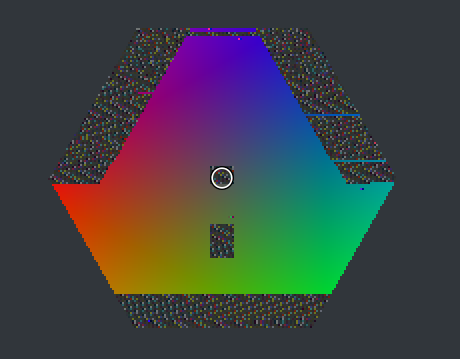
Output with the refered Noise, alot less noise than my initial attempts though.

code:

def UVD_Array(self, distance, half, rgb_d):
    self.current = rgb_d
    if self.current != self.previous:
        imgBits = bytearray((distance * distance)<<2)
        index = 0
        count = distance * distance
        for w in range(distance):
            for h in range(distance):
                u = (w-half)/(0.5*distance)
                v = (h-half)/(0.5*distance)
                d = self.rgb_d
                rgb = self.uvd_to_rgb(u, v, d)
                r = int(rgb[0]*kritaRGB)
                g = int(rgb[1]*kritaRGB)
                b = int(rgb[2]*kritaRGB)
                # Correct Red Bleed
                if r<=0:
                    r=0
                elif r>=kritaRGB:
                    r=kritaRGB
                # Correct Green Bleed
                if g<=0:
                    g=0
                elif g>=kritaRGB:
                    g=kritaRGB
                # Correct Blue Bleed
                if b<=0:
                    b=0
                elif b>=kritaRGB:
                    b=kritaRGB
                # blue
                imgBits[index] = r
                index+=1
                # green
                imgBits[index] = g
                index+=1
                # red
                imgBits[index] = b
                index+=1
                # alpha
                imgBits[index] = 0xFF
                index+=1

        pixmap = QPixmap.fromImage(QImage(imgBits, distance, distance, QImage.Format_RGB32))
        self.layout.panel_rgb_uvd_input.setPixmap(pixmap)
        self.previous = self.current

I thought initially to make a sort of middle ground but there is none right? since one initializes the QImage to place the array and the other changes it after the fact.

setPixelColor despite being slow it seemed consistent in behavior and merged well with the cursor.

Despite the issues I am greatfull I actually illustrate with the non linear gradient. For me that is a win already. I was not aware that this module made stuff like this. I just need to read more about the module and balance things now to work the best considering all the rest in the code.

I am also gonna see what is the Scanlines thing they speak off in the alternatives. Scan lines in Nuke was quite dependable I am not sure how it is in PyQt5.

I must say I love these type of gradients ^.^

Answering from my phone, no computer to test deeper the problem with generated noise :thinking:

I’ll take a look on it when I came back home

Looking your code, you can improve performances

Example
calculating 0.5 x distance twice time on each pixel is cpu consuming

do : half_distance = 0.5 x distance before for loops, and use it in your calculation

another improvment

rather than doing
if r<= 0 :
r =0
elif r>= kritaRGB :
r = kritaRGB

do

if r< 0 :
r =0
elif r>kritaRGB :
r = kritaRGB

you’ll have a small gain (avoid to affect 0 when r is already set to 0)

these are small change, but multiplied by number of pixels, you can get a significant gain

not easy to use the phone keyboard :sweat_smile:
I’ll take a look monday or tuesday

Grum999

1 Like

I am just wiggling my mouse around but the feeling I have is that replacing:

  • QColor for qRgb
  • setPixelColor for setPixel

Helps it go a tad faster.

Btw out of curiosity, once constructed the QImage can you delete it?

Ahh, please don’t treat my code as already ultimately optimized :slight_smile: I haven’t tried to do anything with it yet, I just noticed it fit your description of what you wanted.
I believe that yes, what you suggested can improve the performance. If I were you, I would try to measure it with some timers. Like create a timer at the very beginning of the function and at the very bottom, and measure time for different functions you use. That way you’ll be able to tell which change makes it just more difficult to code, and which one actually helps.

Regarding QImage, it would be best if you saved it as a member of the class and initialized in the constructor, and in the function like show(self) just put pixels there, without creating a new QImage. Since you’re replacing all pixels, not having an empty qimage every time doesn’t matter.

1 Like

I think I may have finished my wacky widget XD
might need some retouches but it is there.

I placed a explanation about it here:

When you create a QImage like this image = QImage(distance, distance, QImage.Format_RGB32) you’re using RGB32 colorspace (1 byte per R,G,B channel and 1 byte for Alpha channel set to 0xFF)

So, you can work with value from 0 to 255 directly instead of working with float values

I think I found the origin of this problem, I was able to reproduce it.
I’m not really satisfied by the solution :roll_eyes:

It seems (according to QImage documentation) that buffer (here bytearray) used to create QImage need to live during QImage live.

So, to fix the problem I had to declare the bytearray as a global variable but I don’t really like use of global variables (but properly defined as member of a class it could ok)

And I’m not completely sure about how the Pixmap is built (need to keep QImage instance?)

Grum999

1 Like

well this has been on my head for a while as I have been trying to gain more speed. I was trying to give it another go with the bytearray method and I redid it like this, this time:

def UVD_Color(self, rgb_d):
    try:
        # Measures
        self.width = self.layout.panel_uvd_mask.width()
        self.height = self.layout.panel_uvd_mask.height()
        w2 = 0.5 * self.width
        h2 = 0.5 * self.height
        # Byte Array
        imgBits = bytearray((self.width * self.height)<<2)
        index = 0
        count = self.width * self.height
        for w in range(self.width):
            for h in range(self.height):
                # Consider pixel location and its location color
                u = (w-w2)/w2
                v = (h-h2)/h2
                d = self.uvd_3
                # Convert UVD to RGB
                r = int((-0.57735*u + 0.333333*v + 1*d) * 255)
                g = int((0.57735*u + 0.333333*v + 1*d) * 255)
                b = int((-0.0000000113021*u -0.666667*v + 1*d) * 255)
                # Correct out of Bound values
                if r <= 0:
                    r = 0
                if r >= 255:
                    r = 255
                if g <= 0:
                    g = 0
                if g >= 255:
                    g = 255
                if b <= 0:
                    b = 0
                if b >= 255:
                    b = 255
                # Red
                imgBits[index] = r
                index+=1
                # Green
                imgBits[index] = g
                index+=1
                # Blue
                imgBits[index] = b
                index+=1
                # Alpha
                imgBits[index] = 0xFF
                index+=1
        # Pixmap
        pixmap = QPixmap.fromImage(QImage(imgBits, self.width, self.height, QImage.Format_RGB32))
        self.layout.panel_uvd_input.setPixmap(pixmap)
    except:
        pass

while passing a restriction to the widget that holds it to something like this:

# UVD Panel Ratio Adjust to maintain Square
uvd_width = self.layout.panel_uvd.width()
uvd_height = self.layout.panel_uvd.height()
# For when UVD Panle is Minimized
if uvd_width <= 0:
    uvd_width = 1
if uvd_height <= 0:
    uvd_height = 1
# Shape Mask like a Perfect Square
if uvd_width >= uvd_height:
    self.layout.panel_uvd_mask.setMaximumWidth(uvd_height)
    self.layout.panel_uvd_mask.setMaximumHeight(uvd_height)
elif uvd_width < uvd_height:
    self.layout.panel_uvd_mask.setMaximumWidth(uvd_width)
    self.layout.panel_uvd_mask.setMaximumHeight(uvd_width)
# Max limit or else it might crash Krita with UVD display (limit for fast representation Only)
if (uvd_width >= 500 or uvd_height >= 500):
    self.layout.panel_uvd_mask.setMaximumWidth(500)
    self.layout.panel_uvd_mask.setMaximumHeight(500)

it is so much lighter but it crashes krita for certain when the widget is too big.
to the point when I restart krita it will crash right the moment it tries to render it because it was still in view. I am still testing it to see if I can eliminate the source of eventual crashes that appear randomly.
but i think it was relevant to report since my UVD conversion is now much more stable and reliable with the error it produces as it self corrects itself smoothly.

Since the gradient is very smooth you can try to paint it in a small image that has always the same size and then scale it with bilinear interpolation (with the qt function for peformance). Maybe the interpolation artifacts are not noticeable.
Edit: Are you sure that color wheel can’t be achieved with 3 linear gradients?

I have reduced from 500 to 256 and it has becomes more stable. but it still causes crashes.
I feel that it being a certain small size would help considering this method, maybe with the other slower method that is more reliable it would be better to scale up yes.

to my knowledge making this gradient is impossible with simple gradients due to:

  • the intersection of the cut not being regular (still doable but bad results).
  • linear gradients cannot reproduce it’s influence in just one direction.
  • more than 2 gradients have a alpha issue. the top most gradient eats the alpha from the ones below.

I said the linear gradient thing because it seems that the math you use do just that. You make linear gradients based on the uv coordinates and then those magic numbers you use are like the values in a rotation matrix, so the gradients are rotated. If you only set one component of the color and the others to 0, you should see a linear gradient of that component color (I’ve made a quick test in blender and this seems to be correct).
I’ll try to make it in Qt with gradients.

yes it is just a rotation matrix with linear gradients, but my attempts on PyQt5 at that way gave very poor results, and that mainly because of the alpha of the top most one as it just becomes predominant over the others.

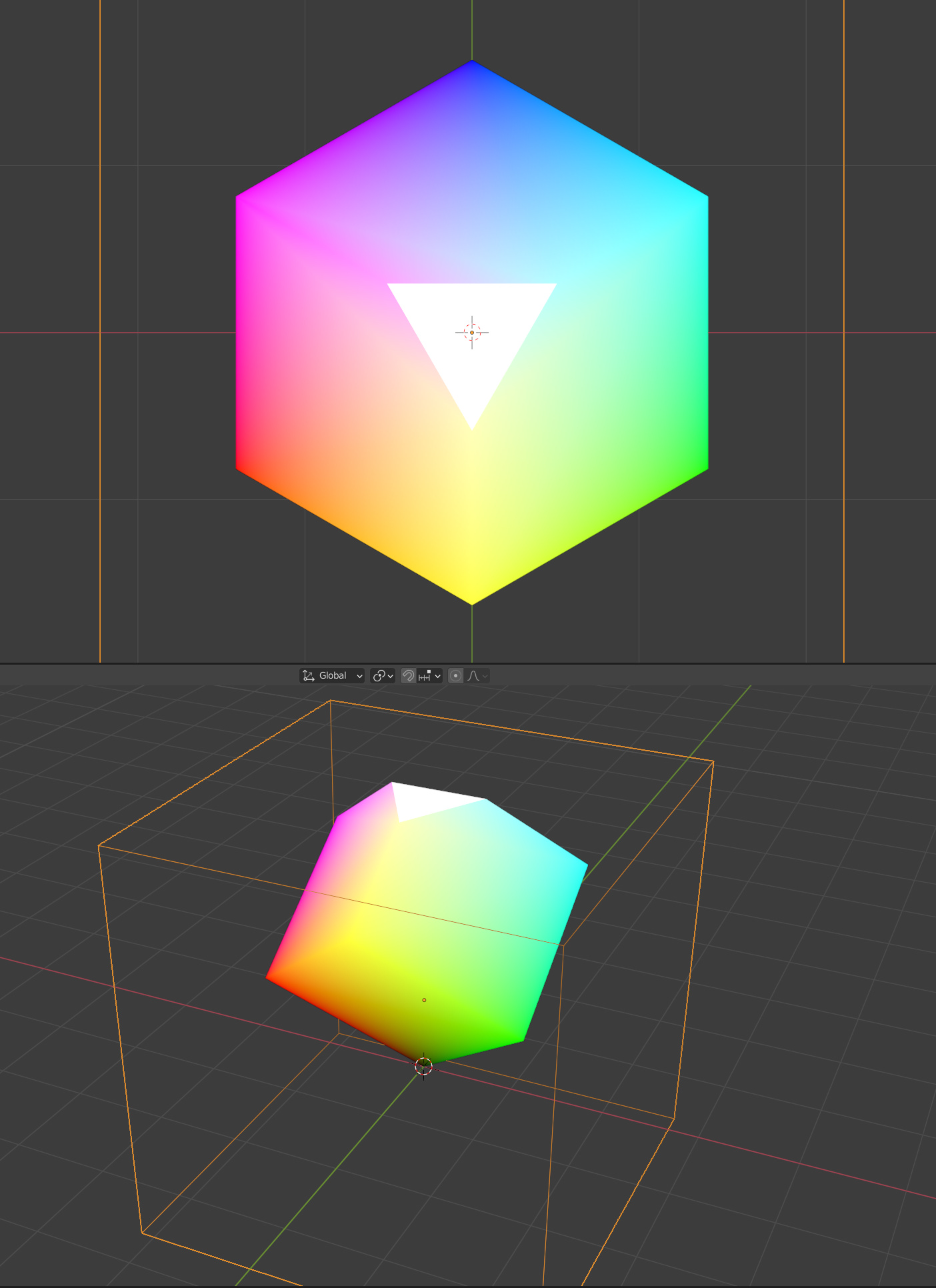
using vertex color here

Yes, I understand. But you shouldn’t relly on the alpha because the “source over” operation (the default is not what you want. You should make 3 linear gradients, each from red/green/blue to black and then paint them in a black image with the “add” composition mode.

1 Like

I did a small test inside krita just to check how well Adding would hold up.
and it totally Works on par in terms of display compared to the other versions.

Using addition in such a way would never cross my mind, thank you.

I should be able to make it happen but I might have a question or two to make the comp happen fully since it uses a very confusing class for me.

I will work on it tomorrow. I think it should be light but I am not sure how much it will be but I will sure try it.

P.S. - Qpainter is able to draw gradients?

I’ve made a test:

void window::paintEvent(QPaintEvent *e)
{
    // Create the image
    const int size = qMin(this->width(), this->height());
    const int sizeOverTwo = size / 2;
    // m_d is in the range [0, 100]
    const int scaled_d = m_d * sizeOverTwo / 100;
    QImage img(size, size, QImage::Format_ARGB32);
    img.fill(0);

    // The gradient and positions are reused
    QLinearGradient grd(0, 0, sizeOverTwo, 0);
    grd.setColorAt(0.0, QColor(0, 0, 0));

    // Paint gradients
    QPainter painterImg(&img);
    painterImg.setCompositionMode(QPainter::CompositionMode_Plus);
    // Red
    {
        grd.setColorAt(1.0, QColor(255, 0, 0));
        QTransform tfm;
        // Move to the center of the image
        tfm.translate(sizeOverTwo, sizeOverTwo);
        // The following transformations seem to adjust to the code posted
        tfm.rotate(-150);
        tfm.scale(1.5, 1.0);
        tfm.translate(-scaled_d, 0);
        QBrush brush(grd);
        brush.setTransform(tfm);
        painterImg.fillRect(img.rect(), brush);
    }
    // Green
    {
        grd.setColorAt(1.0, QColor(0, 255, 0));
        QTransform tfm;
        tfm.translate(sizeOverTwo, sizeOverTwo);
        tfm.rotate(-30);
        tfm.scale(1.5, 1.0);
        tfm.translate(-scaled_d, 0);
        QBrush brush(grd);
        brush.setTransform(tfm);
        painterImg.fillRect(img.rect(), brush);
    }
    // Blue
    {
        grd.setColorAt(1.0, QColor(0, 0, 255));
        QTransform tfm;
        tfm.translate(sizeOverTwo, sizeOverTwo);
        tfm.rotate(90);
        tfm.scale(1.5, 1.0);
        tfm.translate(-scaled_d, 0);
        QBrush brush(grd);
        brush.setTransform(tfm);
        painterImg.fillRect(img.rect(), brush);
    }

    // Paint the image
    QPainter painter(this);
    if (this->width() < this->height()) {
        painter.drawImage(0, this->height() / 2 - sizeOverTwo, img);
    } else {
        painter.drawImage(this->width() / 2 - sizeOverTwo, 0, img);
    }
}
1 Like