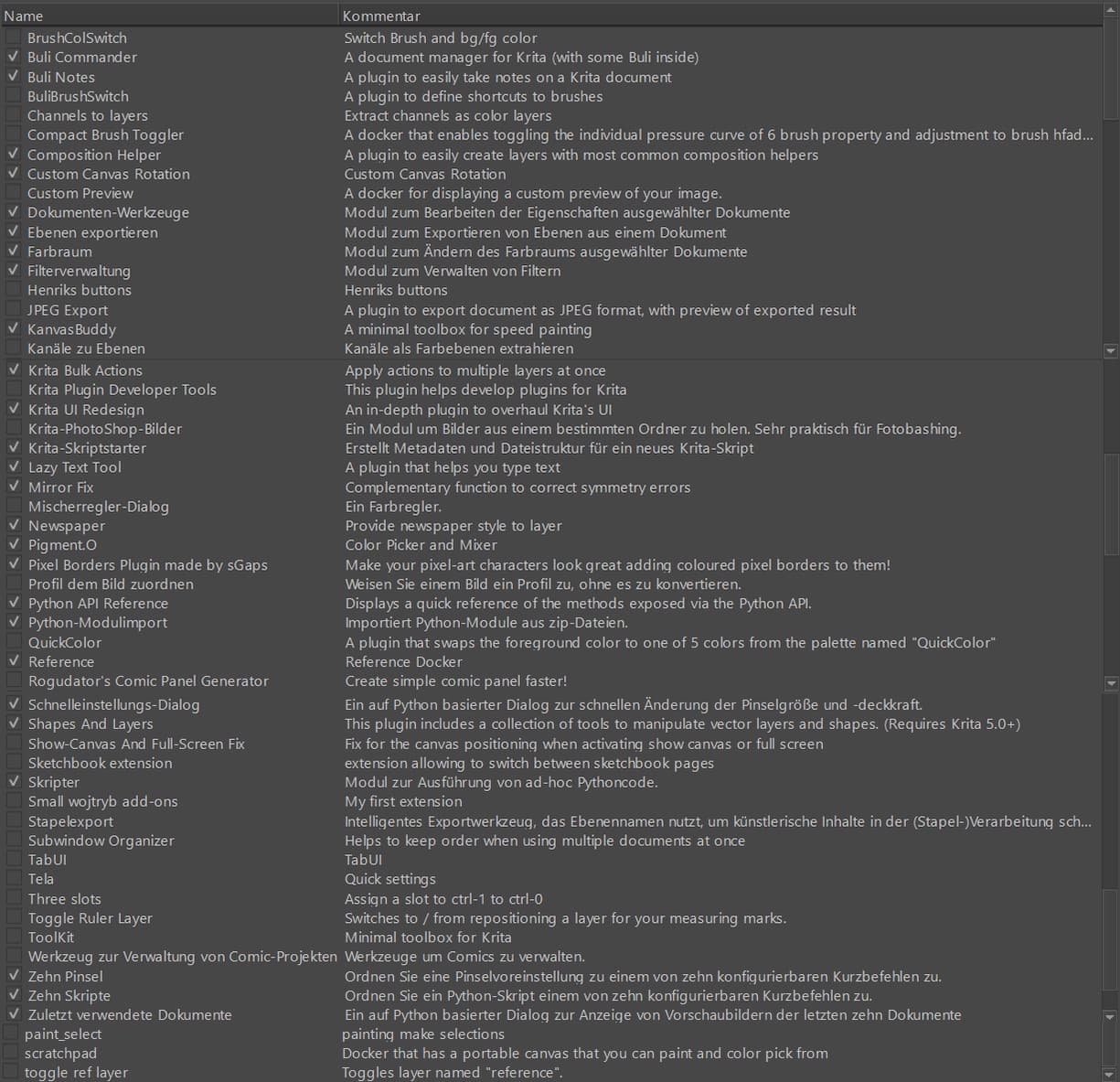
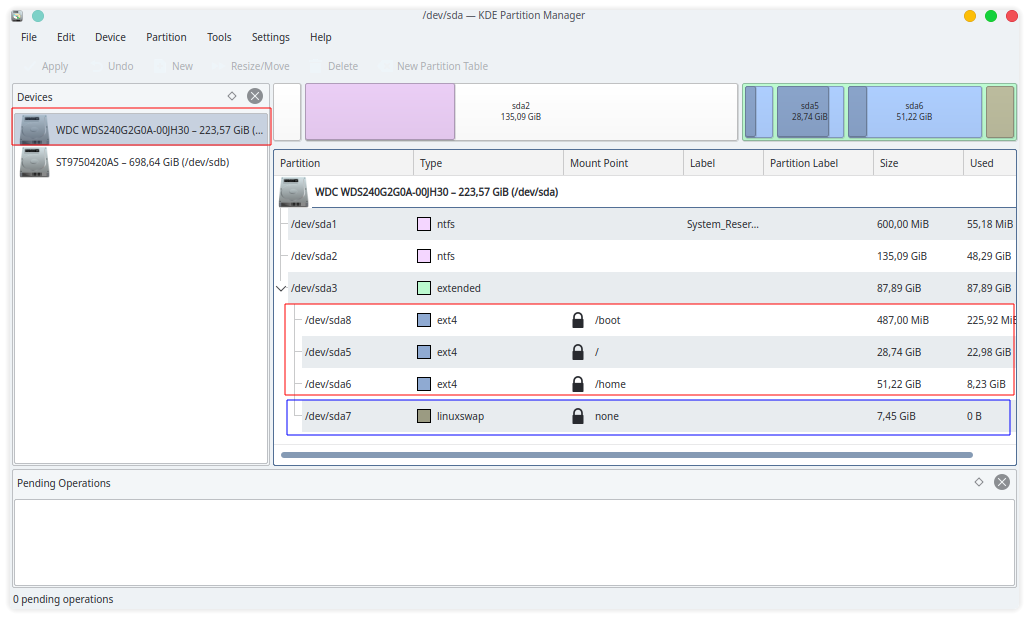
Python plugins and Extreme Lag!

I was at first very excited to discover a few very useful plugins created, BUT so disappointed at how much lag it creates on my Krita … is is laggy with everyone’s?
If not what could the problem be? I know I don’t have a powerful laptop, but it seems crazy how even enabling a single additional plugin, suddenly my brush at default size and brush just is unusable!!
I tried it in both Krita 5 and 5.0.2 … I first had about 3 new plugins installed and active (tool modifier, Kanvasbuddy, Pigment.) master) … then disable one at a time, trying just one at a time, but no difference in lag , UNTIL I disabled ALL of newly installed plugins! Then suddenly Krita is fast and back to normal!
Ps … also, is there any specific way to properly uninstall a script?
TIA

Operating System: Kubuntu 20.04
KDE Plasma Version: 5.18.5
KDE Frameworks Version: 5.68.0
Qt Version: 5.12.8
Kernel Version: 5.11.0-46-generic
OS Type: 64-bit
Processors: 8 × Intel® Core™ i7-2630QM CPU @ 2.00GHz
Memory: 7,7 GiB of RAM

1 Like

Delete it with its folder from the “pykrita”-folder, and don’t forget the corresponding “desktop”-file in the “pykrita”-folder.

Michelist

Edit/Add: And I don’t think that plugins have much impact on my system, but its specs seem to be a “little bit” in front… :upside_down_face:

Krita Version: 5.0.2

Pretty Productname: Windows 10 (10.0)
Product Type: windows
Product Version: 10
Renderer: “ANGLE (Radeon RX 580 Series Direct3D11 vs_5_0 ps_5_0)”

Hardware Information

GPU Acceleration: angle
Memory: 98227 Mb
Number of Cores: 24 - two XEON CPU’s :wink:
Swap Location: D:/_TEMP - on 2nd SSD

1 Like

I never noticed any difference with plug-ins enabled but I only use small ones. It always depends on the plug-in since every plug-in developer is responsible for their own code, so if they implemented it in a bad way (like polling events every millisecond or something) or it does heavy operations constantly, it can make Krita slow down but there isn’t much Krita can do about it.

So, what plug-ins have you installed?

1 Like

If anyone is to blame is probably pigment.o doing the lag. However for pigment.o you have several options to make it lighter, but all of them break functionality in some way so you have to choose.

  • In the menu you have 2 performance options.
  • In the on off switch you have p>k mode, the triangle circle now.
  • If your computer is really bad you can go the code and change the update cycle timer to be larger.

Note that all the details on all of this are in the manual for more info.

However I placed alot of work on it to run smoothly so it does not need any of the performance enhancements by default and it only uses what is strictly required to update what you have active, the more you active the more is needed. Also all elements are very very light.

Honestly pigment.o has equal speed to the c++ code pickers for a user stand point (and I say this because I can’t measure both to say the difference in ms) and is running in python. It should be slower but not by much. The last update made it as fast as it ever been with the new design unless is a potato pc.

Extreme lag is hard to believe for me as I fixed the performance for many users that had issues in the past and I haven’t had a report like that in a long while now, and I gained confidence that all is well now.

If it is a combo of factors it would also a possible reason. Occasionally 2 plugins don’t mix well. When I started working on photobash_images and created key_enter to expand it both would NOT play nice with each other because of incremental updates so I had to make them cooperate. Krita is starting to have enough plugins around to these kinds of events to happen. Means Python is growing.

3 Likes

I’ll have to play around more and see if the is any plugins that are messing with each other … I original had the Pie Menu plugin and had no issue.
Only when i installed the 3 mentioned (immediately one after each other) that issues started … lag was so bad it was impossible to do a stroke or zoom etc.

As mentioned in original post, (tool modifier, Kanvasbuddy, Pigment.0 master)

This is a montage of screenshots taken from a Krita installation for testing purposes, and I do not see or feel any lag, only because these plugins are installed.

If I need a plugin not all the time, I can always deactivate it.
Some plugins need more, some need less time to do their specific job/trick/action, but that depends on the job they have to do.
If a PC is set up and configured correctly, and also has the necessary hardware for the task it is intended for, then you won’t have any problems with it.
I paraphrase it very strongly exaggerated: But if I edit a canvas of 100 megapixels with tens of layers with the CPU from a better calculator, then I have to reckon with lags. And whether you use Krita or Photoshop for such, this does not change the result, if the hardware is too weak or inappropriately configured you have more time to drink coffee! :wink:
Three plugins should not cause Extreme Lag.

Michelist

Then what possibly be the issue?

Operating System: Kubuntu 20.04
KDE Plasma Version: 5.18.5
KDE Frameworks Version: 5.68.0
Qt Version: 5.12.8
Kernel Version: 5.11.0-46-generic
OS Type: 64-bit
Processors: 8 × Intel® Core™ i7-2630QM CPU @ 2.00GHz
Memory: 7,7 GiB of RAM

Mobile CPUs are often not the most powerful, it is good that your CPU “already” has four cores (HT included 8 cores), it also shares the RAM with the graphics, which costs performance.
A mobile processor from more than 10 years ago is not a powerhouse, for standard applications (office packages for example) it is still more than sufficient, but for Krita it seems to have to work.

If your notebook already had the latest USB interface or even Thunderbolt, you could still connect a fast SSD to it, to store the Krita swap file, then “pressure” would be reduced from the system SSD in case of necessary swaps. If you could install a second SSD in your notebook itself, that would of course be even better, but very few notebooks have two SATA interfaces…

Close every application you don’t need while painting, this too takes pressure from the pot, if you need your browser, perhaps for the manual or to take a quick look what is happening on KA, then don’t use tons of tabs. Things like that.

I suspect that my Krita in the Linux VM with 8 GB RAM and 8 cores allocated might be faster on my PC than your Krita on the notebook, because there too I put my swap file in a partition on the second SSD and don’t run anything else with it, and the 8 GB RAM is fully available to the VM and not shared with the graphics.

Michelist

1 Like

You are using an 11 year old computer with a mobile cpu… that is pretty dated and weak for a processor…

It’s possible that some delays in event processing of some plugins cause issues on old slow cpus. But that is hard for plugin devs to really test without using a slow computer, which would come with its own annoyances as you gotta reload krita every time other than isolated tests you can do in scripter. At best, running time tests on some operations in sensitive areas can lead to optimizations or limit the amount of events being filtered/watched, but again it takes away from development time.

1 Like

Thanks again for info.
I actually replaced my cd-rom with a tray and use my original HHD there for storage and use a SSD as the main.
If I replaced the HHD (storage) with another SSD and use part of that 2nd SSD for Krita Swap, will that make a difference you think?
Honestly I was under the impression, that with SSD it doesn’t matter where the swap is as location on a SSD doesn’t matter?
Also, if I use a second SSD in the cradle, would it be as good to share the swap space with other storage space or are you saying I should dedicate the WHOLE SSD to the swap?
Also I thought the swap only comes into effect when Krita runs out of real RAM memory … and so far as per my indicators, there always seemed to still be a lot of unused RAM that Krita hasn’t used so far.

Yep I understand … I know my laptop old … just didn’t think a little tiny script would have such a huge effect on Krita performance … but then what do I know :slight_smile:

The good new is, is that Pigment.0 is NOT the problem. After several tests, Pigment.0 appears to work perfectly WITHOUT any lag.
Culprit appears to be “kritaToolModifier” … sadly when enabling this, it causes extreme lag.

1 Like

In the event that the resources allocated to Krita are not sufficient and Krita begins to swap out, it is not uncommon for the operating system to swap out as well. The idea is to eliminate competing accesses. If the storage space on the SSD/HDD is scarce (not uncommon on mobile hardware), Krita and the OS will “compete” for it. If you now have two channels on which this happens you save time because it is parallel and the “competition” is omitted, with SSD’s it is only faster than with HDD’s.

And you could also take a bigger SSD to use the non swap space for other things if you like, this usually doesn’t bother since when Krita swaps out you are painting and not storing any files, exception can be saving a Krita file (Krita saves and needs swap space for the process, but this is a rare special case) but if you don’t touch the space reserved for Krita while it is needed it is ok. But even there, if two processes access a disk at the same time, they can compete with each other if the bandwidth is too large for both accesses at the same time.

So, it can bring something, the emphasis is on CAN! Small SSD’s, between 60 GB and 80 GB, are available for little money (Krita can allocate a maximum of 64 GB to a swap file, so I thought of using such a tiny SSD only for Krita), but do you really want to invest money in such an old computer, you should ask yourself first?
Are you editing such large images that your notebook has to swap out constantly, then it will probably help, but is it worth it? If you only own this PC, and it will stay that way in the long run, you use Krita a lot, it’s more worth considering. If you plan to buy a regular PC soon, then save the money for it, it will bring you more joy.
In the other topic, I think I mentioned that there’s little point in tweaking anymore - it’s cosmetics, save up for “the big one” and then get hardware that meets your PC requirements well. If it’s mainly Krita, then a strong multicore processor and plenty of memory counts, a standard graphics card will do, as you learned in your CPU/GPU topic. If you want to play the latest games in high resolutions, then spend a lot of money on the graphics card, and so on.

Michelist

Supplementary: I don’t know how you are with money and how urgent you want better hardware and if there is a reasonable offer of second hand hardware in your home country. Here in Germany there is a good second-hand market for leasing returns from the commercial sector, companies often replace their hardware in a rhythm of 2 years or less.
If I ever come into money again, I would buy a good used professional graphics workstation, preferably from HP again (or this time a new one depending on how much money I would get).
I get a lot of computing power and memory for all my interests, and for comparatively very little money. Something with the processing power would have cost at least triple new when I acquired it, even with cheap consumer hardware. Unfortunately, for me, this will remain a dream.

1 Like

Thanks again for all this info.

Unfortunately where i am buying 2nd hand is not a good idea .
Also, for the high end pc I will need to upgrade to, I do not have the funds currently and will for the time being have to make this old laptop work to the best of its ability.
I’m not really into gaming, so that’s not the focus … it’s more for art and graphics and creative work.

So to be clear and simple … firstly as mentioned I have a SSD and HDD (storage) internally.
Would a bigger size 2ndary SSD work with Krita swap while additionally using rest for storage space … will that make any worthwhile improvement on Krita performance on my old laptop?

This would work.
But while making my first proposal, I didn’t know of your HDD. Use it as storage whenever possible for pictures, downloads et cetera, free up space on your SSD if possible, if it is scarce on resources, until now I don’t know of the existent free space on it, nor you told how big it is in complete, I’m poking around in the fog. While Krita running, there should be at minimum 20 GB of free space if your Krita-Swap-File isn’t bigger than 2 GB. The rule of thumb for Windows would do here too, if you are using a swap-file for your OS. So 40 GB free on your SSD would allow up to 20 GB Krita-Swap. So, do you use a swap-file or a swap-partition for your Linux, is another question to take into account? If it is a partition, you can raise Kritas swap-file-size accordingly.

When you are a lucky human, this will make a difference, but only in extreme-load-situations. So, if you are always encounter swapping, this might help. But if you always have an eye on your free space of your SSD, so OS and Krita don’t suffer from swapping possibilities, then safe your money for the PC you will buy once in the - hopefully not so far - future.

Sorry, but I hate these remote analyses without knowing about the important environmental conditions! Do you remember that I asked for your free space on your SSD while Krita is running with a large file loaded, in the other topic? The fact that you have already installed another mass storage device will come out in the course of this topic. I constantly have to rethink.

Besides, I maintain that it will only bring a cosmetic improvement to your notebook due to its age, even if a second SSD brings improvement, it won’t bring much, you’ll probably be able to measure it, but feel it? If you like red lips for your Computer, then buy a 2nd SSD. 4 days ago I said it will be almost cosmetic, and there has nothing changed in between.

Michelist

Not sure what’s with the big bold text but no obviously what’s the point of cosmetic? If one can’t feel any difference then it’s pointless.
I’m pretty sure I’ve mention is most posts that I have always had a 2nd drive HDD as storage, replaced cd-rom with cradle.
I originally created a swap partition when installing Kubuntu … I honestly don’t know if it’s actually being used or not.
Not sure what size “large” is considered to be as it’s relative to each user, for me currently working on A3 at 300dpi about 6 layers. I’m new to linux and krita, feeling my way.
SSD is being share with Win10 on duel boot.

Thanks for sending me the results of your testing. I guess I could test that plugin too, my pc is a decade old too so I could see what I can see. I don’t know the creator yet of that tool but might be worth noting to the creator if it is a constant lag for everyone.

1 Like

Yes I contacted the creator and he suggested I try disabling a few things, but the results weren’t any better … this was my response to him …

“I tried disabling/deleting eventually both alpha and eraser, plus all other tools except just one (freehand selection tool) … and sadly no difference, lag remains.
What I did realise however, is that the lag does Not happen when attempting to paint with the mouse, but lag Does happen when trying to use the wacom pen! At first I thought it maybe because I was using it wirelessly, but then also tried hard wired and same lag happened.
Maybe its got something to do with reading the pressure/size/opacity reading, although same lag happens with the very basic brush (no size, opacity, etc)”

Hi, it’s my plugin.

The plugin installs event filters on QMdiArea. I recommended to reduce the number of filters (by default there are 7, one for each shortcut), but @redrobin experience a lag even with a single event filter installed. This means that even refractoring the code to have one complex filter instead of set of filters, won’t help in this case.

The fact that the lag appears only with wacom pen as input is a bit puzzling - I believe there are more events then, as tablet sends both mouse and tablet events, but still - using a filter on QMdiArea seems like a standard procedure, and there is no way to achieve this feature any other way.

I admit I only tested this plugin on my rather fast machine, and the plugin itself was not that popular, but I haven’t heard of similar problems of the few other users who tried it.

1 Like