I hope everyone had a great holiday and is having a productive first week of 2021. I’m currently working on a new feature for the Reference Image Tool: the ability to create a reference images from the canvas, and could use some input from artists.
Pushing this button in the tool creates a reference image from the active layer:
I’m also thinking about adding a second option to create a reference image from the entire canvas. Does it make more sense to have the button circled above open a sub-menu with both options listed, or to add a second button? If the latter, what should the icon look like?
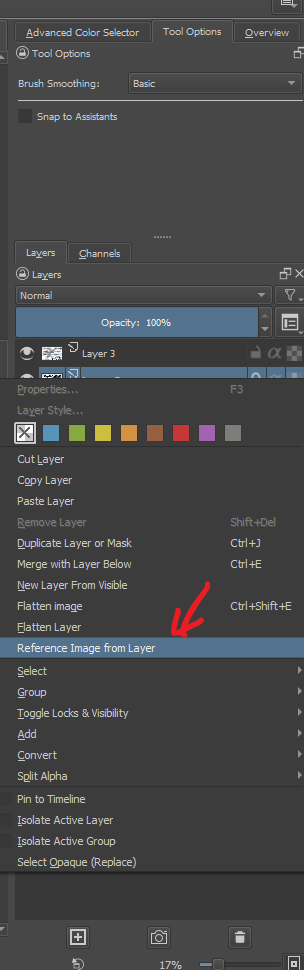
Right-clicking on a layer in the docker, and selecting this option also does the same:
For the option to create a reference from the entire canvas (i.e the projected image?) I think there’s enough space in the Tool Options docker to have a second button for it, which would be more convenient that going into another level of choice.
The icon you’ve made for Reference From Active Layer looks like it has two layers, though I realise it’s meant to symbolise a reference being derived from a layer. For any Reference From Visible icon, the distinction would have to be clear and I’m not sure how that would or could look.
If you also put that second option in the Layers docker right-click menu, then I think it should go immediately after the ‘New Layer From Visible’ option because they are both about the entire image and not a single layer.
Would it be called ‘New Reference From Visible’?
For the other menus they could both go into the Layer -> New option group but it’s arguable that they are not layers. However, I think that would be a ‘tidy’ arrangement and no other main menu item is more appropriate.
This would be entirely another feature request I think.
For menu items If this change gets in we would have a lot of reference image related menus scattered around. For example currently we only have: Edit > Paste as a Reference Image but there is request to add
Import file as reference image
Add reference image from visible
Layer > Add reference from current Layer
That would make 4 different action pertaining to reference image. I propose, to make ti easy to find, we should consolidate all the reference image related menu in one place.
My suggestion is to have a sub - menu in tools menu. For example:
Tools > Reference Images > Import file(s) as Reference Image
Tools > Reference Images > Paste From clipboard
Tools > Reference Images > Add from current Layer
Tools > Reference Images > Add from visible
… … … (A separator)
Tools > Reference Images > Load Reference Image set
Tools > Reference Images > Save Reference Image set
Tools > Reference Images > Delete All Reference Images
I know this rearrangement is beyond the scope of the current MR.
Load and save reference image sets seems a bit over the top. Is not the idea to have reference images set to a single file? That would mean you would use the same image reference set on multiple files?
Why not make a duplicate kra file or make a new folder on the same project? Or just reimport them if there is such need. Even so it would be useful if you want to import like a truck load of reference images and not just a couple right. And a couple could be done with singular imports by just dragging and dropping easily.
I dont know having a ref file in parallel with like 2 kra files sounds weird to me.
I didn’t realise that this was in response to a Wishlist bug report.
I thought about a new ‘Reference’ menu item but didn’t suggest it because it seemed ‘over the top’.
However, looking at the number of Reference items in that suggestion of a Tools sub-menu, it may be reasonable to have a specific Reference Menu item with all Reference related actions in there.
As you say, it is beyond current formal scope and so it would need more discussion.
The icon you’ve made for Reference From Active Layer looks like it has two layers, though I realise it’s meant to symbolise a reference being derived from a layer. For any Reference From Visible icon, the distinction would have to be clear and I’m not sure how that would or could look.
There’s a cursor icon that shows up when you hold ‘r’ on the canvas. If I can locate the image file, I can try to use it for the “Create Reference Image from Layer” button and the currently used copy icon for the “Add reference image from visible” button. Thoughts?
Yes, the three ‘layer’ one. The icons are in a collection somewhere in the source resources. Somone who works in that area will be able to tell you where exactly.
I just found this MR, and if it works (which I kinda assume it does, it looks like it does, I will check it when I’ll start doing proper review and fixing those few things), I think that this needs to be done:
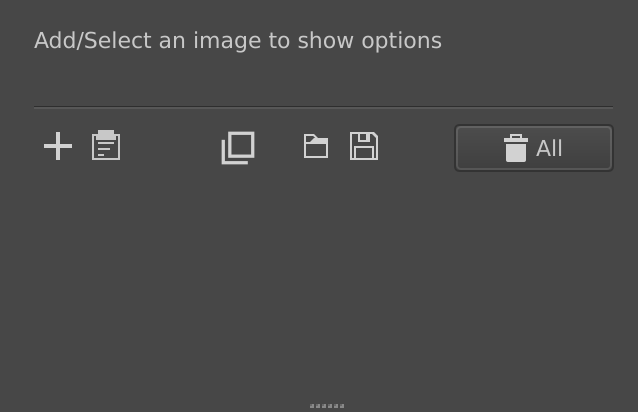
Change the icons in the Reference Images docker to those used in Fill Tool Tool Options docker in the “Reference” section, they imho will be more clear than those originally suggested by @TomWoo
From this (“duplicate layer” icon, more about duplicating than layer): and this:
To this: (possibly with pluses like the second icon shown above)
Move “Create reference image from visible canvas” to Menu → Image menu (I don’t think it should be in Layer docker layer context menu if it’s about a whole image or whole canvas, not a layer)
Move “Create reference image from current layer” to Menu → Layer menu (I’m not 100% sure about that, but I think if we move one, then we can move the other too)
Well, it’s a bit of a question to everyone It seems like the MR is advanced enough that it can be finished quite easily, so I’ll just do that if they’re not here anymore.
I suspect that users who regularly work with references will be very happy about your decision. So it’s a good idea to get this project over the finish line.
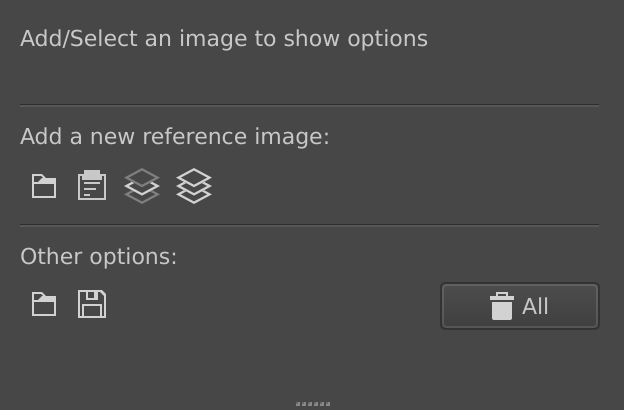
I put all buttons that create new reference images in their own section
I changed the first button from “plus” to “folder”, because now all of them were adding new references; but the first one was adding reference images from a folder, so it made sense to me (but it might be confusing to users that there is another “folder” icon underneath - any ideas? The one below is about loading a whole set of reference images)
I changed the icons for “From Current Layer” and “From Visible” to those horizontal layers icons, because I think they look more clear.
Any ideas for better organization? Or maybe what kind of icon to use for the first button in either row, so that they’re not identical?
Please add an option to put the reference image behind the canvas.
You can either make a toggle on the tool options window like front/back, or just fix the menu when you right-click the reference image using the tool – it shows Bring to Front, Raise, Lower and Send to Back; but it seems these don’t work!
I’m not even asking for full mid-layer positioning; just toggling under everything or in front of everything would already help a lot!


 and this: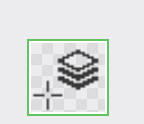
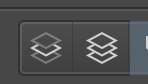 (possibly with pluses like the second icon shown above)
 It seems like the MR is advanced enough that it can be finished quite easily, so I’ll just do that if they’re not here anymore.
 So it’s a good idea to get this project over the finish line.