Hi,
I know that this question has been asked in different forms but i am unable to find an answer for my case so I post here.
I have imported in krita an image as new layer. (I want to use it as reference for practice). The image is colored, so not black and white. The background is white or white-ish, meaning is not exactly (255,255,255) but also something like (235,235,235) or more.
I tried to use Filter→ Colors→Color to Alpha and set a threshold of about 35-40 (the one to completely remove the background) but at this point even other shades/hue are affected (like red is more transparent and the same happens for other colors)
So the only method i found is to use the magic wand and manually select all the areas of the background but it is quite lengthy so I am wondering, is there any better/faster alternative?
thanks for the help
If you just want to use it as a reference, perhaps it is better to not import it as a layer at all but as a reference image that sits on the side of the canvas where it doesn’t get in the way. That way you don’t have to bother removing the background or anything. Most of the time references are better not part of the image itself unless what you really want is to trace it or something.


Try the Similar Color Selection Tool.
main setting to adjust is threshold
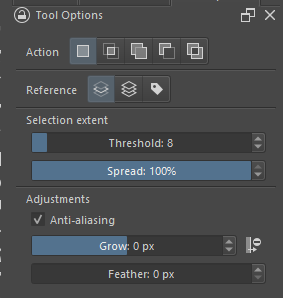
random image

There is also the Vision Tools plugin that adds a few selection tools utilizing segmentation, think of it like a smarter Contiguous Selection Tool.
Thanks, this worked pretty well for my case, because it did not increase the transparency for “non white” colors.
Vision tools works really well, thanks. This also work for my case. I selected the answer proposed by @cgidesign as solution only because is more “Krita native” but the Vision plugin works perfectly also
Pigment.o plugin now has a sampler docker now that can create sekections out of color spaces or color ranges. If you color pick the white it will display where it is and you can choose how much range around it you want.