For personal reasons I wasn’t able to animate for a while, did something simple to get back in the game 
6 Likes
@Guerreiro64 It’s a 336kB .mp4 video that’s been uploaded to the forum.
My Firefox v-106.0.5 on Linux shows it ok.
Can you play other .mp4 uploads on the forum?
Can you Save Image As to download it then open it in Firefox, or another player?
I just updated Firefox to version 107. I use Ghostery and have now set it to “trust the site”. I also went into settings and set “Autoplay” to “enable audio and video”. None of that resolved.
The interesting thing is that the playback controls appear when I enter the topic for the first time… but if I click on Play, this image that I posted appears.
When I click open new tab… it downloads the video. I can see it normally in Media Player classic - Home Cinema.
Nice animation!
Just as @Guerreiro64 has experienced, I can’t view the video here (using Opera on mobile), but I was able to download it and watch it using VLC Media player.  . Interestingly, the default Samsung media player couldn’t play it.
@Guerreiro64, @CrazyCatBird, Can you find other uploaded .mp4 files on the forum and see if they give you any problems?
What happens with posted links to YouTube videos and other internet hosted videos?
I’m wondering if it’s a codec problem or settings problem when @Warrenayiss rendered it.
1 Like
I’m thinking it’s a codec problem. That’s why I keep VLC Media Player around. It plays stuff that other media players can’t because they don’t have all the codec decoders.
YouTube videos linked here play just fine.
This one is an uploaded .mp4:
Troll animation
Does it play in your browser?
1 Like
Yup! I was just going to tell you that that one works great.
1 Like
We need to wait for @Warrenayiss to say where he got ffmpeg from and what the rendering options were.
I got the ffmpeg here : Link
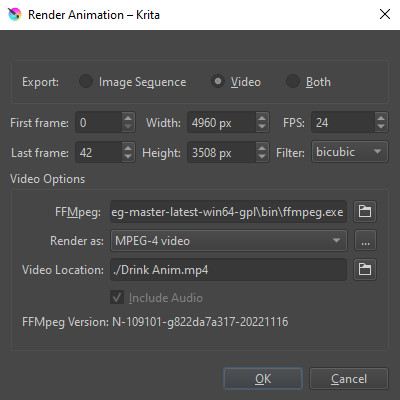
And the rendering option I just chose Mp4 without changing anything else
Here is the screenshot:
I’m not certain but I thiink that the gyan release-essentials build is more often used.
https://www.gyan.dev/ffmpeg/builds/ffmpeg-release-essentials.zip
For rendering to .mp4, there ar more options that are shown by clicking the icon to the right of the Render as: drop down. These are what I usually use:
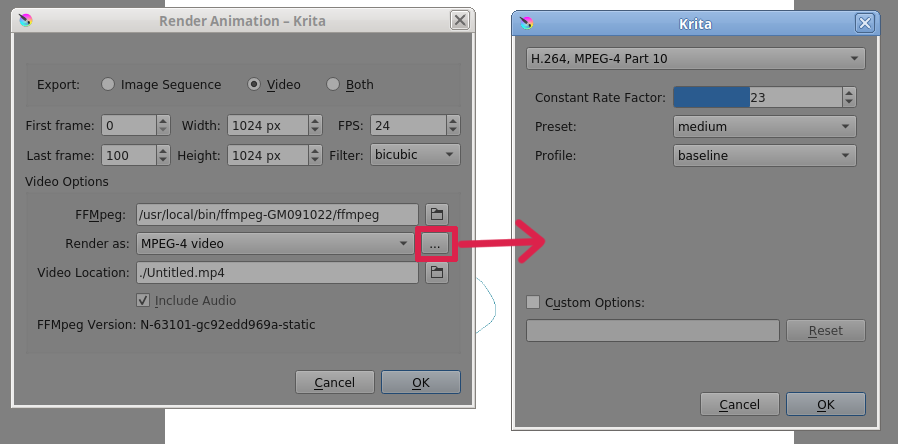
If you can find the time, sometime, can you try rendering with the gyan build of ffmpeg with the .mp4 options as shown then upload the video here under a different name and with a large colour change on the background so it isn’t detected as identical content?
Sorry for the delay: I was two days without internet here.
This troll animation I can visualize perfectly in my firefox.
1 Like