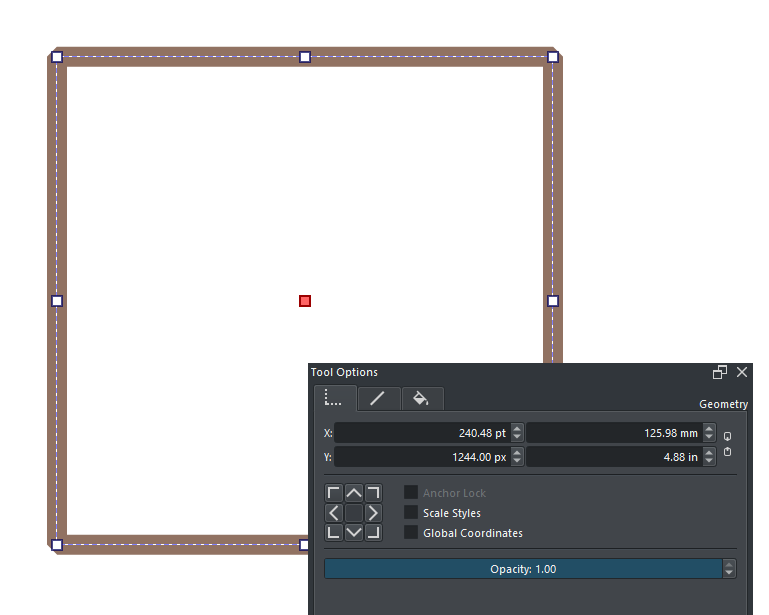
I just upgraded to Krita 5.2 from 5.1 and noticed that the select shapes tool now has dimensions in points (pt) instead of pixels (px) in the tool options docker. I tried searching for a setting that could revert that back, but I can’t find anything.
Does anyone know if there is any way to switch it back to pixels?
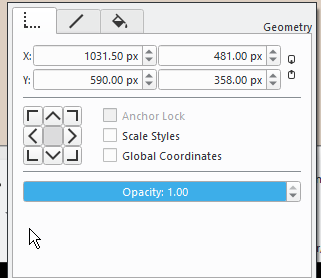
Mine is not set to pts, it’s px but I’m on Windows 10. It would be helpful for you to provide your operating system (Windows, Linux, macOS…) as well as a screenshot of the tool options docker showing pts.
Also, just to confirm, when you say “select shapes tool” you are referring to the selection arrow that works only on vector layers.
This screenshot shows my tool options for the select shapes tool in a document where I chose pts instead of pixels in the first document creation window. It’s exactly the same in a document where pixels are my chosen units of measure.
Looking at your screenshot, although it does say px I notice that the actual coordinates are decimal and x in particular is 1031.50. That shouldn’t be possible if they were indeed pixels (pixels are always integers), so might it be that Windows is also on pt but not displaying the correct unit?
I was able to reproduce this. When I created a new image and chose Points as as unit I had points in the document too. It also keeps Points for every image created after that until Krita was restarted.
If you create a new image with any size unit other than pixels, it displays as points in the select shapes tool options from then onwards in the session for any new or opened document.
If you open or create a document initially in pixels, that document will display as pixels even if you create another document in points. So it’s local to the document in the session and is not stored in the .kra file.
@mourgos Can you make a reply in the 5.2.0 release topic Krita 5.2 is released!
Just a short note is needed with a link to this topic.
@sooz Do you think it would be better to move all the posts from this topic to the 5.2.0 topic?
I think we have a release now so It is okay to have separate topics for questions and feedback, Since number of feedback and questions will be higher now. May be we need a version tag now. Having separate topics now will help in search. user can search for specific issue and get to the topic quickly. if it is in a single long thread it would be hard to keep track of the conversation.
The vector layers allow for decimals in the pixels.
That said, you can switch to ‘pt’ by simply selecting the ‘px’ part, and replacing it with pt. So if you, if you were using that screenshot, selected ‘1794 px’, you can remove all that and replace with something like ‘200pt’. We usually use dropdowns for this elsewhere, but we were worried the docker would otherwise become too wide.
EDIT: other units like mm and in are also possible.
EDIT2: It’s not possible to default to pt or any other measurement right now. We set everything to pixels because it confused newcomers.
It’s actually the opposite. I want pixels but in 5.2 it defaulted to pt. As @Takiro /@AhabGreybeard found that seems to happen if you create a document using points as a unit.
For me this happened because I had to create a new empty document before I could use the Comics Manager docker to open my pages, and I guess I defaulted to pt. I will submit a bug for that as it was very confusing.
Having decimals for vectors does make sense. That said, the vector layers in 5.1.5 and earlier do not have decimals as you can see in the screenshot above which confused me further.
This is actually more confusing than I ever expected when reading the thread
should not the unit of measurement be exposed into some kind of combobox displaying all available unit types possible there or in the settings ? instead of guessing that it exists and what is the correct string for it.
having to input every unit type on all value boxes so the values make sense compared to each other. Also because of it does not convert the size when changing the unit type only as it reads what it is directly that messes up the values if previous edits where made. I really do think the unit type of the value box should be non editable as it causes some more issues. As if I change the unit type and save the file it does not load up with the same units as it would not make sense to, nor it does, which is even more confusing.
The possibility of having 4 unit types at the same time seems like a degree of freedom that is unnecessary.